
Generate GCP Serverless Architecture Diagrams from Text
Describe your Google Cloud serverless application in plain English. Get a valid Draw.io diagram with Cloud Run, Cloud Functions, Eventarc triggers, and managed service connections.
This GCP serverless architecture diagram generator converts plain-text application descriptions into Draw.io diagrams with official Google Cloud icons for Cloud Run, Cloud Functions, Eventarc, Cloud Tasks, Cloud Scheduler, Firestore, and Cloud SQL. Describe an application: Cloud Run service handling REST API requests behind a global external Application Load Balancer with Cloud Armor, Eventarc routing Pub/Sub messages to a second Cloud Run service for async processing, Cloud Functions triggered by Firestore document writes to generate PDF reports, and Cloud Scheduler firing hourly HTTP requests to a cleanup endpoint. The AI maps each component to its canonical GCP icon, draws event trigger connections with labeled source and type, and groups services by domain. Grid alignment follows RULE-04. Architecture warnings flag public endpoints without Cloud Armor (WARN-02) and services with ambiguous responsibilities (WARN-05). Output is native .drawio XML.
What Is a GCP Serverless Architecture Diagram?
A GCP serverless architecture diagram shows how Google Cloud's managed compute services connect through events, tasks, and schedules without you managing servers or clusters. GCP offers three serverless compute options: Cloud Run for container-based services that scale to zero, Cloud Functions for single-purpose event handlers, and App Engine for web apps. The event routing layer distinguishes GCP's serverless model. Eventarc routes events from over 130 Google Cloud sources and custom Pub/Sub topics to Cloud Run and Cloud Functions targets. Cloud Tasks handles asynchronous HTTP dispatch with rate limiting and retries. Cloud Scheduler triggers endpoints on cron schedules. Drawing these manually requires placing each service icon, routing event arrows with type labels, and grouping components by domain. An AI GCP serverless architecture diagram generator does this from a text prompt. Describe 'Cloud Run service orders-api behind global ALB with Cloud Armor. Eventarc routes audit log events for Cloud Storage object creation to Cloud Run thumbnail-processor. Cloud Functions gen2 on Firestore trigger generates invoices on document write to orders collection. Cloud Tasks dispatches webhooks with 5 retries and exponential backoff. Cloud Scheduler triggers daily reports at 06:00 UTC.' Diagrams.so selects official GCP icons from its 30+ libraries. RULE-06 groups services by business domain. RULE-05 enforces left-to-right event flow from triggers through compute to data stores. VLM visual validation catches overlapping icons in dense fan-out diagrams. WARN-02 flags Cloud Run services with allow-unauthenticated IAM but no Cloud Armor. WARN-05 identifies functions with generic names. The .drawio output version-controls alongside your Terraform modules.
Key components
- Cloud Run services with container image tags, CPU allocation modes (request-only, always-on), and concurrency settings
- Cloud Functions gen2 with event trigger type labels, runtime annotations (Python 3.12, Node.js 20), and memory/timeout settings
- Eventarc triggers with event source (audit log, Pub/Sub, direct), event type filter, and target service labels
- Cloud Tasks queues with rate limit, retry policy (max attempts, backoff), and target HTTP endpoint annotations
- Cloud Scheduler jobs with cron expression labels, HTTP target URLs, and OIDC/OAuth token annotations
- Firestore collections with document trigger annotations and security rule boundary indicators
- Cloud SQL instances (PostgreSQL, MySQL) with Private Service Connect access paths from Cloud Run
- Global external Application Load Balancer with Cloud Armor WAF policy and Cloud CDN backend bucket labels
How to generate with AI
- 1
Describe your serverless application
Write your GCP serverless architecture in plain English. Name every service, trigger mechanism, and data store. For example: 'Cloud Run service api-gateway handles HTTPS requests from global ALB with Cloud Armor OWASP rules. On POST /orders, the service writes to Firestore orders collection and publishes to Pub/Sub topic order-events. Eventarc routes order-events messages to Cloud Run service order-processor which calls Stripe API and updates Firestore order status. Cloud Functions gen2 triggered by Firestore writes to orders collection sends confirmation emails via SendGrid. Cloud Scheduler triggers Cloud Run service daily-report at 06:00 UTC with OIDC token.'
- 2
Select GCP and architecture type
Set cloud provider to GCP and diagram type to Architecture. Diagrams.so loads official GCP icons covering Cloud Run, Cloud Functions, Eventarc, Cloud Tasks, Cloud Scheduler, Pub/Sub, Firestore, Cloud SQL, Cloud Storage, and load balancers. Enable opinionated mode to enforce event-flow left-to-right layout and automatic grouping of services by business domain.
- 3
Generate and validate
Click generate. The AI produces a .drawio XML with service icons, event trigger arrows labeled with source and type, and domain groupings. Architecture warnings flag public Cloud Run services without Cloud Armor (WARN-02), services without clear responsibility (WARN-05), and single-region deployments (WARN-01). VLM visual validation checks for overlapping trigger arrows in fan-out patterns. Download as .drawio, PNG, or SVG.
Example prompt
GCP serverless e-commerce backend: Global external Application Load Balancer with Cloud Armor WAF policy (OWASP CRS rules, rate limiting 500 req/min per IP, geo-blocking). Cloud Run service api-gateway (Python 3.12, 2 vCPU, 1GB RAM, concurrency 80, min instances 2) handles REST API on /api/v1. POST /orders writes order document to Firestore collection orders and publishes JSON message to Pub/Sub topic order-events. Eventarc trigger routes order-events to Cloud Run service order-processor (Node.js 20, 1 vCPU, 512MB) which validates inventory from Firestore products collection, creates Stripe PaymentIntent, and updates order status. Cloud Functions gen2 on-order-confirmed triggered by Firestore document update (status field changes to confirmed) sends confirmation email via SendGrid API and generates PDF invoice stored in Cloud Storage bucket invoices-prod. Cloud Tasks queue webhook-delivery dispatches partner notifications with max 5 retries, 10s initial backoff, 300s max backoff. Cloud Scheduler job daily-cleanup triggers Cloud Run service cleanup-worker at 02:00 UTC with OIDC token to archive orders older than 90 days. Cloud SQL PostgreSQL 15 in us-central1 stores analytics data accessed by api-gateway via Private Service Connect. Firestore in Native mode for transactional order data. Secret Manager stores Stripe API key and SendGrid API key mounted as environment variables in Cloud Run services.
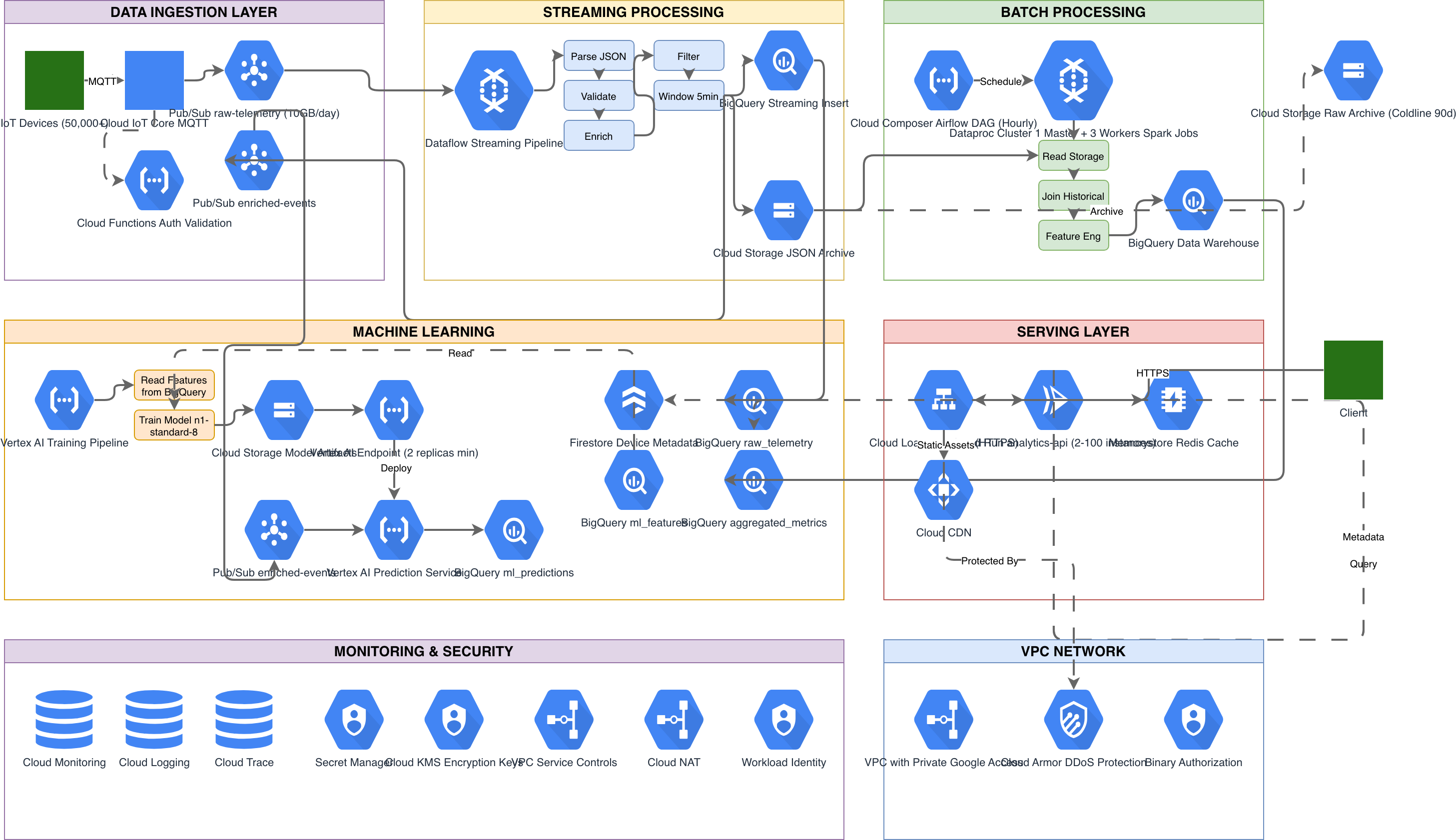
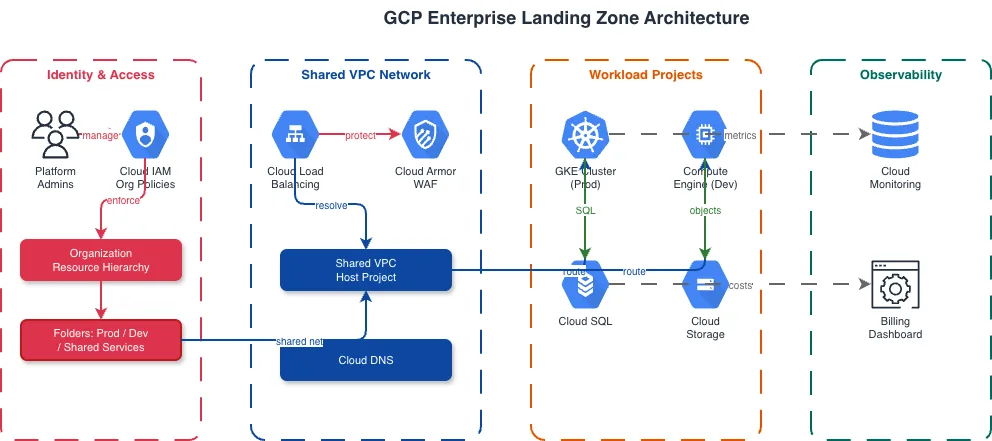
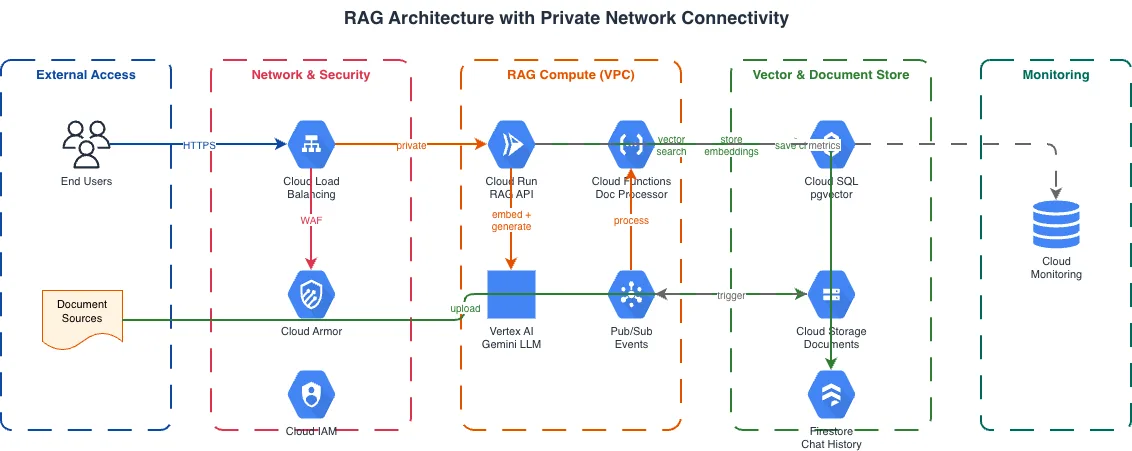
Example diagrams from the gallery

Cloud Run vs Cloud Functions vs App Engine
GCP offers three serverless compute platforms, each designed for different workload patterns. Cloud Run deploys containers with full HTTP server control. Cloud Functions executes single-purpose event handlers. App Engine provides a managed platform for web applications with built-in versioning and traffic splitting. Choosing the right one affects your architecture diagram structure.
| Feature | Cloud Run | Cloud Functions | App Engine |
|---|---|---|---|
| Runtime model | Any container image listening on a port; full control over HTTP server, middleware, and startup logic | Single function entry point invoked per event; runtime manages the HTTP server and request routing | Full web application deployed as versions; Standard environment has sandboxed runtimes, Flexible runs containers |
| Scaling behavior | Scales to zero by default; min instances prevent cold starts; max instances cap concurrency; concurrency per instance configurable up to 1000 | Scales to zero; one concurrent request per instance (gen1) or configurable concurrency (gen2); max instances cap | Standard scales to zero with automatic instance management; Flexible maintains minimum instances; no per-request scaling granularity |
| Event trigger support | Eventarc for Pub/Sub, audit log, and 130+ Google Cloud event sources; direct HTTP invocation; Cloud Tasks and Scheduler | Native triggers for Pub/Sub, Cloud Storage, Firestore, Firebase Auth, and HTTP; Eventarc for gen2 functions | Cloud Tasks push queues, Cloud Scheduler cron, and Task Queues (legacy); no native event trigger integration |
| Networking options | VPC connector or Direct VPC egress for private resources; Private Service Connect; ingress controls (all, internal, internal-and-cloud-load-balancing) | VPC connector for private resource access; ingress settings (all, internal-only, internal-and-gclb); no Direct VPC egress | VPC connector for Standard; direct VPC for Flexible; firewall rules on App Engine level; no Private Service Connect |
| Deployment model | Container images from Artifact Registry; revisions with traffic splitting; continuous deployment via Cloud Build | Source code or container image (gen2); automatic build via Cloud Build; no revision-based traffic splitting | Versions deployed from source; traffic splitting between versions; promote/rollback via gcloud; no container image option in Standard |
| Best suited for | REST APIs, gRPC services, web backends, async job processors that need container flexibility and per-instance concurrency | Webhook handlers, file processors on Cloud Storage events, Firestore triggers, lightweight event-driven microservices | Monolithic web apps migrating to GCP, applications needing built-in versioning and traffic management without containerization |
When to use this pattern
Use a GCP serverless architecture diagram when your application relies primarily on Cloud Run, Cloud Functions, Eventarc, and other managed services without a Kubernetes cluster. It's the right choice for architecture design reviews before building event-driven applications, cost discussions comparing Cloud Run always-on CPU versus request-based billing, and documenting event routing through Eventarc triggers. If your serverless functions are part of a larger GKE-based platform, fold them into a GKE architecture diagram as external triggers. For applications that span multiple cloud providers' serverless offerings, use the general serverless architecture diagram type. Don't diagram application-level business logic in the architecture view; use flowcharts for order processing flows and sequence diagrams for inter-service message timing.
Frequently asked questions
What GCP serverless services does the diagram generator support?
This GCP serverless architecture diagram generator supports Cloud Run, Cloud Functions (gen1 and gen2), App Engine, Eventarc, Cloud Tasks, Cloud Scheduler, Pub/Sub, Firestore, Cloud SQL, Cloud Storage, Secret Manager, and global Application Load Balancers. Each renders with its official GCP icon from the 30+ available libraries.
How does the AI show Eventarc trigger routing?
Describe the event source and target in your prompt: 'Eventarc routes Cloud Storage object.finalize events to Cloud Run service image-processor.' The AI draws a labeled arrow from the event source through the Eventarc icon to the target service. The arrow label includes the event type filter and any path pattern matching conditions.
Can I include Cloud Tasks queues with retry policies?
Yes. Specify the queue configuration: 'Cloud Tasks queue email-dispatch with max 10 concurrent dispatches, 5 retries, 30s initial backoff.' The AI draws the queue icon between the dispatching service and the target endpoint with retry policy and rate limit annotations. Failed task paths to dead-letter topics render as branching arrows.
What architecture warnings apply to GCP serverless diagrams?
WARN-02 flags Cloud Run services with allow-unauthenticated ingress but no Cloud Armor policy in front. WARN-01 catches single-region deployments without failover. WARN-05 detects services with vague names like 'processor' that don't specify their event trigger or domain. Warnings appear as non-blocking annotations alongside the diagram.
Can I show Cloud Run traffic splitting between revisions?
Yes. Mention the traffic split in your prompt: 'Cloud Run service api-gateway with 90% traffic to revision v5 and 10% to revision v6-canary.' The AI draws both revision boxes behind the service with labeled traffic percentage arrows. This is useful for documenting canary deployments and gradual rollout strategies.
Related diagram generators
Generate Serverless Architecture Diagrams from Text with AI
Describe your serverless components and event triggers in plain English. Get a valid Draw.io diagram with Lambda functions, API Gateway, and managed services.
Generate GCP Architecture Diagrams from Text
Describe your Google Cloud infrastructure in plain English. Get a valid Draw.io diagram with official GCP icons, project boundaries, and VPC networking.
Generate Event-Driven Architecture Diagrams from Text with AI
Describe your event producers, brokers, and consumers in plain English. Get a valid Draw.io diagram with Kafka topics, saga patterns, and DLQ flows.
Generate Cloud Architecture Diagrams from Text
Describe your cloud infrastructure in plain English. Get a valid Draw.io diagram with region boundaries, availability zones, managed services, and DR paths.