
Generate GCP Networking Diagrams from Text
Describe your Google Cloud network topology in plain English. Get a valid Draw.io diagram with Shared VPC, Cloud Armor, Cloud Router, and firewall policies using official GCP icons.
This GCP networking diagram generator converts plain-text network descriptions into Draw.io diagrams with official Google Cloud icons for Shared VPC, Cloud NAT, Cloud Router, Cloud Interconnect, and Cloud Armor. Describe a topology: Shared VPC host project with two subnets in us-central1 (10.128.0.0/20 for GKE pods, 10.132.0.0/20 for Cloud SQL), hierarchical firewall policies at the organization level, VPC-level firewall rules per service project, Cloud NAT for GKE egress, and Cloud Interconnect VLAN attachments to an on-premises data center via a Partner Interconnect at 10Gbps. The AI places each component with its canonical GCP icon, draws subnet boundaries with CIDR labels, and routes connections through the correct network path. Grid alignment follows RULE-04. Architecture warnings flag public endpoints without Cloud Armor (WARN-02) and missing VPC boundaries (WARN-04). Output is native .drawio XML.
What Is a GCP Networking Diagram?
A GCP networking diagram maps the virtual network topology of a Google Cloud deployment: VPCs, subnets, firewall policies, routing, NAT gateways, interconnects, and load balancers. Google Cloud networking has distinctive constructs. VPCs are global resources with regional subnets, unlike AWS where VPCs are regional. Shared VPC lets a host project own the network while service projects consume subnets. Firewall policies operate at two levels: hierarchical policies at the organization or folder level and VPC-level rules within each network. Drawing these manually requires placing VPC boundaries, nesting subnets with CIDR blocks, showing Cloud Router BGP sessions, and connecting to on-premises networks via Cloud Interconnect or Cloud VPN. An AI GCP networking diagram generator handles this from a text prompt. Describe 'Shared VPC host project network-prod with custom-mode VPC. Subnet gke-usc1 10.128.0.0/20 in us-central1 and subnet db-use1 10.132.0.0/20 in us-east1. Hierarchical firewall policy at org level denies all ingress. VPC-level rules allow TCP 443 from Cloud Armor ranges to GKE node ports. Cloud NAT on Cloud Router in us-central1 for GKE egress. Dedicated Interconnect 10Gbps with two VLAN attachments for HA to on-prem 172.16.0.0/12.' Diagrams.so selects official GCP icons from its 30+ libraries. RULE-05 enforces left-to-right flow from external networks through firewall policies to internal subnets. RULE-06 groups components by VPC and region. VLM visual validation catches overlapping subnet labels on multi-region topologies. WARN-02 flags load balancers without Cloud Armor. WARN-04 triggers for missing firewall boundaries between tiers. The output is native .drawio XML for architecture reviews and compliance documentation.
Key components
- Shared VPC host project boundaries with service project attachment arrows and subnet consumption labels
- Regional subnets with CIDR block annotations, secondary ranges for GKE pods and services, and Private Google Access status
- Hierarchical firewall policies at organization and folder level with priority-ordered rule summaries
- VPC-level firewall rules with source/destination tags, service account filters, and port/protocol labels
- Cloud Router instances with BGP ASN, advertised routes, and Cloud NAT gateway associations
- Cloud Interconnect (Dedicated and Partner) VLAN attachments with bandwidth and BGP session labels
- Private Service Connect endpoints connecting to Google APIs and third-party published services
- Cloud Armor security policies attached to global external Application Load Balancers with preconfigured WAF rule labels
How to generate with AI
- 1
Describe your GCP network topology
Write your network layout in plain English. Include VPC type, subnets, regions, and connectivity. For example: 'Shared VPC host project network-prod with custom-mode VPC. Subnet app-usc1 10.128.0.0/20 in us-central1 with secondary range 10.4.0.0/14 for GKE pods. Subnet db-use4 10.136.0.0/20 in us-east4 for Cloud SQL. Cloud Router cr-usc1 with ASN 65001 in us-central1. Cloud NAT for all subnets in us-central1. Partner Interconnect 10Gbps to on-prem data center with BGP peer 169.254.1.1/30. Hierarchical firewall policy blocks all SSH except from IAP ranges.'
- 2
Select GCP and network type
Set cloud provider to GCP and diagram type to Network. Diagrams.so loads official Google Cloud networking icons covering VPC, subnets, Cloud Router, Cloud NAT, Cloud Interconnect, Cloud VPN, Cloud Armor, Cloud CDN, Cloud DNS, and load balancers. Enable opinionated mode to enforce external-to-internal left-to-right flow and automatic grouping by VPC and region.
- 3
Generate and validate
Click generate. The AI produces a .drawio XML with VPC boundaries, subnet containers with CIDR labels, firewall rule annotations, Cloud Router BGP sessions, and interconnect links. Architecture warnings flag public load balancers without Cloud Armor (WARN-02), missing firewall boundaries between tiers (WARN-04), and ambiguous network component names (WARN-05). VLM visual validation detects overlapping subnet labels. Download as .drawio, PNG, or SVG.
Example prompt
GCP enterprise network architecture: Organization-level hierarchical firewall policy with default deny ingress, allow egress to Google APIs. Shared VPC host project network-prod with custom-mode VPC. Subnets: gke-pods-usc1 (10.128.0.0/20, secondary range 10.4.0.0/14 for pods, 10.8.0.0/20 for services) in us-central1, app-usc1 (10.130.0.0/20) in us-central1 for Cloud Run VPC connectors, db-use4 (10.136.0.0/20) in us-east4 for Cloud SQL and Memorystore. Private Google Access enabled on all subnets. Cloud Router cr-usc1 ASN 65001 in us-central1 with custom route advertisements for 10.128.0.0/16. Cloud NAT nat-usc1 on cr-usc1 with static IP allocation for GKE egress. Dedicated Interconnect 10Gbps with two VLAN attachments for HA: vlan-a on cr-usc1 (169.254.1.0/30 BGP peer), vlan-b on cr-usc1 (169.254.2.0/30 BGP peer). On-prem routes: 172.16.0.0/12 and 192.168.0.0/16. VPC-level firewall rules: allow TCP 443 from health check ranges to GKE node ports, allow TCP 5432 from app-usc1 subnet to db-use4 subnet, deny all other internal traffic. Private Service Connect endpoint for Cloud SQL in db-use4 subnet. Cloud Armor policy prod-waf on global external ALB with OWASP ModSecurity CRS rules and rate limiting at 1000 req/min per IP. Cloud CDN enabled on static asset backend bucket.
Example diagrams from the gallery


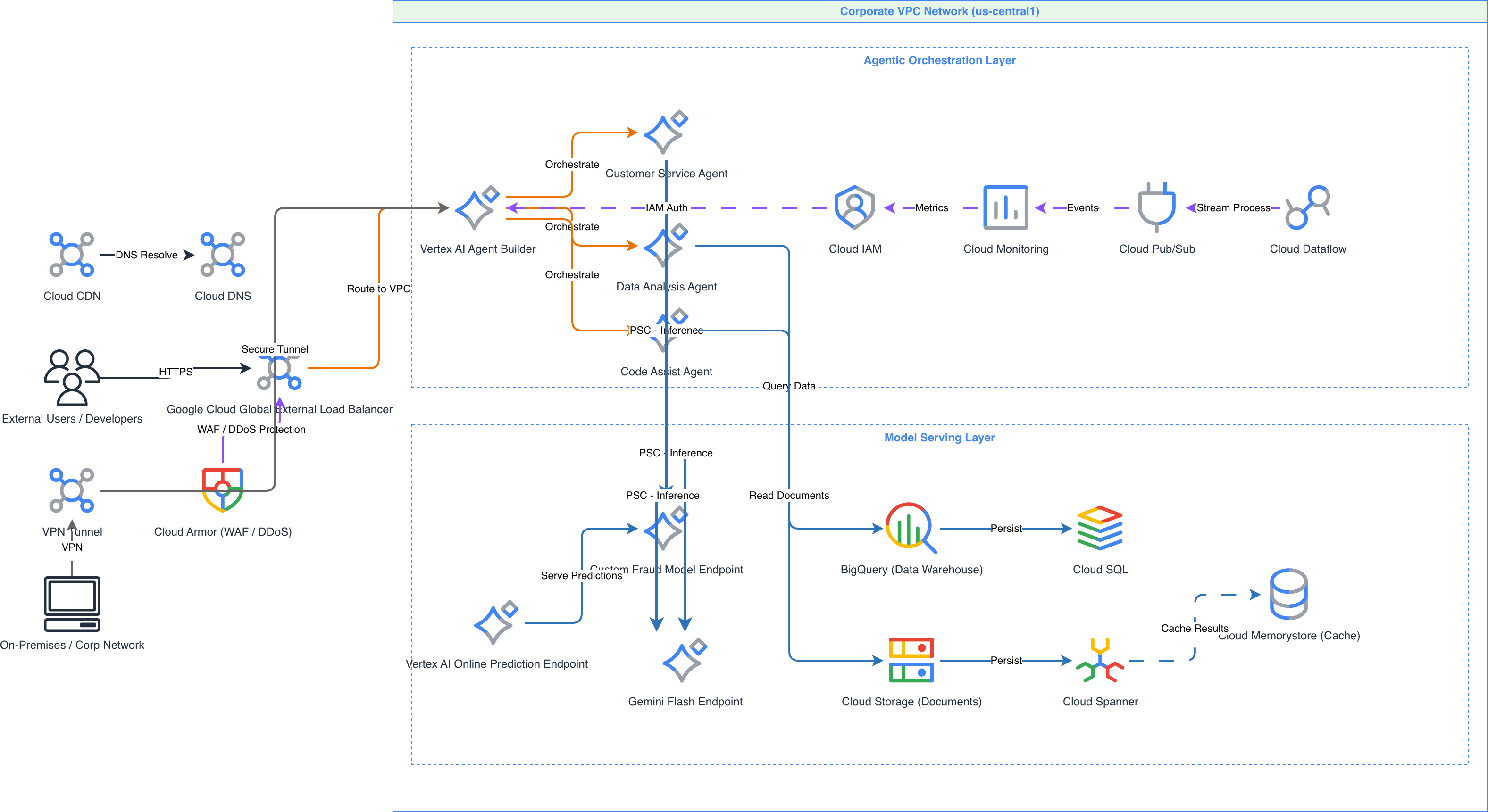
GCP Shared VPC vs AWS Transit Gateway vs Azure Hub-Spoke VNet
Each major cloud provider takes a different approach to multi-project or multi-account networking. GCP uses Shared VPC to let multiple projects consume subnets from a host project. AWS connects VPCs across accounts through Transit Gateway. Azure implements hub-spoke topology with VNet peering or Virtual WAN. The routing, security, and cost models differ significantly.
| Feature | GCP Shared VPC | AWS Transit Gateway | Azure Hub-Spoke VNet |
|---|---|---|---|
| Network sharing model | Host project owns the VPC and subnets; service projects attach to specific subnets via IAM bindings | Each account owns its VPC; Transit Gateway acts as a central router connecting VPCs via attachments | Hub VNet contains shared services (firewall, DNS); spoke VNets peer to hub; no subnet sharing across subscriptions |
| Routing | VPC routes apply globally across all service projects; Cloud Router handles dynamic BGP routes to on-prem | Route tables per attachment with association and propagation rules; supports inter-region peering | User-defined routes in each spoke point to Azure Firewall or NVA in hub; route tables per subnet |
| Firewall architecture | Two-tier: hierarchical policies at org/folder level plus VPC-level rules; evaluated top-down by priority | Security groups per ENI plus NACLs per subnet; Network Firewall or third-party NVA for centralized inspection | Azure Firewall or NVA in hub VNet inspects all spoke-to-spoke and spoke-to-internet traffic; NSGs per subnet |
| Hybrid connectivity | Cloud Interconnect (Dedicated/Partner) or Cloud VPN HA terminates on Cloud Router in the host project VPC | Direct Connect with Transit VIF attaches to Transit Gateway; Site-to-Site VPN on Transit Gateway attachment | ExpressRoute or VPN Gateway in hub VNet; spokes reach on-prem through hub routing |
| Cost model | No charge for Shared VPC itself; standard VPC pricing for NAT, Interconnect, and egress traffic | Per-attachment hourly charge plus per-GB data processing fee; significant cost at high cross-AZ traffic volumes | VNet peering charged per GB in each direction; Azure Firewall has fixed hourly rate plus per-GB processing fee |
| Diagram representation | Single VPC container with host project label; service project boxes connected by subnet attachment arrows | Central Transit Gateway node with spoke VPCs connected by attachment links; route table annotations per spoke | Hub VNet in center with firewall icon; spoke VNets radiate outward with peering arrows to hub |
When to use this pattern
Use a GCP networking diagram when you need to document VPC topology, subnet layout, firewall policies, or hybrid connectivity for a Google Cloud deployment. It's the right choice for network architecture reviews with security teams, compliance documentation showing traffic flow through firewall tiers, and planning Cloud Interconnect or Cloud VPN deployments to on-premises data centers. If your focus is on the full application stack including compute and databases, start with a GCP architecture diagram and embed networking detail within it. For Kubernetes-specific networking with GKE pod CIDR ranges and network policies, a GKE architecture diagram captures that context better. Don't overload a network diagram with application logic. Keep it focused on VPCs, subnets, routes, and firewall policies.
Frequently asked questions
Does the GCP networking diagram generator support Shared VPC?
Yes. Describe your host project and service projects in the prompt. This GCP networking diagram generator draws the host project as a container owning the VPC and subnets, with service project boxes attached via subnet IAM binding arrows. Cross-project network flows render as labeled connections through the shared subnets.
Can I show hierarchical firewall policies and VPC-level rules together?
Yes. Mention both tiers in your prompt. The AI renders hierarchical policies at the organization or folder boundary and VPC-level rules at the network boundary. Priority numbers and rule summaries appear as annotations. This two-tier view makes the effective firewall evaluation order visible in a single diagram.
How does the AI represent Cloud Interconnect and on-prem connectivity?
Describe your Interconnect type, bandwidth, and BGP peer details. The AI draws VLAN attachments between the Cloud Router and an on-premises router icon with BGP ASN and peer IP labels. Dedicated Interconnect shows direct physical connections. Partner Interconnect includes the service provider as an intermediate node.
What architecture warnings apply to GCP networking diagrams?
WARN-02 flags external load balancers without Cloud Armor WAF policies. WARN-04 triggers for missing firewall boundaries between network tiers, like application subnets with direct access to database subnets without rules. WARN-01 catches single-region deployments. WARN-05 flags vague component labels like 'firewall' instead of specific policy names.
Can I include Private Service Connect endpoints in the diagram?
Yes. Describe your PSC endpoints: 'Private Service Connect endpoint for Cloud SQL in db-subnet, PSC endpoint for Vertex AI API in app-subnet.' The AI draws PSC forwarding rule icons in the specified subnets with arrows to the target services. This visualizes private API access paths that bypass the public internet.
Related diagram generators
Generate GCP Architecture Diagrams from Text
Describe your Google Cloud infrastructure in plain English. Get a valid Draw.io diagram with official GCP icons, project boundaries, and VPC networking.
Generate Network Diagrams from Text with AI
Describe your network topology in plain English. Get a valid Draw.io diagram with routers, switches, firewalls, VLAN segmentation, and labeled subnet ranges.
Generate Azure networking diagrams from text
Describe your Azure network topology in plain English. Get a valid Draw.io diagram with hub-spoke VNets, Azure Firewall rules, NSG flows, and Private Link endpoints.
Generate Cloud Architecture Diagrams from Text
Describe your cloud infrastructure in plain English. Get a valid Draw.io diagram with region boundaries, availability zones, managed services, and DR paths.