
Generate Data Flow Diagrams from Text with AI
Describe how data moves through your system. Get a valid Draw.io DFD with Yourdon-DeMarco notation, decomposition levels, and named data flows.
This AI data flow diagram generator converts plain-text system descriptions into Draw.io DFDs with Yourdon-DeMarco notation and hierarchical decomposition. Describe a payment processing system where a customer submits a credit card charge through a web frontend, the payment service validates the card via Stripe API, stores the transaction in PostgreSQL, and sends a receipt through Amazon SES. The AI identifies external entities, processes, data stores, and data flows, then outputs a valid mxGraphModel XML file. Every element aligns to a 10px grid per RULE-04. Architecture warnings flag ambiguous components (WARN-05) and missing security boundaries between trust zones (WARN-04). The output opens directly in Draw.io, Confluence, or any mxGraph-compatible editor.
What Is an AI Data Flow Diagram Generator?
A data flow diagram maps how information moves between external entities, processes, and data stores in a system. Unlike flowcharts that model control logic with decision branches, DFDs focus exclusively on data transformation and movement. Traditional DFD creation requires manually placing circles (Yourdon-DeMarco) or rounded rectangles (Gane-Sarson) for processes, open rectangles for data stores, and squares for external entities, then connecting everything with labeled arrows. An AI data flow diagram generator automates that entire process. You write a natural-language description of your system. The AI identifies the four DFD element types and their relationships, then generates the diagram with correct notation. Diagrams.so supports hierarchical decomposition across Level 0 (context diagram), Level 1 (major subsystems), and Level 2 (detailed process internals). Describe 'order management system with inventory, payment, and shipping subsystems' and the AI generates a Level 0 context diagram plus Level 1 expansion. Each process bubble gets a unique reference number. Data flows carry explicit labels like 'order_confirmation_email' or 'inventory_count_update,' not vague 'data' labels. The AI enforces RULE-07 to label everything clearly. Opinionated mode locks the layout to prevent manual rearrangement that breaks the decomposition hierarchy. VLM visual validation catches overlapping data flow labels and crossing arrows that a syntax-only check would miss. Architecture warnings identify missing security boundaries (WARN-04) when sensitive data like credit card numbers crosses trust zones without encryption notation. The output is native .drawio XML, exportable to PNG and SVG.
Key components
- External entities (squares) representing actors like customers, third-party APIs, and partner systems
- Processes (Yourdon-DeMarco circles) with unique reference numbers and transformation descriptions
- Data stores (open-ended rectangles) labeled with storage type: PostgreSQL, Redis, S3, DynamoDB
- Named data flows as labeled arrows showing specific payloads like 'JSON order payload' or 'JWT access token'
- Level 0 context diagrams showing system boundaries with external actor interactions
- Level 1 decomposition expanding a single process into its constituent sub-processes
- Trust boundary markers identifying where data crosses security zones (WARN-04 trigger points)
- Color-coded data sensitivity indicators for PII, financial, and health data flows
How to generate with AI
- 1
Describe your data flows
Write how data moves through your system in plain English. Name the external entities, processes, and storage systems explicitly. For example: 'Customer submits order through React frontend. Order service validates inventory via gRPC call to inventory service. Inventory service queries PostgreSQL stock table. If in stock, order service creates a Stripe PaymentIntent, stores the transaction in the orders table, and publishes an order.created event to Kafka. Notification service consumes the event and sends a confirmation email via Amazon SES.' The more specific you are about data payloads, the more useful the labels.
- 2
Select DFD level and options
Choose 'Data Flow' as the diagram type. Specify the decomposition level in your prompt: 'Level 0 context diagram' for a high-level overview or 'Level 1 expansion of the order processing system' for subsystem detail. Diagrams.so applies Yourdon-DeMarco notation by default. Enable opinionated mode to lock the hierarchical layout and prevent manual rearrangement.
- 3
Generate and refine
Click generate. The AI outputs a .drawio XML file with correctly notated external entities, processes, data stores, and named data flows. VLM visual validation flags overlapping labels and crossing arrows. Architecture warnings identify sensitive data crossing trust boundaries without encryption (WARN-04) and ambiguous process descriptions (WARN-05). Download as .drawio to add Level 2 decomposition manually, or export to PNG or SVG.
Example prompt
Level 1 data flow diagram for an e-commerce order system: Customer (external entity) submits order via REST API to Order Service. Order Service sends inventory check request to Inventory Service via gRPC. Inventory Service reads from PostgreSQL inventory table and returns stock status. If in stock, Order Service creates Stripe PaymentIntent via Stripe API (external entity). Stripe returns payment confirmation. Order Service writes order record to PostgreSQL orders table and publishes order.created event to Kafka topic. Fulfillment Service consumes event and creates shipment record in DynamoDB. Notification Service consumes same event and sends confirmation email through Amazon SES (external entity). Show trust boundaries between internal services and external APIs. Label all data flows with payload names.
Example diagrams from the gallery

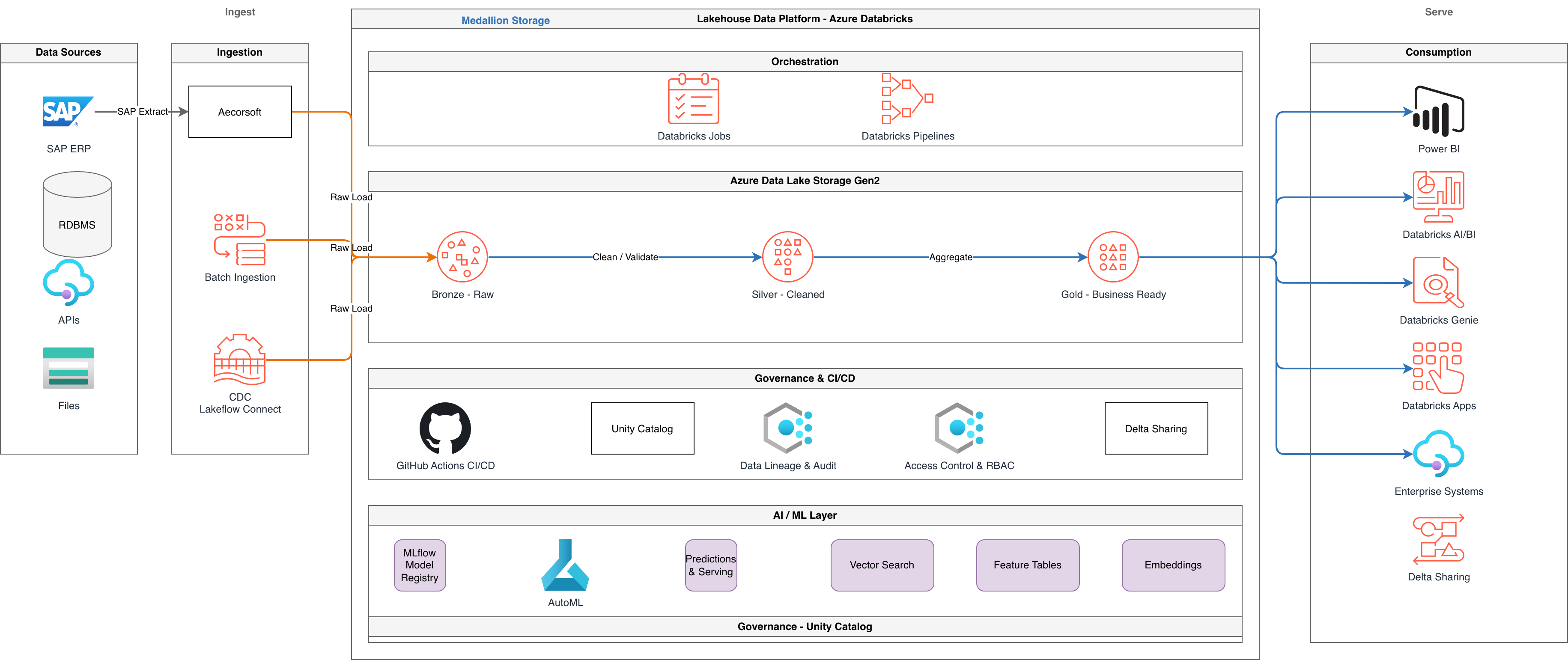
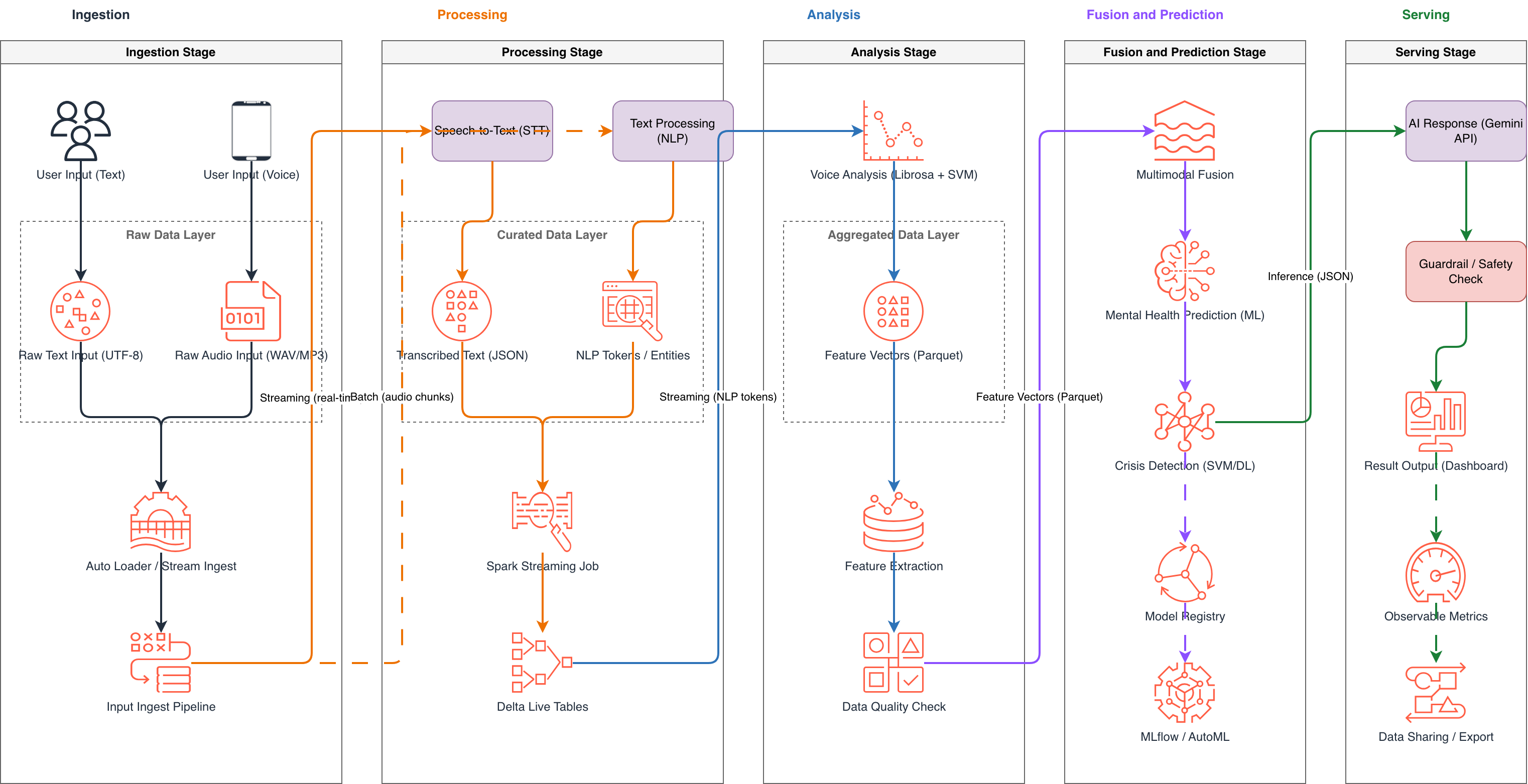

Data Flow Diagram vs Flowchart vs Sequence Diagram
Data flow diagrams, flowcharts, and sequence diagrams overlap in usage but differ fundamentally in what they model. DFDs track data movement and transformation. Flowcharts model control flow with decision logic. Sequence diagrams show message ordering between named participants over time.
| Feature | Data Flow Diagram | Flowchart | Sequence Diagram |
|---|---|---|---|
| Primary focus | How data moves between external entities, processes, and data stores in a system | Sequential control flow with decision branches, loops, and termination points | Ordered messages between named participants (objects, services, actors) over a time axis |
| Decision logic | Not represented; processes are black boxes that transform input data to output data | Explicit diamond symbols with labeled yes/no branches per ISO 5807 | Alt/opt combined fragments with guard conditions like [balance > 0] in UML 2.5 |
| Time axis | No time axis; diagrams show data relationships regardless of execution order | Implicit top-to-bottom or left-to-right ordering of steps | Explicit vertical time axis with messages ordered from top to bottom |
| Standard notation | Yourdon-DeMarco (circles for processes, open rectangles for stores) or Gane-Sarson (rounded rectangles) | ISO 5807:1985 with terminators, process rectangles, decision diamonds, and I/O parallelograms | UML 2.5 with lifelines, activation bars, synchronous (solid) and asynchronous (dashed) arrows |
| Decomposition support | Native hierarchical decomposition: Level 0 context, Level 1 subsystems, Level 2 process details | Subprocess expansion via off-page connectors but no formal decomposition hierarchy | Interaction references (ref fragments) link to separate sequence diagrams |
| Best suited for | System analysis, ETL pipeline documentation, GDPR data mapping, threat modeling data paths | User registration flows, incident response runbooks, approval chains, troubleshooting guides | API contract documentation, microservice choreography, OAuth 2.0 authorization code flows |
When to use this pattern
Use a data flow diagram when you need to understand what data enters, exits, and transforms within a system without worrying about the order of operations. DFDs are the right choice for GDPR data mapping exercises where you must trace PII from collection to storage to deletion. They work well for ETL pipeline documentation showing how raw data flows from source systems through transformations into a data warehouse. Threat modeling benefits from DFDs because trust boundary analysis requires knowing exactly where sensitive data crosses security zones. If your primary concern is the order of steps with decision branches, use a flowchart. If you need to show message timing between specific services, a sequence diagram fits better.
Frequently asked questions
What notation does the AI data flow diagram generator use?
This AI data flow diagram generator uses Yourdon-DeMarco notation by default: circles for processes, open-ended rectangles for data stores, squares for external entities, and labeled arrows for data flows. Each process gets a unique reference number for traceability across decomposition levels. Gane-Sarson notation is available by specifying it in your prompt.
Can I generate multiple decomposition levels?
Yes. Specify the level in your prompt: 'Level 0 context diagram' for the system boundary view, 'Level 1 for the order subsystem' for process expansion. Each generated diagram maintains consistent process numbering. Generate Level 0 first, then create Level 1 expansions for individual processes to build a complete hierarchical DFD set.
How does the AI label data flows?
The AI extracts specific payload names from your description. If you write 'sends order confirmation email,' the arrow label reads 'order_confirmation_email,' not 'data.' RULE-07 enforces clear labeling on every element. Be explicit about data payloads in your prompt to get the most useful flow labels.
Does the diagram show trust boundaries?
Yes. The AI draws trust boundary markers where data crosses security zones, such as between internal services and external APIs like Stripe or Twilio. WARN-04 triggers when sensitive data like credit card numbers or PII crosses a trust boundary without encryption notation. These boundaries render as dashed rectangles with zone labels.
What file formats can I export the DFD to?
Native .drawio XML is the default output. You can also export to PNG and SVG directly from Diagrams.so. The .drawio file opens in Draw.io desktop, the VS Code draw.io extension, Confluence, and any tool that reads mxGraphModel XML. No format conversion or third-party plugins required.
Related diagram generators
Generate Flowcharts from Text with AI
Describe a process in plain English. Get a valid Draw.io flowchart with correct ISO 5807 symbols, decision diamonds, and directional arrows.
Generate System Architecture Diagrams from Text
Describe your system's components in plain English. Get a valid Draw.io diagram with services, databases, message queues, caches, and API connections.
Generate Entity-Relationship Diagrams from Text with AI
Describe your database schema in plain English. Get a valid Draw.io ERD with Crow's Foot notation, cardinality markers, and primary/foreign key labels.
Generate UML Diagrams from Text with AI
Describe your classes, components, or deployment topology in plain English. Get a valid Draw.io UML diagram with correct UML 2.5 notation and relationships.
Format converters
Convert JSON to a diagram
Paste a JSON structure — infrastructure, a service map, or config — and get a native, editable .drawio diagram with the entities and relationships drawn for you.
Convert Mermaid to an editable .drawio diagram
Paste your Mermaid and get a native .drawio you can actually edit — real draggable shapes and connectors instead of a rendered image, ready for Draw.io.