
Generate Azure DevOps Pipeline Diagrams from Text with AI
Describe your Azure DevOps YAML pipeline stages, deployment jobs, and approval gates in plain English. Get a valid Draw.io diagram with official Azure icons.
This Azure DevOps pipeline diagram generator converts plain-text descriptions of your YAML pipelines into Draw.io diagrams with stages, jobs, deployment jobs, and environment approval gates. Describe a pipeline like 'Build stage runs dotnet build and dotnet test in parallel, then pushes a Docker image to Azure Container Registry. Deploy-to-staging stage uses a deployment job targeting the Staging environment with AKS kubectl rollout. Deploy-to-production requires manual approval from the release-managers group.' The AI maps each stage to a labeled node, wires dependencies with condition annotations, and renders environment gates as approval checkpoints. Architecture warnings flag production endpoints without WAF (WARN-02) and single-replica AKS deployments (WARN-01). Every element aligns to a 10px grid. Native .drawio XML output.
What Is an Azure DevOps Pipeline Diagram?
An Azure DevOps pipeline diagram maps the structure of a YAML pipeline: stages, jobs within stages, deployment jobs targeting environments, service connections to Azure resources, variable groups, approval gates, and artifact flows. Azure DevOps pipelines have a specific execution model. Stages run sequentially by default. Jobs within a stage can run in parallel on different agents. Deployment jobs are special: they target named environments (Dev, Staging, Production) with configurable approval and check gates. Drawing this manually means representing stage dependencies, parallel job execution within stages, deployment job targets, and the flow of artifacts from Azure Artifacts or Azure Container Registry through each environment. Diagrams.so understands these Azure DevOps constructs natively. Describe 'stage Build with two parallel jobs: build-api and build-web, both pushing images to ACR myregistry.azurecr.io' and the AI creates a fork node, two parallel job lanes, and artifact arrows pointing to ACR. Mention 'deployment job to Production environment with pre-deployment approval from release-managers' and the diagram shows a gate node with the approver group and optional timeout. RULE-05 enforces left-to-right flow matching pipeline execution order. Opinionated mode prevents stages from appearing out of sequence. The AI draws service connections as dotted lines from jobs to Azure resources: ACR, AKS, Azure SQL, Key Vault. Variable groups appear as parameter blocks attached to their consuming stages. VLM visual validation catches overlapping job labels in dense multi-stage pipelines. WARN-02 flags deployment targets with public endpoints lacking WAF. WARN-01 identifies single-replica targets. The .drawio output is version-controllable alongside your azure-pipelines.yml file.
Key components
- Pipeline stages as sequential blocks: Build, Test, Deploy-Staging, Approval, Deploy-Production with dependency arrows
- Parallel job lanes within stages showing concurrent execution on separate agents (e.g., build-api and build-web)
- Deployment jobs with environment targets (Dev, Staging, Production) and pre/post-deployment gates
- Approval checkpoints with reviewer group labels (release-managers) and timeout annotations (24h, 72h)
- Service connection lines from jobs to Azure resources: ACR, AKS, Azure SQL, Key Vault, Azure Artifacts
- Variable group blocks attached to stages showing shared configuration (connection strings, feature flags)
- Artifact flow arrows with image tags (myregistry.azurecr.io/api:$(Build.BuildId)) from build to deploy stages
- Condition annotations on stage dependencies (succeeded(), failed(), always()) controlling execution flow
How to generate with AI
- 1
Describe your Azure DevOps pipeline
Write your pipeline structure in plain English. Map out stages, jobs, and their dependencies. For example: 'Trigger on push to main branch. Stage 1 Build: two parallel jobs, build-api runs dotnet publish and pushes to ACR, build-web runs npm run build and pushes to ACR. Stage 2 Deploy-Staging: deployment job targets Staging environment, runs helm upgrade on AKS cluster aks-staging in rg-staging, pulls images from ACR. Stage 3 Integration-Test: runs Playwright tests against staging endpoint. Stage 4 Deploy-Production: requires approval from release-managers group with 48-hour timeout, deployment job targets Production environment, runs helm upgrade on AKS cluster aks-prod with canary strategy.'
- 2
Select CI/CD type and Azure provider
Choose 'CI/CD' as the diagram type and 'Azure' as the cloud provider. Diagrams.so loads the official Azure icon set including Azure DevOps, ACR, AKS, Azure Artifacts, and Key Vault icons. Enable opinionated mode to enforce strict left-to-right stage ordering matching YAML pipeline execution semantics. The AI follows RULE-02 for official icons and RULE-05 for chronological layout.
- 3
Generate and validate
Click generate. The AI produces .drawio XML with stages as bounded regions, parallel jobs inside, approval gates between environments, and service connection lines to Azure resources. Architecture warnings flag production AKS without multi-replica deployments (WARN-01) and public staging endpoints without WAF (WARN-02). VLM visual validation catches overlapping job labels. Download as .drawio for editing, or export to PNG or SVG for pipeline documentation in Azure DevOps wiki.
Example prompt
Azure DevOps YAML pipeline for a .NET 8 microservices app. Trigger: push to main or release/* branches. Variable groups: vg-common (ACR login server, AKS resource group), vg-staging (staging connection strings), vg-production (production connection strings, Key Vault reference). Stage 1 Build: Job build-api runs dotnet test on Api.sln, dotnet publish, docker build, docker push to myacr.azurecr.io/api:$(Build.BuildId). Job build-web runs npm ci, npm test, docker build, docker push to myacr.azurecr.io/web:$(Build.BuildId). Both jobs run in parallel on ubuntu-latest agents. Stage 2 Deploy-Staging: deployment job targets Staging environment (no approval gate), service connection to AKS aks-staging-eastus2, runs helm upgrade release-staging with image tags from Stage 1. Stage 3 Smoke-Test: job runs Newman against https://staging.app.contoso.com, condition succeeded(). Stage 4 Deploy-Production: deployment job targets Production environment, pre-deployment approval from release-managers group with 72-hour timeout, service connection to AKS aks-prod-eastus2, runs helm upgrade release-prod with canary weights 10% then 50% then 100%. Post-deployment gate: Azure Monitor alert query for error rate < 1% over 15 minutes. Rollback: on failure, helm rollback to previous revision and notify #releases Slack channel.
Example diagrams from the gallery
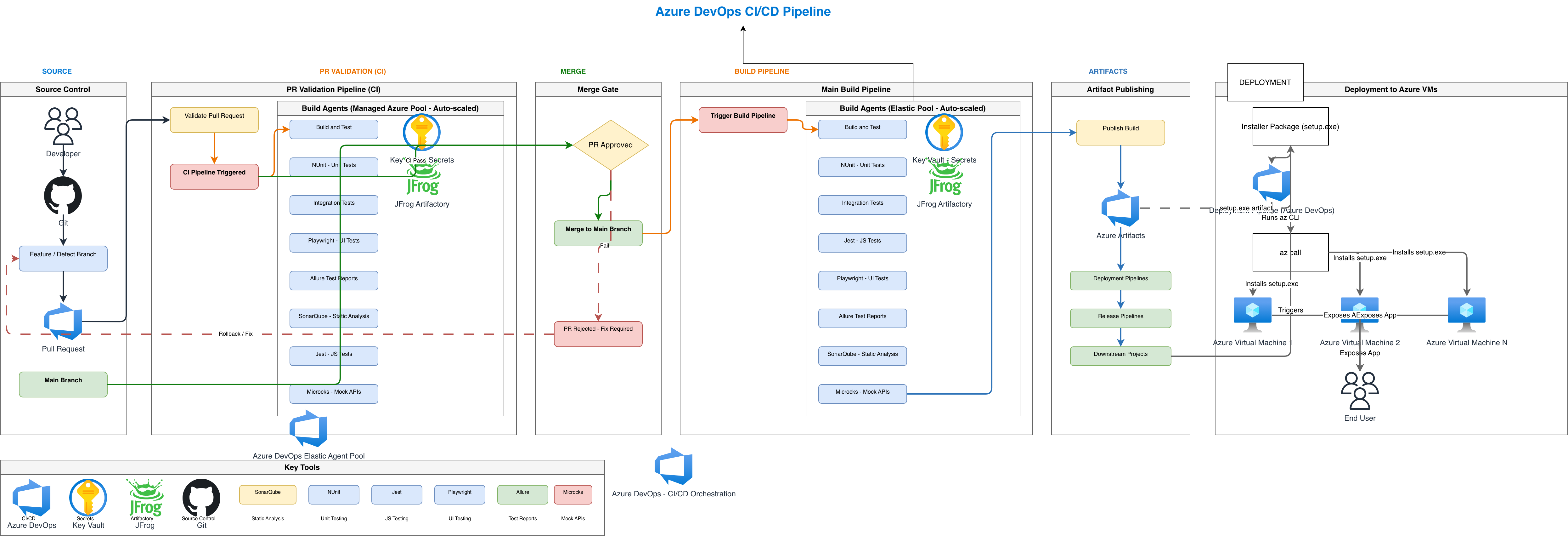


Azure DevOps Pipelines vs GitHub Actions vs GitLab CI on Azure
All three CI/CD platforms can deploy to Azure, but their pipeline models, environment management, and Azure integration depth differ. Azure DevOps has native service connections. GitHub Actions uses OIDC federation. GitLab CI relies on environment variables and Kubernetes agent.
| Feature | Azure DevOps Pipelines | GitHub Actions | GitLab CI on Azure |
|---|---|---|---|
| Pipeline structure | Stages > jobs > steps; deployment jobs are a distinct job type with environment targeting and lifecycle hooks | Workflows > jobs > steps; no native stage concept; job dependencies via needs keyword create implicit stages | Stages > jobs; stages are ordered, jobs within a stage run in parallel; environment keyword on any job |
| Environment management | Named environments with approval gates, checks (Azure Monitor, REST API, business hours), and deployment history | Environments with protection rules: required reviewers, wait timer, deployment branches; no custom checks natively | Environments with manual approval via when:manual, protected environments requiring maintainer role; auto-stop for dynamic envs |
| Azure integration | Service connections to ACR, AKS, Azure SQL, App Service; Azure Artifacts for packages; native ARM/Bicep tasks | azure/login action with OIDC workload identity federation; azure/aks-set-context for kubectl; marketplace actions for ARM/Bicep | Azure CLI via service principal; Kubernetes agent for in-cluster deploys; Terraform integration via GitLab-managed state |
| Artifact management | Azure Artifacts with NuGet, npm, Maven, Python feeds in the same organization; pipeline artifacts for inter-stage data | GitHub Packages for npm, NuGet, Docker; actions/upload-artifact for workflow artifacts; 90-day retention default | GitLab Package Registry for multiple formats; job artifacts with configurable expiry; cache for dependency speedup |
| Approval workflow | Pre/post-deployment approvals per environment; branch control; business hours gates; Azure Monitor health checks | Required reviewers on environment; wait timers; no native Azure Monitor gate; custom actions needed for health checks | Manual job gates (when:manual); protected environments restrict who can trigger; no built-in health check gates |
| Diagram layout | Stages as columns, parallel jobs as rows within each stage, approval gates between stage boundaries | Jobs as nodes in a DAG; needs arrows show dependencies; matrix strategy fans out into parallel job lanes | Stages as vertical columns; jobs stacked within stages; environment links shown as deploy arrows to targets |
When to use this pattern
Use an Azure DevOps pipeline diagram when you need to document YAML pipeline structure for onboarding, compliance reviews, or change management. It's the right choice when your team runs Azure DevOps as the primary CI/CD platform with service connections to ACR, AKS, and Azure SQL. Common scenarios include pipeline design reviews before implementing multi-stage YAML, documenting approval workflows for SOC 2 audit evidence, and onboarding new team members to the release process. If your CI/CD runs on GitHub Actions deploying to Azure, use a CI/CD pipeline diagram with GitHub Actions constructs instead. If you need to document the runtime AKS topology rather than the build pipeline, use an AKS architecture diagram.
Frequently asked questions
What Azure DevOps constructs does the diagram generator support?
This Azure DevOps pipeline diagram generator supports stages, jobs, deployment jobs, environments with approval gates, service connections, variable groups, pipeline artifacts, and condition expressions. The AI maps each construct to a visual element using official Azure icons from Diagrams.so's 30+ libraries. Template references render as reusable block indicators.
Can I show parallel jobs within a stage?
Yes. Describe parallel jobs explicitly: 'Stage Build contains build-api and build-web jobs running in parallel.' The AI creates a fork node at the stage entry, renders both jobs as parallel lanes, and adds a join node before the next stage dependency. Each job shows its agent pool label (ubuntu-latest, windows-latest).
How are environment approvals represented?
Approval gates render as checkpoint nodes between stages. The AI labels each gate with the approver group (release-managers), timeout duration, and any additional checks like Azure Monitor health queries. Pre-deployment and post-deployment gates get distinct positions before and after the deployment job node.
Does the diagram include service connections?
Yes. Mention service connections in your prompt and the AI draws dotted lines from jobs to their target Azure resources. ACR connections show the registry login server. AKS connections show cluster name and resource group. Key Vault connections indicate secret references. Each line is labeled with the connection type.
What architecture warnings apply to pipeline diagrams?
WARN-01 flags deployment targets with single-replica configurations. WARN-02 catches staging or production endpoints exposed without Azure Front Door WAF. WARN-03 identifies database targets without geo-replication in the deploy pipeline. Warnings appear as non-blocking annotations on the deployment stage where the issue exists.
Related diagram generators
Generate CI/CD Pipeline Diagrams from Text with AI
Describe your build, test, and deploy stages in plain English. Get a valid Draw.io pipeline diagram with parallel jobs, approval gates, and rollback paths.
Generate AKS Architecture Diagrams from Text with AI
Describe your Azure Kubernetes Service cluster in plain English. Get a valid Draw.io diagram with node pools, Azure CNI networking, AGIC ingress, and KEDA autoscaling.
Generate Azure Architecture Diagrams from Text with AI
Describe your Azure infrastructure in plain English. Get a valid Draw.io diagram with official Azure icons, VNet boundaries, resource groups, and NSG rules.
Generate DevOps Diagrams from Text with AI
Describe your DevOps toolchain in plain English. Get a valid Draw.io diagram with correct tool icons, pipeline flows, and infrastructure relationships.