
Generate Azure Data Platform Diagrams from Text with AI
Describe your Azure data architecture in plain English. Get a valid Draw.io diagram with Data Factory pipelines, Synapse pools, Databricks workspaces, and Purview governance.
This Azure data platform diagram generator converts plain-text descriptions of your data architecture into Draw.io diagrams with ingestion, transformation, serving, and governance layers. Describe a setup like 'Event Hubs capturing clickstream at 10,000 events/second into ADLS Gen2 bronze layer, Databricks with medallion architecture transforming through silver and gold, Synapse serverless SQL for ad-hoc queries, and Power BI connected to the gold layer via DirectQuery.' The AI maps each service to its official Azure icon, draws data flow arrows with throughput annotations, and structures the diagram in medallion layers. Architecture warnings flag data pipelines without Purview governance (WARN-05) and storage accounts with public endpoints (WARN-02). Every element aligns to a 10px grid. Native .drawio output.
What Is an Azure Data Platform Diagram?
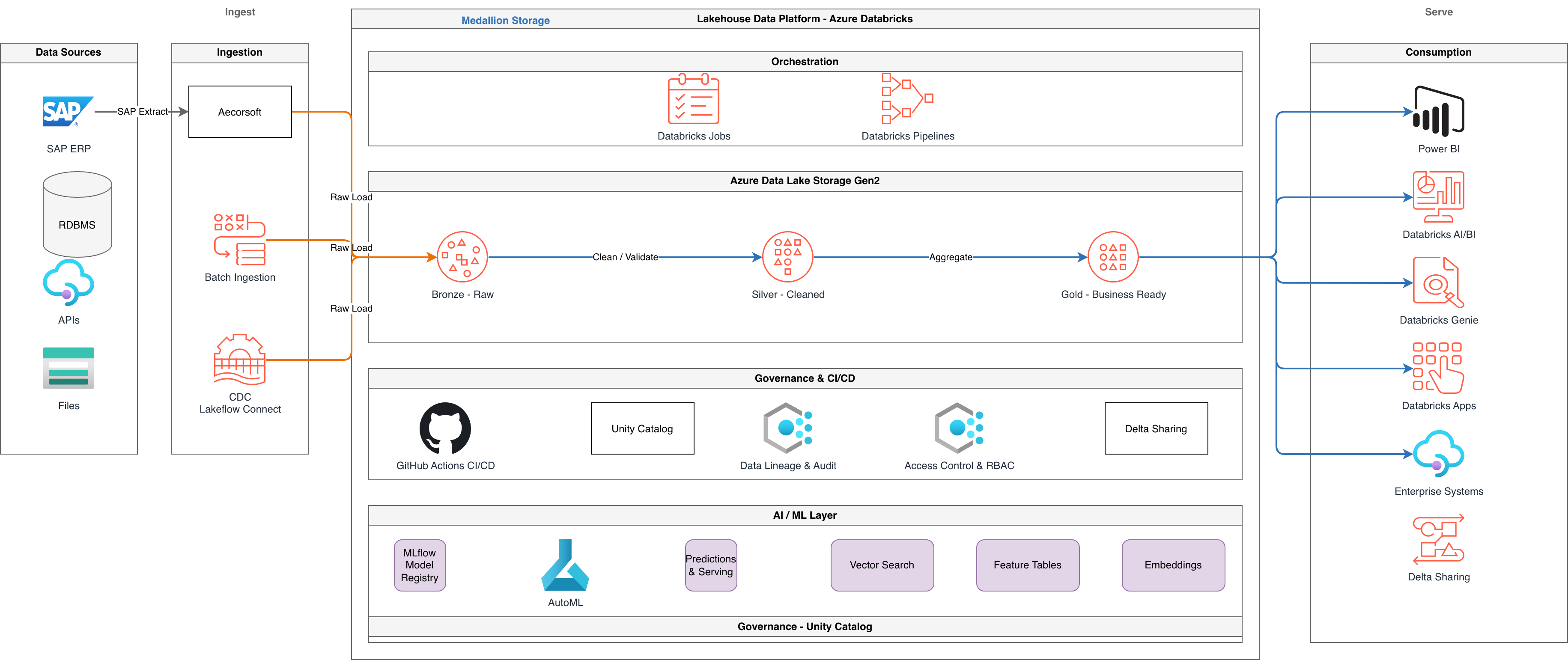
An Azure data platform diagram maps the end-to-end data lifecycle on Azure: ingestion from source systems, raw storage in Azure Data Lake Storage Gen2, transformation through Azure Data Factory or Azure Databricks, analytical serving via Azure Synapse Analytics, visualization in Power BI, and governance through Microsoft Purview. Building this diagram manually requires understanding the data flow between a dozen Azure services and representing both batch and streaming paths. An AI data platform diagram generator does the heavy lifting. You describe your data sources, transformation logic, and consumption patterns. The AI structures the diagram into logical layers. Diagrams.so handles the medallion architecture pattern natively. Describe 'bronze layer in ADLS Gen2 container raw, silver layer in container cleansed with Databricks Delta Lake, gold layer in container curated with star schema for Power BI' and the AI draws three distinct storage containers with transformation arrows between them, each labeled with the processing engine and data format. Data Factory pipelines appear as orchestration flows with Copy Activity, Dataflow, and trigger annotations. Event Hubs and IoT Hub show as real-time ingestion endpoints with partition counts and throughput units. Synapse dedicated SQL pools display with DWU labels (DW1000c). Synapse Spark pools show autoscale ranges. Purview connects as a governance overlay with scan connections to each data store. RULE-02 enforces official Azure icons for every service. RULE-05 produces left-to-right data flow from sources through transformation to consumption. WARN-02 flags ADLS Gen2 accounts with public network access enabled. WARN-05 catches data stores not registered in Purview. VLM visual validation detects overlapping pipeline labels on dense architectures.
Key components
- Medallion architecture layers: bronze (raw ingestion), silver (cleansed/conformed), gold (curated/aggregated) as labeled container groups
- Azure Data Factory pipelines with Copy Activity, Mapping Dataflows, triggers (schedule, tumbling window, event), and linked service connections
- Azure Databricks workspaces with cluster specifications (Standard_DS3_v2, autoscale 2-8 workers) and Delta Lake table annotations
- Azure Synapse Analytics with dedicated SQL pools (DW1000c), serverless SQL pools, and Spark pools with autoscale labels
- Event Hubs and IoT Hub ingestion endpoints with partition counts, throughput units, and consumer group labels
- Azure Data Lake Storage Gen2 containers with hierarchical namespace, lifecycle policies, and access tier annotations (Hot/Cool/Archive)
- Microsoft Purview governance connections showing scan relationships, data lineage arrows, and classification labels on sensitive columns
- Power BI workspace with dataset connections (Import, DirectQuery, Composite) to gold layer Synapse or Databricks SQL endpoints
How to generate with AI
- 1
Describe your Azure data architecture
Write your data platform in plain English. Specify sources, processing, and consumption. For example: 'Source systems: SAP S/4HANA via Data Factory self-hosted integration runtime, Salesforce via REST connector, IoT devices via IoT Hub (100 devices, 5-second telemetry interval). Ingestion: Data Factory copies SAP and Salesforce data daily at 02:00 UTC to ADLS Gen2 bronze container. IoT Hub routes telemetry to Event Hubs standard tier (32 partitions). Processing: Databricks on Standard_DS4_v2 (autoscale 4-16 workers) reads bronze, deduplicates, conforms schemas, writes to silver as Delta Lake tables. Gold layer: Databricks aggregates into star schema fact and dimension tables. Serving: Synapse serverless SQL exposes gold layer via views. Power BI connects via DirectQuery. Governance: Purview scans all ADLS containers and Synapse databases weekly.'
- 2
Select data pipeline type and Azure provider
Choose 'Data Pipeline' as the diagram type and 'Azure' as the cloud provider. Diagrams.so loads the official Azure icon set with icons for Data Factory, Databricks, Synapse, Event Hubs, ADLS Gen2, Purview, and Power BI. Enable opinionated mode to enforce left-to-right data flow from sources through medallion layers to consumption per RULE-05.
- 3
Generate and validate
Click generate. The AI produces .drawio XML with source systems on the left, medallion layers in the center, and consumption on the right. Data Factory pipelines show as orchestration flows with trigger annotations. Databricks clusters display with node specs. Architecture warnings flag ADLS Gen2 with public access (WARN-02) and data stores missing Purview governance (WARN-05). VLM visual validation catches overlapping pipeline labels. Download as .drawio or export to PNG/SVG.
Example prompt
Azure data platform with medallion architecture. Sources: SAP S/4HANA (Data Factory self-hosted integration runtime, daily full load at 02:00 UTC), Salesforce (REST API connector, incremental by LastModifiedDate), IoT sensor data (IoT Hub S2, 500 devices, 10-second interval routing to Event Hubs Standard 32 partitions 4 TUs). Bronze layer: ADLS Gen2 account stproddata01 with hierarchical namespace, container raw, lifecycle policy moving data older than 90 days to Cool tier. Data Factory pipeline ppl-ingest-sap copies SAP tables to raw/sap/YYYY/MM/DD/ in Parquet. Data Factory pipeline ppl-ingest-sfdc copies Salesforce objects to raw/sfdc/. Event Hubs Capture writes IoT telemetry to raw/iot/ in Avro. Silver layer: Databricks workspace dbw-prod-eastus2, cluster Standard_DS4_v2 autoscale 4-16 workers, reads bronze Parquet and Avro, deduplicates, conforms schemas, writes Delta Lake tables to container cleansed. Unity Catalog manages silver table permissions. Gold layer: Databricks job aggregates silver into star schema with fact_orders, dim_customer, dim_product as Delta tables in container curated. Synapse serverless SQL pool creates external tables over gold Delta for ad-hoc queries. Dedicated SQL pool DW1000c loads daily aggregates for Power BI. Power BI workspace ws-analytics with Import datasets refreshing every 6 hours from dedicated pool and DirectQuery dataset on serverless pool. Governance: Purview account pv-prod scans ADLS Gen2, Synapse databases, and Databricks Unity Catalog weekly. Classification rules tag PII columns (email, SSN). Data lineage tracked end-to-end from SAP source to Power BI report.
Example diagrams from the gallery



Azure Synapse vs AWS Redshift vs GCP BigQuery - Data Platform Architecture
Each cloud provider offers a different data warehousing and analytics architecture. Azure Synapse combines dedicated and serverless SQL pools with Spark. AWS Redshift focuses on provisioned and serverless cluster modes. GCP BigQuery is fully serverless with separation of storage and compute. These differences shape how data platform diagrams are structured.
| Feature | Azure Synapse | AWS Redshift | GCP BigQuery |
|---|---|---|---|
| Compute model | Dedicated SQL pools (DW100c to DW30000c) for predictable workloads; serverless SQL for ad-hoc; Spark pools with autoscale for ETL | Provisioned clusters (ra3.xlplus to ra3.16xlarge) with managed storage; Redshift Serverless with RPU-based pricing; no built-in Spark | Fully serverless per-query pricing or flat-rate slots (100 to 10,000+); no cluster provisioning; BigQuery Spark for in-engine processing |
| Storage layer | ADLS Gen2 as external data lake; dedicated pool has managed columnar storage; Parquet and Delta Lake for lake tables | Redshift Managed Storage (RMS) with automatic tiering to S3; Redshift Spectrum queries S3 directly without loading | Managed columnar storage (Capacitor format); BigLake for external tables on Cloud Storage; native Iceberg support |
| Ingestion pipeline | Data Factory (embedded in Synapse Studio) with 100+ connectors, Mapping Dataflows for code-free ETL, pipeline triggers | AWS Glue ETL jobs, Glue crawlers for schema discovery; Redshift COPY from S3; Amazon AppFlow for SaaS sources | Dataflow (Apache Beam) for batch and stream; BigQuery Data Transfer Service for SaaS; federated queries to Spanner/Cloud SQL |
| Governance | Microsoft Purview for catalog, lineage, and classification; Unity Catalog for Databricks; Azure RBAC and column-level security | AWS Glue Data Catalog; AWS Lake Formation for fine-grained access; Redshift column-level and row-level security | Dataplex for data mesh governance; Data Catalog for discovery; BigQuery column-level security and data masking policies |
| Real-time ingestion | Event Hubs Capture to ADLS Gen2; Synapse Link for operational analytics from Cosmos DB; Spark Structured Streaming | Kinesis Data Firehose to Redshift; Amazon MSK to S3 for Spectrum; Redshift Streaming Ingestion from Kinesis directly | BigQuery Storage Write API for streaming inserts; Pub/Sub to Dataflow to BigQuery; BigQuery subscriptions from Pub/Sub |
| Diagram layout | Left-to-right: sources > Data Factory > ADLS Gen2 medallion layers > Synapse pools > Power BI; Purview as governance overlay | Left-to-right: sources > Glue/Kinesis > S3 data lake > Redshift cluster/Spectrum > QuickSight; Lake Formation as access layer | Left-to-right: sources > Dataflow/Transfer Service > BigQuery datasets > Looker; Dataplex as governance mesh overlay |
When to use this pattern
Use an Azure data platform diagram when designing or documenting your end-to-end analytics architecture on Azure. It's the right choice for data engineering team onboarding, medallion architecture design reviews, and data governance audits with Microsoft Purview. Common scenarios include documenting Data Factory pipeline orchestration for new team members, mapping data lineage from source systems to Power BI reports, and presenting architecture decisions to stakeholders. If you only need to document real-time event streaming without the full data warehouse, use a data flow diagram focused on Event Hubs and Stream Analytics. If your architecture spans multiple clouds, create provider-specific data platform diagrams and link them through a multi-cloud overview.
Frequently asked questions
What Azure data services does the diagram generator support?
This Azure data platform diagram generator supports Data Factory, Databricks, Synapse Analytics (dedicated and serverless pools), Event Hubs, IoT Hub, ADLS Gen2, Power BI, Microsoft Purview, Stream Analytics, and Azure SQL. Each service renders with its official icon from Diagrams.so's 30+ libraries. RULE-02 enforces correct icons.
Can I show the medallion architecture pattern?
Yes. Describe your bronze, silver, and gold layers with their storage containers and processing engines. The AI renders each layer as a labeled container group with ADLS Gen2 storage inside. Transformation arrows between layers show the processing engine (Databricks, Data Factory Dataflow) and data format (Parquet, Delta Lake, Avro).
How is Microsoft Purview governance represented?
Purview appears as a governance overlay connected to each data store it scans. Scan connections show as dotted lines from the Purview account to ADLS Gen2, Synapse, and Databricks Unity Catalog. Classification labels annotate sensitive columns. Data lineage arrows trace from source to consumption. WARN-05 flags stores not registered in Purview.
Does the diagram show Data Factory pipeline details?
Yes. Data Factory pipelines render as orchestration flows with Copy Activity nodes, Mapping Dataflow nodes, and trigger annotations (schedule, tumbling window, event-based). Linked service connections show as dotted lines to source and sink data stores. Pipeline dependencies and execution order follow the left-to-right layout.
What architecture warnings apply to data platform diagrams?
WARN-02 flags ADLS Gen2 storage accounts with public network access enabled. WARN-05 catches data stores not registered in Microsoft Purview for governance. WARN-03 identifies Azure SQL or Synapse dedicated pools without geo-replication. WARN-04 detects missing private endpoints on storage accounts. Warnings are non-blocking annotations.
Related diagram generators
Generate Azure Architecture Diagrams from Text with AI
Describe your Azure infrastructure in plain English. Get a valid Draw.io diagram with official Azure icons, VNet boundaries, resource groups, and NSG rules.
Generate Data Flow Diagrams from Text with AI
Describe how data moves through your system. Get a valid Draw.io DFD with Yourdon-DeMarco notation, decomposition levels, and named data flows.
Generate GCP Data Analytics Diagrams from Text
Describe your Google Cloud data pipeline in plain English. Get a valid Draw.io diagram with BigQuery, Dataflow, Pub/Sub, and Looker components using official GCP icons.
Generate Cloud Architecture Diagrams from Text
Describe your cloud infrastructure in plain English. Get a valid Draw.io diagram with region boundaries, availability zones, managed services, and DR paths.