
Google Cloud Architecture Framework
Google's opinionated guide to building on GCP. Five pillars, a Landing Zone blueprint backed by Terraform, and reference architectures drawn from Google's own production patterns.
What Google's framework covers and how it differs from AWS and Azure
The Google Cloud Architecture Framework is a collection of best practices, design principles, and implementation guidance published by Google Cloud to help architects build workloads that are secure, reliable, cost-effective, and performant on GCP. Google released the framework after AWS and Azure had already established their Well-Architected programs, and the structure reflects lessons learned from watching how enterprises used those competing frameworks. Where AWS organizes everything around six pillars with deep whitepapers, and Azure ties its framework directly to portal-integrated tooling, Google took a more concise approach. The GCP framework is organized around five pillars: Operational Excellence, Security Privacy and Compliance, Reliability, Cost Optimization, and Performance Optimization. The documentation is shorter and more prescriptive than AWS's, with less theory and more direct 'do this, not that' guidance. Google's framework carries a distinct bias toward managed services and serverless architectures. Where AWS's framework discusses EC2 instance sizing and EBS volume types at length, Google's framework steers architects toward Cloud Run, Cloud Functions, and BigQuery before discussing Compute Engine VMs. This reflects Google's internal philosophy where Borg (the predecessor to Kubernetes) abstracted away individual machines decades ago. The framework also emphasizes data-driven decision making more heavily than its competitors. Google recommends instrumenting everything with Cloud Monitoring and Cloud Trace from day one, then using that telemetry to drive architecture decisions rather than guessing at capacity requirements. The framework integrates with Google's Architecture Center, which hosts over 100 reference architectures with Terraform deployment samples. Each reference architecture maps back to specific pillar recommendations, creating a connection between abstract principles and deployable infrastructure.
The five pillars with GCP-specific service recommendations
Operational Excellence on GCP starts with infrastructure automation. Google recommends Terraform or Deployment Manager for resource provisioning, Cloud Build for CI/CD pipelines, and Cloud Deploy for managed continuous delivery to GKE or Cloud Run. The framework prescribes using Organization Policies to enforce guardrails at the org level, like restricting which regions resources can be created in or requiring that all Cloud SQL instances have automated backups enabled. Security, Privacy, and Compliance is the most detailed pillar. Google recommends a BeyondCorp zero-trust approach where identity and context determine access rather than network location. In practice, this means Identity-Aware Proxy for web applications, VPC Service Controls for data exfiltration protection around sensitive APIs like BigQuery and Cloud Storage, and Binary Authorization to ensure only signed container images deploy to GKE clusters. Security Command Center Premium provides the continuous posture assessment, detecting misconfigurations like public Cloud Storage buckets or Cloud SQL instances with public IPs. Reliability on GCP centers around multi-zonal and multi-regional deployment patterns. The framework recommends Cloud Spanner for globally distributed databases that need strong consistency across regions, regional GKE clusters with node pools spread across three zones, and Cloud Load Balancing with global anycast IPs that route users to the nearest healthy backend. Google's documentation is unusually specific about error budgets, drawing directly from the SRE practices described in the Google SRE book. Cost Optimization recommends committed use discounts for Compute Engine and Cloud SQL (one-year or three-year terms), preemptible VMs for batch workloads, and BigQuery's on-demand pricing versus flat-rate reservations based on query volume. Google also pushes active use of billing export to BigQuery, where teams can write SQL queries against their own cost data to identify waste. Performance Optimization focuses on choosing the right compute tier for the workload: Cloud Functions for event-driven microprocesses under 60 seconds, Cloud Run for containerized request-response services, GKE Autopilot for complex orchestration, and Compute Engine only when you need specific machine types or GPU attachments.
How GCP's framework differs from AWS Well-Architected in practice
The structural differences between GCP's and AWS's frameworks reflect how each provider thinks about cloud architecture. AWS Well-Architected has six pillars, including Sustainability, which GCP doesn't break out separately. Google argues that its data centers already run on carbon-free energy and that sustainability is embedded in service choices rather than requiring a dedicated pillar. AWS provides the Well-Architected Tool in the console, a formal lens mechanism for extending the framework to specific workloads like SaaS or machine learning, and a partner ecosystem where AWS Partners conduct paid Well-Architected Reviews. GCP's tooling is lighter: the framework documentation is thorough, but there's no equivalent of the AWS Well-Architected Tool's interactive questionnaire in the Google Cloud Console. Instead, Google relies on Active Assist recommendations in the console, which cover cost, security, and performance but don't map explicitly to framework pillars. The philosophical difference runs deeper. AWS's framework acknowledges that customers will run traditional three-tier applications on EC2 with RDS and gives detailed guidance for that pattern. GCP's framework consistently nudges architects toward serverless and managed services. The GCP reliability pillar spends more time on Cloud Run autoscaling and Cloud Spanner multi-region replication than on Compute Engine instance placement. AWS gives equal weight to both managed and self-managed architectures. In practice, teams moving from AWS to GCP find that GCP's framework assumes more Google-managed infrastructure and less customer-managed infrastructure. AWS architects are used to thinking about VPC routing tables, NAT gateways, and security group rules in detail. GCP architects rely more on VPC Service Controls, Private Google Access, and Cloud NAT, which abstract away much of the networking complexity. The GCP framework also has stronger opinions about data architecture. Google recommends BigQuery as the default analytical data store for nearly every workload pattern. AWS's framework discusses Redshift, Athena, and EMR as roughly equal options depending on the use case. Google's position is that BigQuery's serverless model and separation of storage from compute make it the right default, and you should only consider alternatives for specific edge cases like sub-second query latency requirements where Bigtable might fit.
GCP Landing Zone blueprint and Terraform Foundation Toolkit
Google's Landing Zone blueprint is the infrastructure-as-code counterpart to the Architecture Framework. It provisions a production-ready GCP organization structure through Terraform modules that encode best practices into deployable infrastructure. The blueprint is called the Terraform Example Foundation and lives in the GoogleCloudPlatform GitHub organization. It deploys in four sequential stages. Stage 0 (Bootstrap) creates the Terraform state bucket, the CI/CD pipeline in Cloud Build, and the seed service account that subsequent stages use. Stage 1 (Org) creates the organizational hierarchy: folders for Production, Non-Production, Development, and Shared environments, plus Organization Policies that restrict resource locations, enforce uniform bucket-level access on Cloud Storage, and require OS Login on all Compute Engine instances. Stage 2 (Environments) creates the VPC networks for each environment, configures Cloud NAT for outbound internet access, sets up Private Google Access so workloads reach Google APIs without public IPs, and establishes VPC peering or Shared VPC host project relationships. Stage 3 (Projects) creates individual workload projects within the appropriate folders, assigns IAM roles, and connects the projects to the Shared VPC. The Shared VPC model is central to GCP's networking approach. A host project owns the VPC networks and subnets. Service projects attach to the host and deploy resources into designated subnets. This centralizes network management while letting workload teams manage their own compute and storage resources. The blueprint enforces security boundaries through folder-level IAM policies. A developer in the Development folder can create Compute Engine instances but can't modify network routes in the Shared VPC host project. A security team member can view Security Command Center findings across all projects but can't deploy workloads. Google also publishes the Cloud Foundation Toolkit, a collection of individual Terraform modules for specific GCP resources like GKE clusters, Cloud SQL instances, and IAM bindings. These modules encode Google's best practices at the resource level: the GKE module enables Workload Identity by default, creates private clusters with authorized networks, and configures maintenance windows automatically.
Google's recommended reference architectures and when to use them
Google's Architecture Center publishes reference architectures that map common workload patterns to specific GCP service combinations. These aren't abstract diagrams. Each one includes a Terraform deployment, cost estimates, and pillar-by-pillar analysis. The three-tier web application pattern uses Cloud Load Balancing with a global anycast IP, Cloud Run or GKE for the application tier, Cloud SQL for PostgreSQL or MySQL with high availability enabled and automated backups, and Memorystore for Redis as the caching layer. Google recommends Cloud Run over GKE for this pattern unless you need persistent connections, custom schedulers, or GPU access. The event-driven architecture pattern centers on Pub/Sub as the messaging backbone, Cloud Functions or Cloud Run for event processors, and BigQuery as the analytical sink. Google's reference architecture for clickstream analytics uses this pattern: client events hit a Cloud Endpoints API, which publishes to Pub/Sub, which triggers a Dataflow streaming pipeline that writes transformed events to BigQuery for real-time dashboards in Looker. The machine learning pipeline pattern uses Vertex AI for the entire lifecycle: Vertex AI Workbench for experimentation, Vertex AI Pipelines (built on Kubeflow) for training orchestration, Vertex AI Model Registry for versioning, and Vertex AI Endpoints for serving predictions. The reference architecture shows how to connect training data in BigQuery to the pipeline and serve predictions back to a Cloud Run application. The hybrid connectivity pattern connects on-premises data centers to GCP using Cloud Interconnect (dedicated or partner) with Cloud Router for BGP route exchange. The reference architecture shows a hub-and-spoke network with a Shared VPC host project as the hub, Cloud VPN as backup connectivity, and Cloud DNS for hybrid name resolution. Google publishes specific bandwidth and latency benchmarks for each interconnect option. The data lake pattern uses Cloud Storage as the raw landing zone, Dataproc or Dataflow for ETL processing, BigQuery for the curated analytical layer, and Data Catalog for metadata management and discovery. Google recommends organizing the data lake into three Cloud Storage buckets: raw, processed, and curated, each with different lifecycle policies and access controls.
Diagramming GCP architectures that follow the framework
A GCP architecture diagram that reflects the Architecture Framework should make the framework's principles visible in the layout. Start with the organizational hierarchy at the top: the GCP Organization, then folders for environments, then projects within each folder. This isn't just decoration. It shows that the architecture uses Organization Policies and folder-level IAM, which is the framework's primary governance mechanism. Inside each project, draw the VPC network boundaries. Show whether the project uses a standalone VPC or a Shared VPC, because that distinction determines who controls the network configuration. Mark Private Google Access on subnets that need it, and draw Cloud NAT at the VPC level for subnets that require outbound internet connectivity. Use Google's official GCP icon set for every service. Cloud Run, Cloud SQL, Pub/Sub, BigQuery, and Cloud Load Balancing each have distinct icons that architects recognize instantly. Label each service with its configuration: Cloud SQL should show the tier (db-custom-4-16384), whether high availability is enabled, and the maintenance window. GKE clusters should show the release channel (Regular, Rapid, or Stable) and whether Autopilot mode is active. Draw security boundaries explicitly. VPC Service Controls create a perimeter around sensitive services. Show that perimeter as a dashed boundary enclosing BigQuery, Cloud Storage, and any other services that handle regulated data. Mark IAP-protected endpoints with a distinct visual indicator. Diagrams.so generates GCP architecture diagrams from natural language descriptions using Google's official icon library. Describe your workload pattern, select GCP as the cloud provider, and the AI places services within the correct network topology with project and folder boundaries. The output is native .drawio XML that opens in Draw.io or any mxGraph-compatible editor. Architecture warnings flag issues like single-zone GKE clusters or Cloud SQL instances without high availability, helping you catch framework violations before deployment.
Real-world examples

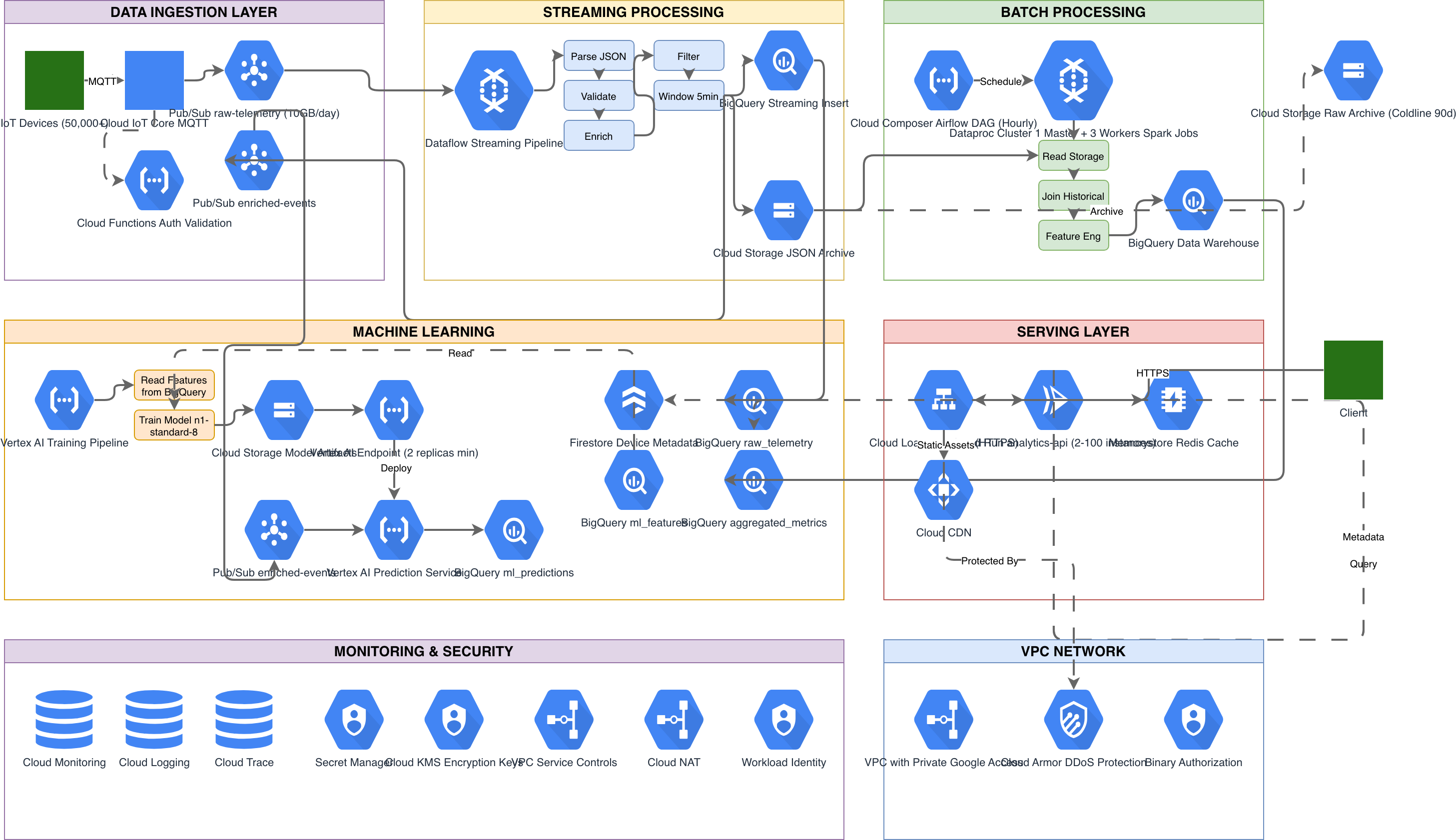
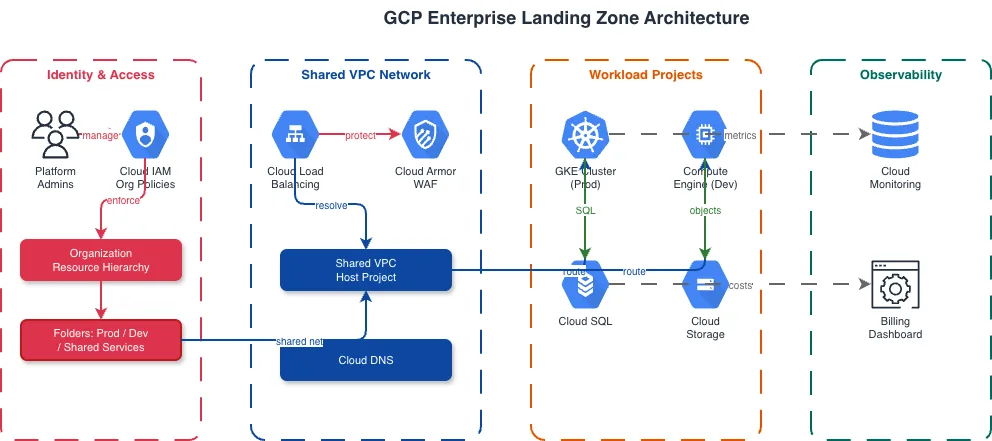
Generate these diagrams with AI
Generate GCP Architecture Diagrams from Text
Describe your Google Cloud infrastructure in plain English. Get a valid Draw.io diagram with official GCP icons, project boundaries, and VPC networking.
Generate GKE Architecture Diagrams from Text
Describe your Google Kubernetes Engine cluster in plain English. Get a valid Draw.io diagram with GKE Autopilot, Anthos Service Mesh, Gateway API, and Workload Identity Federation.
Generate GCP Networking Diagrams from Text
Describe your Google Cloud network topology in plain English. Get a valid Draw.io diagram with Shared VPC, Cloud Armor, Cloud Router, and firewall policies using official GCP icons.
Related guides
Frequently asked questions
What are the five pillars of the Google Cloud Architecture Framework?
The framework is organized around five pillars: Operational Excellence, Security Privacy and Compliance, Reliability, Cost Optimization, and Performance Optimization. Google's documentation is more concise and prescriptive than AWS's, offering direct "do this, not that" guidance. It carries a strong bias toward managed and serverless services like Cloud Run, Cloud Functions, and BigQuery over Compute Engine VMs.
Why does Google's framework have five pillars instead of AWS's six?
AWS Well-Architected has six pillars, including a separate Sustainability pillar that GCP omits. Google argues its data centers already run on carbon-free energy, so sustainability is embedded in service choices rather than broken out. GCP also provides lighter tooling: there's no equivalent to the interactive AWS Well-Architected Tool, only Active Assist recommendations in the console.
What are the stages of the GCP Landing Zone Terraform blueprint?
Google's Landing Zone blueprint, the Terraform Example Foundation, deploys in four sequential stages. Stage 0 (Bootstrap) creates the Terraform state bucket and CI/CD pipeline. Stage 1 (Org) builds the folder hierarchy and Organization Policies. Stage 2 (Environments) creates VPC networks and Cloud NAT. Stage 3 (Projects) provisions workload projects and attaches them to the Shared VPC.
Which GCP reference architecture should I use for a three-tier web application?
Google's three-tier web application reference architecture uses Cloud Load Balancing with a global anycast IP, Cloud Run or GKE for the application tier, Cloud SQL for PostgreSQL or MySQL with high availability, and Memorystore for Redis caching. Google recommends Cloud Run over GKE unless you need persistent connections, custom schedulers, or GPU access.
How do I make a GCP architecture diagram with official Google Cloud icons?
Diagrams.so generates GCP architecture diagrams from natural language using Google's official icon set: describe it in plain English and get an editable .drawio diagram with the correct icons in seconds. It places services within the right network topology with project and folder boundaries, and architecture warnings flag framework violations like single-zone GKE clusters or Cloud SQL without high availability.