
Generate AWS Networking Diagrams from Text with AI
Describe your VPC topology, Transit Gateway attachments, Direct Connect circuits, and Route 53 DNS resolution in plain English. Get a valid Draw.io diagram with official AWS icons.
This AWS networking diagram generator converts plain-text descriptions of your network topology into Draw.io diagrams with correct VPC boundaries, subnet tiers, route tables, and service connections. Describe a setup like 'Hub VPC with Transit Gateway (ASN 64512) connected to three spoke VPCs. Hub VPC has AWS Network Firewall in an inspection subnet, NAT Gateways in public subnets, and a Direct Connect gateway with 10Gbps dedicated connection to on-premises. Spoke VPCs route all egress through Transit Gateway to the hub for centralized inspection.' The AI draws VPC containers with CIDR labels, Transit Gateway at the center with attachment arrows, and route table entries showing next-hop targets. Architecture warnings flag public subnets without NACLs (WARN-04) and missing WAF on internet-facing endpoints (WARN-02). Every element snaps to a 10px grid. Output is native .drawio XML.
What Is an AWS Networking Diagram?
An AWS networking diagram maps the network topology of your cloud environment: VPCs with their CIDR ranges, subnets divided by function and availability zone, route tables directing traffic, Transit Gateway connecting multiple VPCs, Direct Connect or Site-to-Site VPN providing hybrid connectivity, and DNS resolution through Route 53. Building this manually means drawing VPC rectangles, nesting subnet containers inside them, adding route table annotations, connecting everything with arrows, and making sure the traffic flow logic is visually clear. Diagrams.so automates that process. Describe your network topology in plain English and the AI identifies each networking construct, selects the correct icon from the official AWS set, and places components with proper nesting. RULE-02 enforces official AWS icons for Transit Gateway, Direct Connect, Network Firewall, Route 53, CloudFront, NAT Gateway, Internet Gateway, VPC endpoints, and PrivateLink. RULE-06 groups resources logically: subnets inside VPCs, route tables associated with their subnet groups, security groups around the instances they protect. The generator distinguishes public subnets (with Internet Gateway routes) from private subnets (with NAT Gateway routes) and isolated subnets (no internet route). Opinionated mode enforces a hub-spoke layout with Transit Gateway at the center, shared services VPCs on the left, workload VPCs on the right, and on-premises connectivity at the bottom. Architecture warning WARN-01 flags single-AZ NAT Gateway deployments. WARN-02 catches internet-facing ALBs without CloudFront and WAF in front. WARN-04 detects subnets without NACLs or VPCs without Flow Logs enabled. VLM visual validation catches overlapping route table annotations or crossing connection arrows.
Key components
- VPC containers with CIDR notation and region labels, nested subnet rectangles divided into public, private, and isolated tiers per availability zone
- Transit Gateway hub with route table associations and propagations, showing VPC attachments, VPN attachments, and Direct Connect gateway attachments
- Direct Connect dedicated or hosted connections with virtual interfaces (private VIF, transit VIF) and BGP peering ASN annotations
- AWS Network Firewall in a dedicated inspection subnet with stateful rule groups and route table entries forcing traffic through the firewall endpoints
- Route 53 hosted zones with record types (A, AAAA, CNAME, alias) and routing policies (failover, weighted, latency-based, geolocation)
- VPC endpoints: gateway endpoints for S3 and DynamoDB, interface endpoints (PrivateLink) for other services with DNS private hosted zone integration
- Security Groups vs NACLs shown as distinct layers: security groups as dashed boundaries around instances, NACLs as rules attached to subnet containers
- CloudFront distributions with origin configurations pointing to ALB, S3, or API Gateway with WAF web ACL association
How to generate with AI
- 1
Describe your network topology
Write your AWS network architecture in plain English. Be specific about VPC CIDRs, subnet tiers, and connectivity. For example: 'Hub-and-spoke network in us-east-1. Hub VPC (10.0.0.0/16) with Transit Gateway (ASN 64512), AWS Network Firewall in inspection subnet (10.0.3.0/24), NAT Gateways in public subnets (10.0.1.0/24, 10.0.2.0/24) across two AZs, Direct Connect gateway connected to on-premises DC via 10Gbps dedicated connection with transit VIF. Spoke 1: Production VPC (10.1.0.0/16) with private app subnets and isolated DB subnets, default route to Transit Gateway. Spoke 2: Staging VPC (10.2.0.0/16) with same subnet layout. Route 53 private hosted zone shared across all VPCs via association. VPC endpoints for S3 (gateway) and ECR, Secrets Manager, STS (interface endpoints with PrivateLink) in each spoke VPC.'
- 2
Select network diagram type and AWS provider
Choose 'Network' as the diagram type and 'AWS' as the cloud provider. Diagrams.so loads the official AWS icon set with icons for VPC, Transit Gateway, Direct Connect, Network Firewall, Route 53, NAT Gateway, Internet Gateway, PrivateLink, and CloudFront. Enable opinionated mode to enforce hub-spoke layout with Transit Gateway centered and traffic flow arrows showing routing direction.
- 3
Generate and review
Click generate. The AI produces .drawio XML with VPC containers, subnet tiers per AZ, Transit Gateway hub with spoke attachments, route table entries as annotations, and security layer indicators. Architecture warnings flag single-AZ NAT Gateways (WARN-01), public endpoints without WAF (WARN-02), and subnets missing NACLs (WARN-04). VLM visual validation catches crossing arrows and overlapping route labels. Download as .drawio for editing, or export to PNG or SVG for network design reviews.
Example prompt
AWS hub-and-spoke network architecture in us-east-1. Hub VPC (10.0.0.0/16): public subnets 10.0.1.0/24 and 10.0.2.0/24 in us-east-1a and us-east-1b with Internet Gateway and NAT Gateways (one per AZ for HA). Inspection subnets 10.0.3.0/24 and 10.0.4.0/24 with AWS Network Firewall endpoints and stateful rule group blocking known malicious domains. Transit Gateway (ASN 64512) with four route tables: firewall (associated with TGW firewall attachment), shared-services (associated with hub VPC attachment, propagated from all spokes), workloads (associated with spoke attachments, default route to firewall attachment), on-premises (associated with Direct Connect attachment, propagated from all VPCs). Direct Connect gateway with 10Gbps dedicated connection, transit VIF (VLAN 100, BGP ASN 65001 on-prem / 64512 AWS), advertising 10.0.0.0/8 summary route to on-premises. Spoke 1 Production VPC (10.1.0.0/16): private app subnets 10.1.1.0/24 and 10.1.2.0/24, isolated DB subnets 10.1.10.0/24 and 10.1.20.0/24, default route 0.0.0.0/0 via Transit Gateway. Spoke 2 Staging VPC (10.2.0.0/16): same subnet layout as production. VPC endpoints in each spoke: S3 gateway endpoint, interface endpoints for ECR API, ECR DKR, Secrets Manager, STS, CloudWatch Logs (all with private DNS enabled). Route 53 private hosted zone 'internal.company.com' associated with all three VPCs, resolver inbound endpoint in hub VPC for on-premises DNS forwarding. CloudFront distribution with WAF v2 web ACL (AWS Managed Core Rule Set + SQL injection rules) in front of production ALB. Security groups: ALB SG (inbound 443 from CloudFront managed prefix list), App SG (inbound 8080 from ALB SG), DB SG (inbound 5432 from App SG). NACLs on all subnets with explicit deny rules for RFC 1918 ranges not in the 10.0.0.0/8 supernet.
Example diagrams from the gallery
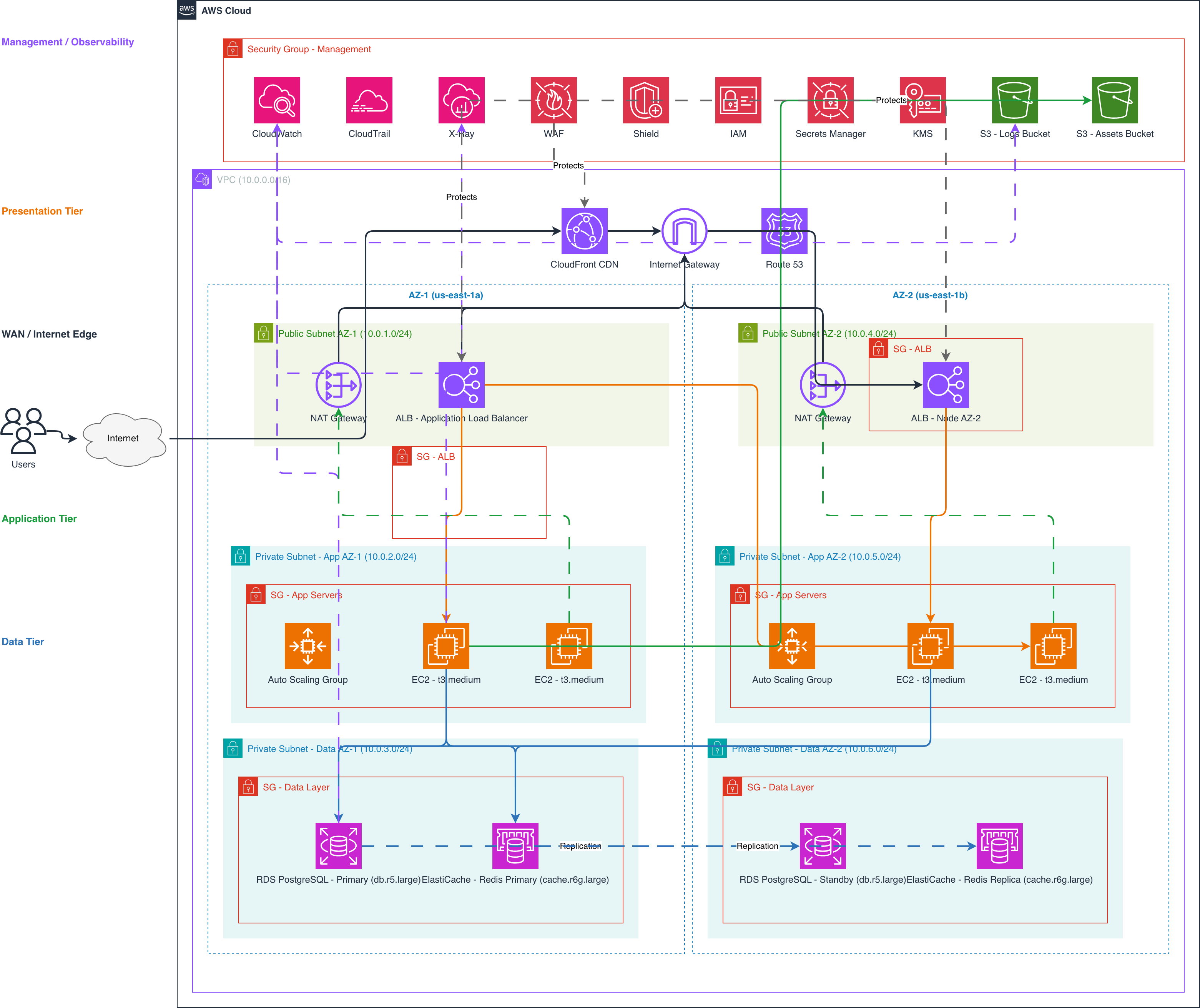
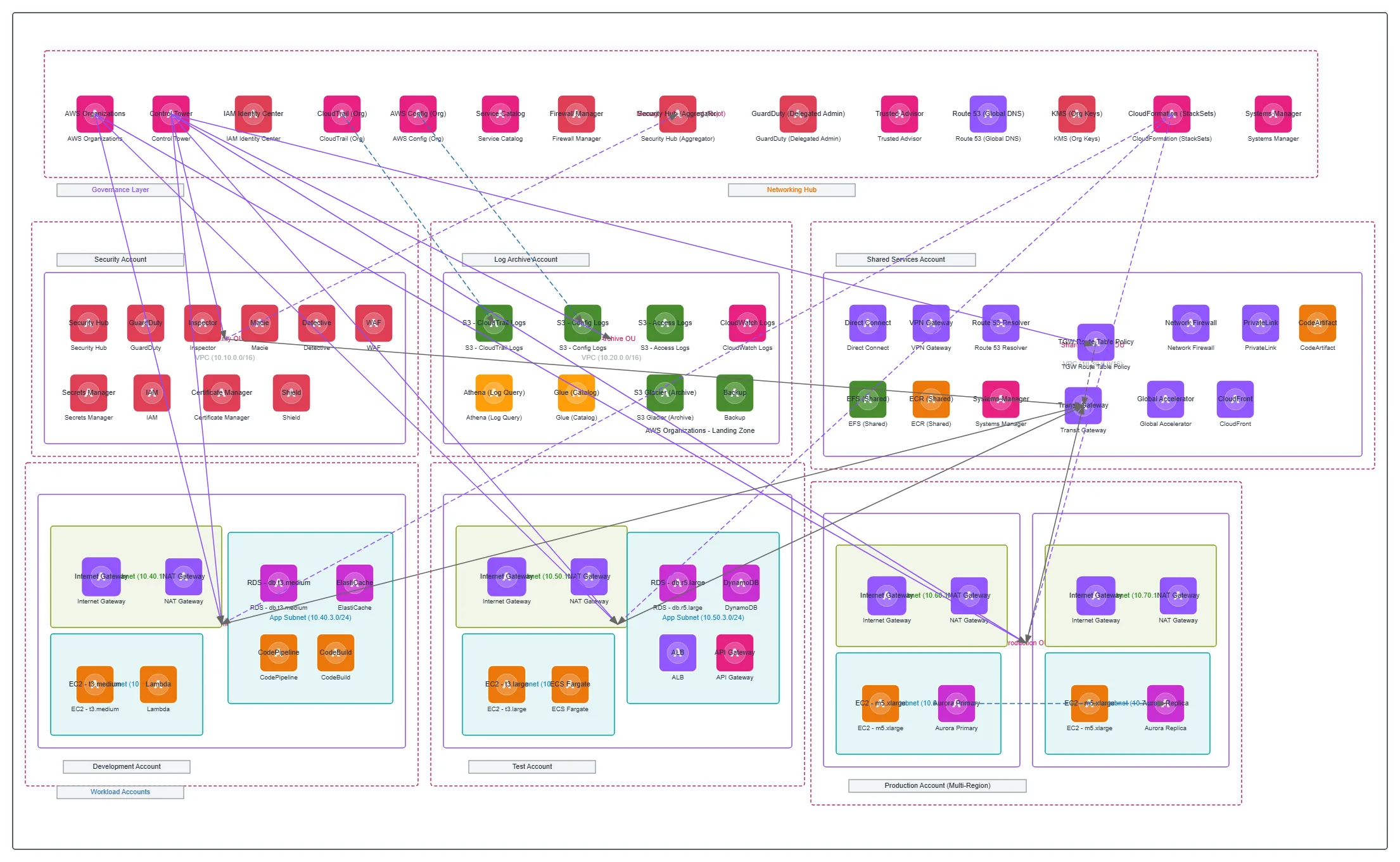

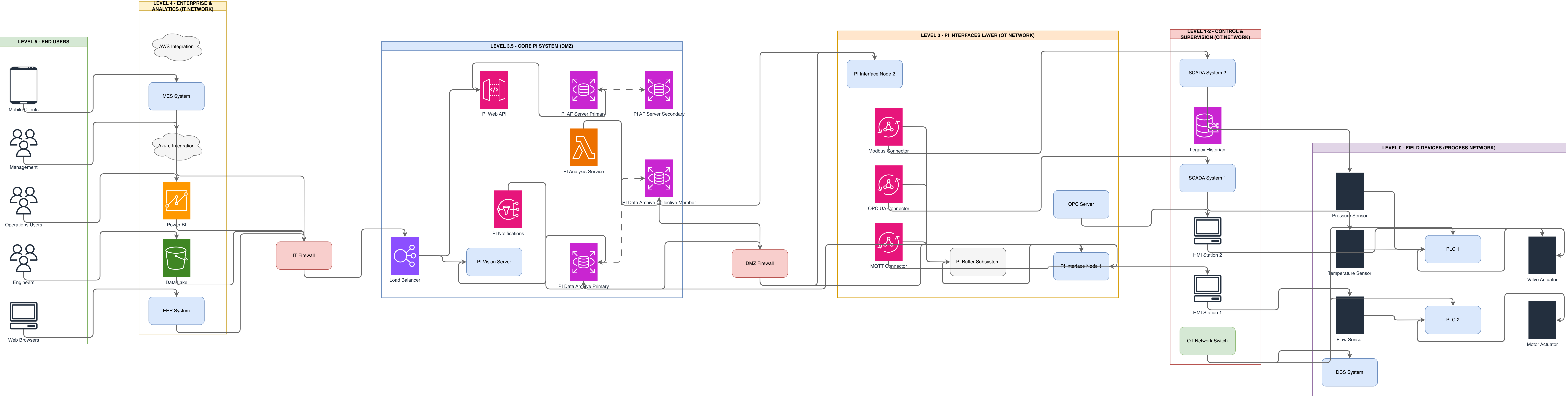
AWS Transit Gateway vs Azure Virtual WAN vs GCP Cloud Router
Each cloud provider takes a different approach to connecting multiple networks. AWS uses Transit Gateway as a regional hub with explicit route tables. Azure uses Virtual WAN for global SD-WAN integration. GCP uses Cloud Router with BGP for dynamic route exchange. The routing model, scale limits, and hybrid connectivity options differ significantly.
| Feature | AWS Transit Gateway | Azure Virtual WAN | GCP Cloud Router |
|---|---|---|---|
| Hub architecture | Regional hub with up to 5,000 attachments; multiple route tables with association and propagation rules; cross-region peering between Transit Gateways | Global WAN resource with regional hubs; automatic any-to-any routing between connected VNets; integrated SD-WAN partner support (Fortinet, Palo Alto) | Regional router with BGP sessions; no centralized hub — each VPC has its own Cloud Router; global dynamic routing mode propagates routes across regions |
| Route management | Explicit route tables with static routes and propagation from attached VPCs; blackhole routes for isolation; separate tables for segmentation | Automatic route programming between hubs; custom route tables for segmentation; static routes for NVA (network virtual appliance) steering | BGP-based dynamic routing; custom route advertisements per session; MED and AS path prepending for traffic engineering |
| Traffic inspection | Route traffic through AWS Network Firewall appliance attachment or third-party NVA in inspection VPC; requires explicit route table entries | Azure Firewall integrated directly into Virtual WAN hub; routing intent directs all traffic through firewall without UDR management | Cloud IDS for threat detection (mirrored traffic); third-party NVAs in dedicated VPCs; no native inline inspection service |
| Hybrid connectivity | Direct Connect gateway (transit VIF) or Site-to-Site VPN attachments; ECMP across up to 8 VPN tunnels for bandwidth aggregation | ExpressRoute circuits, Site-to-Site VPN, and Point-to-Site VPN connected to hub; ExpressRoute Global Reach for cross-premises routing | Cloud Interconnect (dedicated or partner) and Cloud VPN with HA VPN for 99.99% SLA; BGP sessions on each tunnel for automatic failover |
| DNS integration | Route 53 private hosted zones associated with VPCs; Route 53 Resolver endpoints for hybrid DNS forwarding between AWS and on-premises | Azure DNS Private Zones linked to VNets; Azure DNS Private Resolver for hybrid DNS with conditional forwarding rules | Cloud DNS with private zones scoped to VPCs; DNS forwarding zones for on-premises resolution; DNS peering across VPCs |
When to use this pattern
Use an AWS networking diagram when designing or documenting VPC topology, Transit Gateway connectivity, or hybrid network architecture. It's the right choice for network design reviews, Direct Connect provisioning plans, firewall rule audits, and VPC endpoint strategy sessions. The diagram shows network engineers how traffic routes between VPCs, through inspection points, and across hybrid connections to on-premises. If you only need to show application-level infrastructure within a single VPC, an AWS architecture diagram covers that. If your focus is on the multi-account governance layer above networking, an AWS landing zone diagram fits better. Networking diagrams deliver the most value when you have multiple VPCs connected via Transit Gateway, hybrid connectivity through Direct Connect or VPN, and centralized traffic inspection requirements.
Frequently asked questions
What does the AWS networking diagram generator include?
This AWS networking diagram generator produces VPC containers with CIDR labels, subnet tiers per availability zone, Transit Gateway hub-spoke topology with route tables, Direct Connect or VPN hybrid connectivity, Route 53 DNS resolution paths, VPC endpoints, and security layers (Security Groups and NACLs). It uses official AWS icons from Diagrams.so's 30+ icon libraries.
How does the diagram show Transit Gateway routing?
Transit Gateway appears as a central hub with attachment arrows to each connected VPC, VPN, and Direct Connect gateway. Route table associations and propagation rules are labeled on each attachment. Blackhole routes for network segmentation appear as annotated entries. WARN-01 flags single-region Transit Gateway setups missing cross-region peering.
Can I show the difference between Security Groups and NACLs?
Yes. Security Groups render as dashed boundaries around instance groups with inbound/outbound rule summaries. NACLs appear as rule annotations on subnet containers with explicit allow/deny entries and rule numbers. The two-layer visualization makes the stateful (SG) versus stateless (NACL) distinction clear for security reviews.
Does the diagram support hybrid connectivity with Direct Connect?
Yes. Describe your Direct Connect dedicated or hosted connection, virtual interfaces (private VIF, transit VIF), BGP peering ASNs, and bandwidth. The AI draws the connection from on-premises through the Direct Connect location to the Direct Connect gateway and into Transit Gateway or VPC. VLAN tags and BGP ASN labels appear on the connection.
What architecture warnings apply to networking diagrams?
WARN-01 flags single-AZ NAT Gateways and single-region Transit Gateway deployments. WARN-02 catches internet-facing load balancers or API Gateways without CloudFront and WAF. WARN-04 detects subnets without NACLs and VPCs without Flow Logs. WARN-05 flags ambiguous network components lacking CIDR or port specifications. All warnings are non-blocking.
Related diagram generators
Generate AWS architecture diagrams from text
Describe your AWS infrastructure in plain English. Get a valid Draw.io diagram with official AWS icons, VPC boundaries, and Multi-AZ placement.
Generate AWS Landing Zone Diagrams from Text with AI
Describe your AWS Organizations hierarchy, Control Tower guardrails, and Transit Gateway topology in plain English. Get a valid Draw.io diagram with official AWS icons.
Generate Network Diagrams from Text with AI
Describe your network topology in plain English. Get a valid Draw.io diagram with routers, switches, firewalls, VLAN segmentation, and labeled subnet ranges.
Generate Azure networking diagrams from text
Describe your Azure network topology in plain English. Get a valid Draw.io diagram with hub-spoke VNets, Azure Firewall rules, NSG flows, and Private Link endpoints.