
Generate OCI Architecture Diagrams from Text with AI
Describe your Oracle Cloud infrastructure in plain English. Get a valid Draw.io diagram with compartment hierarchies, VCN boundaries, and availability domain placement.
This Oracle Cloud architecture diagram generator converts plain-text infrastructure descriptions into Draw.io diagrams with Oracle's .drawio-compatible icon toolkit. Describe a setup like an OCI Load Balancer fronting a compute instance pool across AD-1 and AD-2 in us-ashburn-1, with Oracle Autonomous Transaction Processing in a private subnet and OCI Object Storage for backups. The AI maps each service to its official icon, draws compartment boundaries with IAM policy annotations, segments VCN subnets by 10.0.0.0/16 CIDR, and outputs valid mxGraphModel XML. Architecture warnings flag single-AD deployments (WARN-01) and public endpoints without OCI WAF (WARN-02). Every element snaps to a 10px grid. The output opens directly in Draw.io with no conversion needed.
What Is an OCI Architecture Diagram Generator?
An OCI architecture diagram maps your Oracle Cloud infrastructure: compartments, Virtual Cloud Networks, compute instances, autonomous databases, and the network paths connecting them. Building these manually means dragging icons across a canvas, guessing at compartment nesting, and hand-drawing subnet boundaries. An OCI architecture diagram generator does this from a text description. You write something like: 'Root compartment with a Network compartment containing a VCN (10.0.0.0/16). Public subnet (10.0.1.0/24) hosts an OCI Load Balancer. Private subnet (10.0.2.0/24) runs a compute instance pool across fault domains FD-1 and FD-2. Database compartment holds Autonomous Transaction Processing with private endpoint access.' Diagrams.so parses this and produces a diagram using Oracle's icon toolkit, which includes .drawio-compatible shapes for 100+ OCI services. Compartments render as nested boundary containers with IAM policy references. The AI follows RULE-06 to group related resources: a compute instance pool with its associated Network Security Groups, an Autonomous Database with its Data Guard standby. Architecture warnings catch real problems. WARN-01 flags single availability domain deployments. WARN-02 identifies public-facing load balancers without OCI WAF. WARN-03 catches databases without Data Guard standby. WARN-04 triggers when compartment isolation lacks explicit IAM policies. VLM visual validation runs post-generation to catch overlapping labels in dense compartment hierarchies. The output is native .drawio XML. Open it in Draw.io, commit it to Git alongside your Terraform OCI provider configs, or embed it in Confluence.
Key components
- Compartment hierarchy with nested boundaries and IAM policy annotations for least-privilege access
- VCN boundaries with CIDR notation (10.0.0.0/16) and subnet segmentation across availability domains
- Availability domain columns showing resource placement in AD-1, AD-2, AD-3 within a region
- Fault domain indicators (FD-1, FD-2, FD-3) for anti-affinity placement of compute instances
- OCI Load Balancer with backend sets, health check rules, and routing policy labels
- Dynamic Routing Gateway (DRG) with VCN attachments and route table associations for hub-spoke topology
- Oracle Autonomous Database icons distinguishing ATP (OLTP) from ADW (analytics) with private endpoint arrows
- Architecture warnings for single-AD (WARN-01), missing WAF (WARN-02), and no Data Guard standby (WARN-03)
How to generate with AI
- 1
Describe your OCI infrastructure
Write your architecture in plain English. Be specific about compartments, services, and network topology. For example: 'Three-tier web app in us-ashburn-1. Network compartment with VCN 10.0.0.0/16. Public subnet (10.0.1.0/24) in AD-1 hosts an OCI Load Balancer with SSL termination. Private subnet (10.0.2.0/24) across AD-1 and AD-2 runs a compute instance pool with autoscaling (min 2, max 8). Database compartment holds Autonomous Transaction Processing with Data Guard standby. OCI Object Storage bucket for static assets with pre-authenticated requests.'
- 2
Select diagram type and cloud provider
Choose 'Architecture' as the diagram type and 'OCI' as the cloud provider. Diagrams.so loads Oracle's .drawio-compatible icon toolkit with shapes for compute, networking, database, and security services. Enable opinionated mode to enforce availability domain column layout and automatic compartment boundaries. The AI follows RULE-02 for official icons and RULE-05 for left-to-right layout.
- 3
Generate and validate
Click generate. The AI produces .drawio XML with compartment hierarchies, VCN boundaries, subnet divisions, and labeled arrows showing traffic flow. Architecture warnings flag single-AD deployments (WARN-01), public endpoints without OCI WAF (WARN-02), and databases without Data Guard (WARN-03). VLM visual validation catches overlapping icons in nested compartments. Download as .drawio for editing, or export to PNG or SVG for documentation.
Example prompt
Production three-tier architecture in OCI us-ashburn-1. Root compartment with three child compartments: Network, Application, Database. Network compartment: VCN 10.0.0.0/16 with Internet Gateway, NAT Gateway, and Service Gateway. Public subnet 10.0.1.0/24 in AD-1 with OCI Load Balancer (100 Mbps flexible shape) and OCI WAF policy. Private subnet 10.0.10.0/24 across AD-1 and AD-2 for compute instance pool (VM.Standard.E4.Flex, 2-8 instances, Oracle Linux 9). Private subnet 10.0.20.0/24 for Autonomous Transaction Processing with private endpoint only. DRG attached to VCN for FastConnect 1Gbps to on-premises data center. Security Lists on each subnet. Network Security Groups around compute pool allowing only port 443 from Load Balancer. OCI Object Storage bucket in Database compartment for backups with lifecycle rules. OCI Functions in Application compartment for async processing triggered by OCI Events. Show IAM policies: allow Application compartment to read objects in Database compartment.
Example diagrams from the gallery
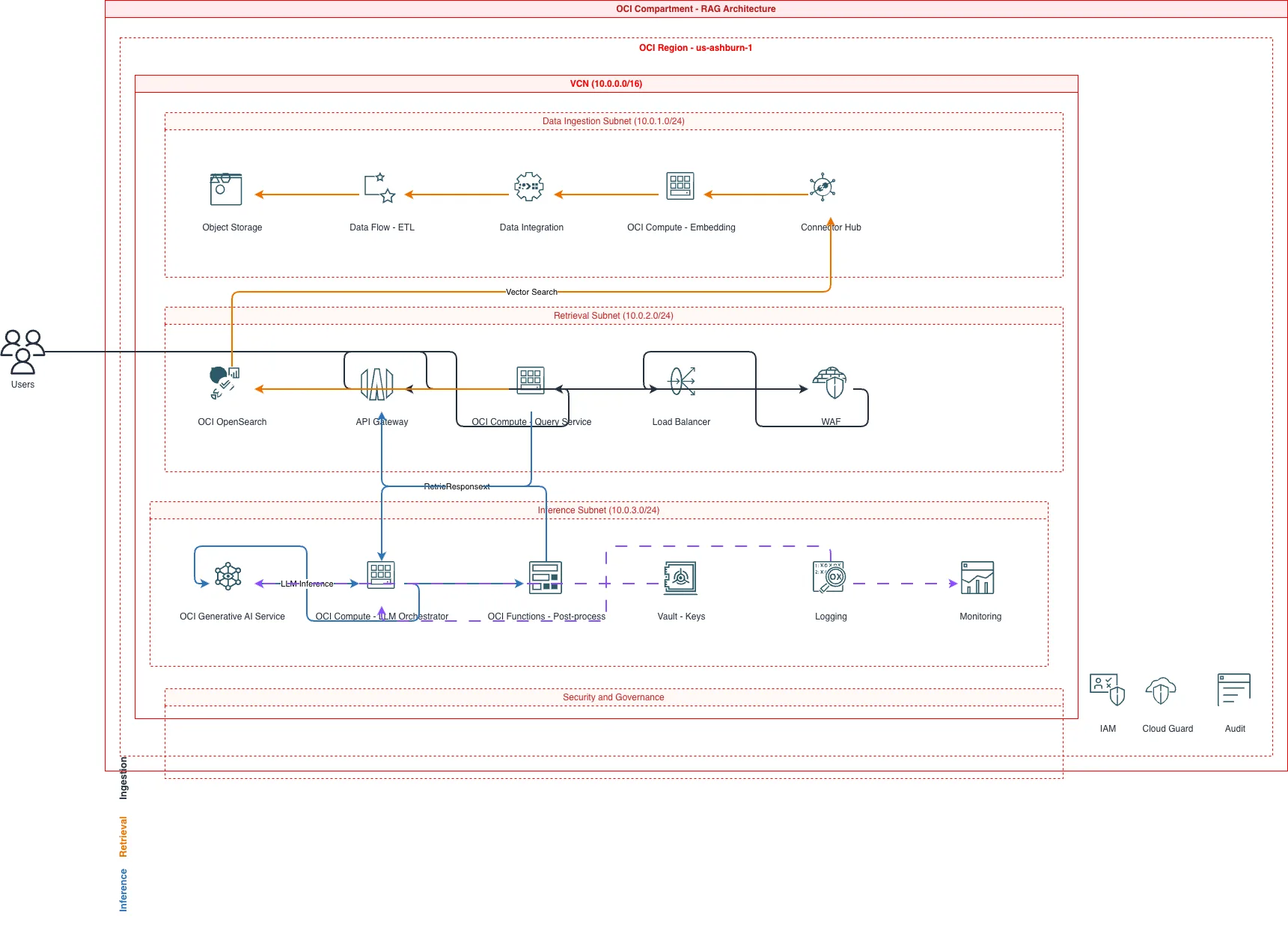
OCI Compartment Architecture vs AWS Account Architecture vs Azure Subscription Architecture
Each cloud provider uses a different isolation model for organizing resources. OCI uses compartments within a single tenancy. AWS uses separate accounts within an Organization. Azure uses subscriptions within a tenant. The hierarchy depth, IAM model, and network isolation strategy differ across all three.
| Feature | OCI Compartment Architecture | AWS Account Architecture | Azure Subscription Architecture |
|---|---|---|---|
| Resource isolation unit | Compartments nested up to 6 levels deep within a single tenancy; resources inherit parent policies | Separate AWS accounts in an Organization; each account is a hard security boundary with its own IAM | Subscriptions grouped under Management Groups; resource groups within subscriptions organize resources |
| IAM policy model | Policy statements in tenancy referencing compartments: 'Allow group NetworkAdmins to manage vcns in compartment Network' | IAM policies per account plus SCPs at the Organization level to restrict maximum permissions | Azure RBAC role assignments scoped to management group, subscription, resource group, or individual resource |
| Network boundary | VCN per compartment with DRG for cross-VCN routing; Local Peering Gateways for same-region VCN peering | VPC per account with Transit Gateway or VPC peering for cross-account connectivity | VNet per subscription with VNet peering or Azure Virtual WAN for cross-subscription routing |
| Billing separation | Cost tracking tags and compartment-level cost analysis; single invoice per tenancy | Per-account billing with consolidated billing through Organizations; separate invoices possible | Per-subscription billing with cost management scopes; invoice sections within billing accounts |
| Availability model | Availability domains (1-3 per region) with fault domains (3 per AD) for rack-level isolation | Availability Zones (typically 3 per region) mapped to physical data centers independently per account | Availability Zones (3 per supported region) with availability sets for older VM fault/update domain placement |
| Diagram visualization style | Nested compartment boxes with AD columns inside the VCN; DRG hub shown as a central gateway icon | Separate VPC boxes per account connected via Transit Gateway; AZ columns within each VPC | Subscription boundaries containing VNets, resource groups as logical labels, hub-spoke via Virtual WAN |
When to use this pattern
Use an OCI architecture diagram when you need to document compartment hierarchies, VCN topology, or present Oracle Cloud infrastructure to stakeholders who need to see specific OCI services and their connections. It's the right choice for documenting three-tier applications on OCI, Autonomous Database deployments with Data Guard, or hybrid setups using FastConnect and DRG. If your infrastructure spans OCI plus other providers, generate the OCI diagram first and compose it into a multi-cloud overview. Don't use an OCI architecture diagram for application-level message flow; use sequence diagrams for that. Keep diagrams focused on one compartment tree or one VCN to avoid visual clutter from deeply nested boundaries.
Frequently asked questions
Does the generator use official Oracle Cloud icons?
Yes. Diagrams.so loads Oracle's .drawio-compatible icon toolkit that covers 100+ OCI services including compute, networking, database, and security resources. RULE-02 enforces official cloud provider icons for every Oracle Cloud architecture diagram. You'll get the correct icon for OCI Load Balancer, Autonomous Database, DRG, and Object Storage. No generic shapes.
How does the AI handle compartment hierarchies?
Describe your compartment structure in the prompt. The AI renders compartments as nested boundary containers up to six levels deep. Each compartment boundary includes IAM policy annotations showing which groups have access. Child compartments appear inside parent boundaries. RULE-06 groups related resources within their assigned compartment automatically.
Can I show fault domains in OCI diagrams?
Yes. Specify fault domain placement in your prompt, like 'distribute compute instances across FD-1, FD-2, and FD-3 in AD-1.' The AI places instances in labeled fault domain columns within the availability domain. This anti-affinity pattern is standard for high-availability deployments on OCI where rack-level isolation matters.
What architecture warnings apply to OCI diagrams?
Five warnings apply. WARN-01 catches single availability domain deployments. WARN-02 flags public-facing load balancers or API gateways without OCI WAF. WARN-03 identifies Autonomous Databases without Data Guard standby. WARN-04 detects missing compartment isolation policies. WARN-05 flags ambiguous components needing clarification. Warnings annotate but don't block generation.
Can I generate DRG hub-spoke network diagrams?
Yes. Describe your DRG with attached VCNs and route tables. The AI renders the Dynamic Routing Gateway as a central hub icon with VCN attachments radiating outward as spokes. FastConnect or IPsec VPN connections appear as external links on the DRG. Route table associations label each attachment with its routing rules.
Related diagram generators
Generate AWS architecture diagrams from text
Describe your AWS infrastructure in plain English. Get a valid Draw.io diagram with official AWS icons, VPC boundaries, and Multi-AZ placement.
Generate Azure Architecture Diagrams from Text with AI
Describe your Azure infrastructure in plain English. Get a valid Draw.io diagram with official Azure icons, VNet boundaries, resource groups, and NSG rules.
Generate GCP Architecture Diagrams from Text
Describe your Google Cloud infrastructure in plain English. Get a valid Draw.io diagram with official GCP icons, project boundaries, and VPC networking.
Generate Cloud Architecture Diagrams from Text
Describe your cloud infrastructure in plain English. Get a valid Draw.io diagram with region boundaries, availability zones, managed services, and DR paths.