About This Architecture

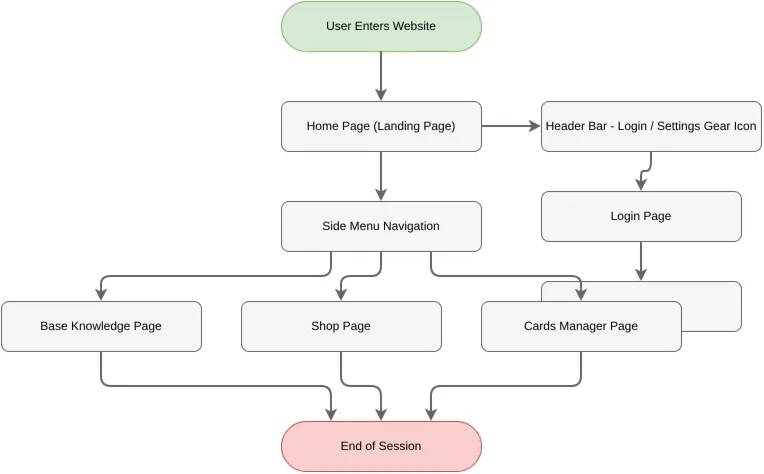
Website user navigation flow mapping entry point through header and sidebar menus to core content pages. Users enter the home page, then branch via header login/settings controls or side menu navigation to reach knowledge base, shop, or cards manager sections. This flow demonstrates clear information architecture with dual navigation patterns—top-level account controls and left-side content discovery—reducing cognitive load and improving user retention. Fork and customize this diagram on Diagrams.so to prototype your own site structure, test navigation hierarchies, or document user journeys for stakeholder alignment.

People also ask

How do I map out a website navigation flow with header and sidebar menus?

This diagram illustrates a complete website navigation structure where users enter a landing page, access account controls via header login/settings, and discover content through a side menu leading to knowledge base, shop, and cards manager sections. Each content page flows to session end, showing clear user journey paths.

Website User Navigation Flow

AWSsimplenavigation-flowUX-designinformation-architectureuser-journeywebsite-structure
Domain: Software ArchitectureAudience: UX/UI designers and product managers designing website navigation flows
2 views0 favoritesPublic

Created by

July 17, 2026

Updated

July 24, 2026 at 9:06 AM

Type

flowchart

Need a custom architecture diagram?

Describe your architecture in plain English and get a production-ready Draw.io diagram in seconds. Works for AWS, Azure, GCP, Kubernetes, and more.

Generate with AI

AI-generated. Verify before production use. Learn more

Report this diagram