Web App Low-Fidelity Wireframes

GENERALOtherssimple
Web App Low-Fidelity Wireframes — GENERAL others diagram

About This Architecture

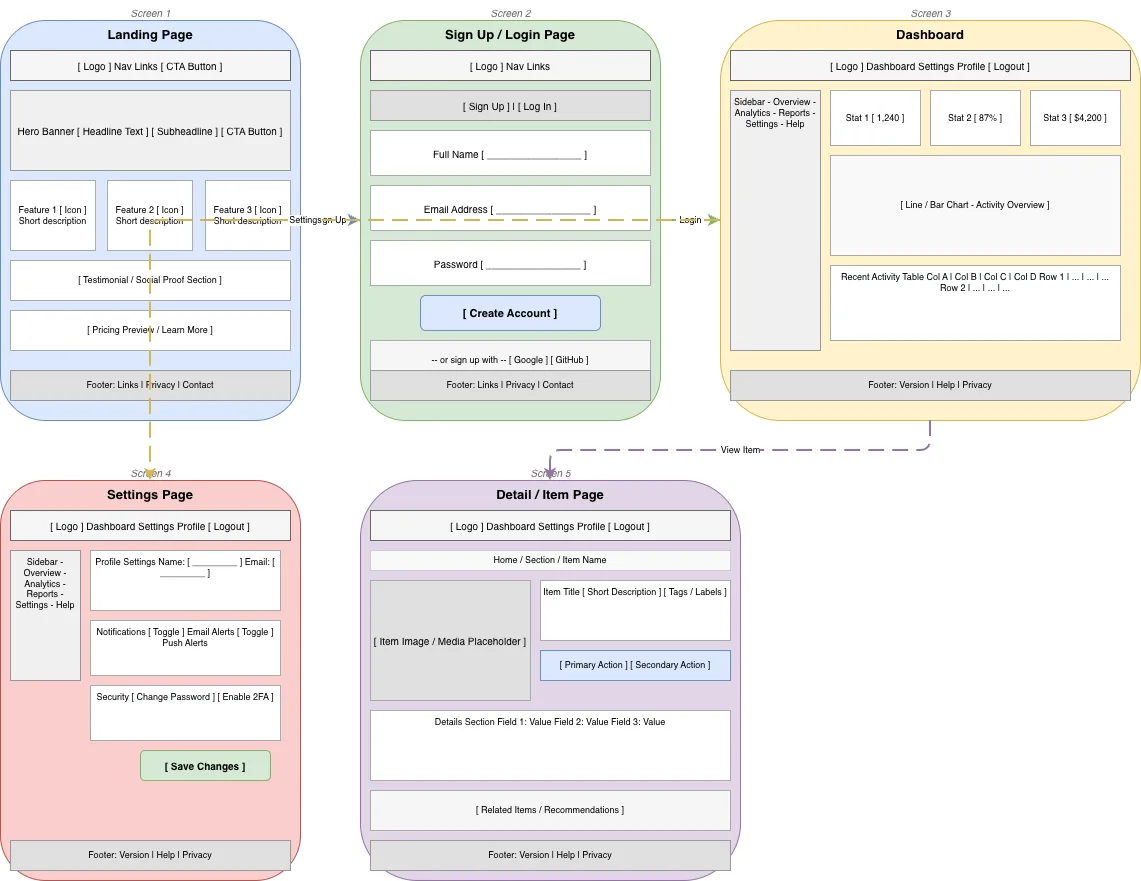
Low-fidelity wireframe set for a complete web application spanning landing, authentication, dashboard, and detail pages. The flow connects a marketing-focused landing page with hero banner and feature sections to a sign-up/login gateway, then into an authenticated dashboard with sidebar navigation, stats, charts, and activity feeds. Users can navigate from the dashboard to granular settings management or drill into individual item detail pages, each maintaining consistent header, navigation, and footer patterns. This wireframe structure demonstrates best practices for user onboarding, information hierarchy, and multi-screen navigation flows. Fork and customize these screens on Diagrams.so to match your product's specific features, branding, and user journeys.

People also ask

What should a complete web application wireframe include from landing page to authenticated dashboard?

A comprehensive web app wireframe includes a marketing landing page with hero and features, a sign-up/login authentication screen, an authenticated dashboard with navigation sidebar and key metrics, a settings page for user preferences, and detail pages for individual items. This diagram shows all five screens and their connections, demonstrating proper user flow and consistent UI patterns across

wireframingUX designproduct designuser flowsdashboard designlow-fidelity
Domain:
Software Architecture
Audience:
UX/UI designers and product managers creating web application wireframes

Generated by Diagrams.so — AI architecture diagram generator with native Draw.io output. Fork this diagram, remix it, or download as .drawio, PNG, or SVG.

Generate your own othersdiagram →

About This Architecture

Low-fidelity wireframe set for a complete web application spanning landing, authentication, dashboard, and detail pages. The flow connects a marketing-focused landing page with hero banner and feature sections to a sign-up/login gateway, then into an authenticated dashboard with sidebar navigation, stats, charts, and activity feeds. Users can navigate from the dashboard to granular settings management or drill into individual item detail pages, each maintaining consistent header, navigation, and footer patterns. This wireframe structure demonstrates best practices for user onboarding, information hierarchy, and multi-screen navigation flows. Fork and customize these screens on Diagrams.so to match your product's specific features, branding, and user journeys.

People also ask

What should a complete web application wireframe include from landing page to authenticated dashboard?

A comprehensive web app wireframe includes a marketing landing page with hero and features, a sign-up/login authentication screen, an authenticated dashboard with navigation sidebar and key metrics, a settings page for user preferences, and detail pages for individual items. This diagram shows all five screens and their connections, demonstrating proper user flow and consistent UI patterns across

Web App Low-Fidelity Wireframes

AutosimplewireframingUX designproduct designuser flowsdashboard designlow-fidelity
Domain: Software ArchitectureAudience: UX/UI designers and product managers creating web application wireframes
0 views0 favoritesPublic

Created by

June 13, 2026

Updated

June 13, 2026 at 4:45 PM

Type

others

Need a custom architecture diagram?

Describe your architecture in plain English and get a production-ready Draw.io diagram in seconds. Works for AWS, Azure, GCP, Kubernetes, and more.

Generate with AI