Video Conference Room AV Architecture

GENERALArchitectureintermediate
Video Conference Room AV Architecture — GENERAL architecture diagram

About This Architecture

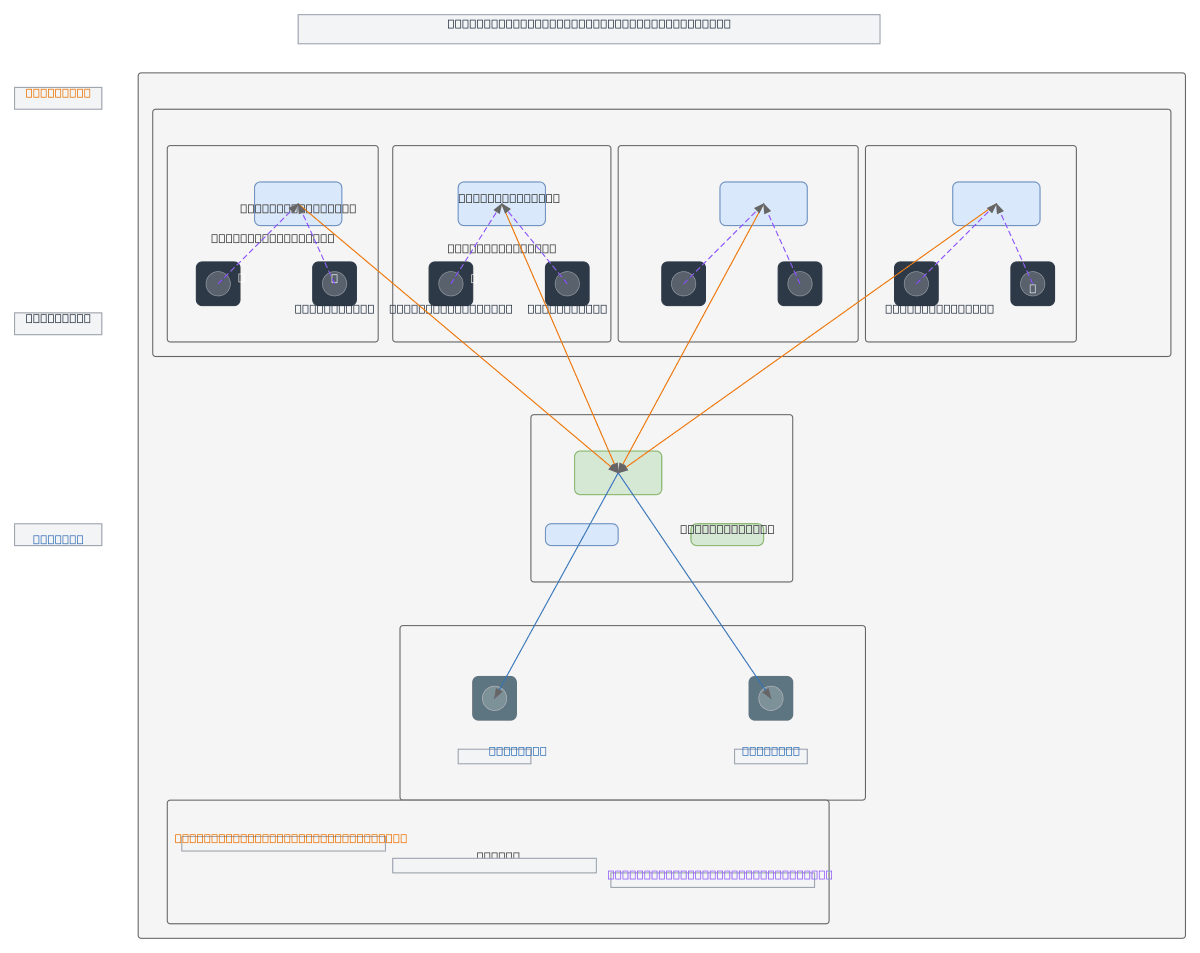
Video conference room AV architecture integrating multiple codec systems—Poly G7500, Poly X50, Poly G62, and Jabra PanaCast 50—each with dedicated cameras and audio peripherals. All endpoints route through a Barco ClickShare switching unit that consolidates HDMI inputs and distributes video output to dual displays, while supporting wireless content sharing from guest laptops. This hub-and-spoke topology centralizes display management and simplifies room scaling across different endpoint types. Fork this diagram to customize codec selections, add recording infrastructure, or adapt for hybrid meeting spaces with multiple camera angles and speaker zones.

People also ask

How do you integrate multiple video conference codecs and cameras into a single conference room with centralized display switching?

This diagram shows how to connect Poly G7500, X50, and G62 codecs alongside Jabra PanaCast 50 through a Barco ClickShare unit that consolidates all HDMI inputs and routes output to dual displays. Each endpoint pairs with dedicated cameras (EagleEye or panoramic) and speaker/mic arrays, while wireless sharing from guest laptops connects via WiFi to the ClickShare hub.

AV architecturevideo conferencingPoly codecsBarco ClickShareconference room designHDMI switching
Domain:
Other
Audience:
AV systems integrators and conference room designers

Generated by Diagrams.so — AI architecture diagram generator with native Draw.io output. Fork this diagram, remix it, or download as .drawio, PNG, or SVG.

Generate your own architecture diagram →

About This Architecture

Video conference room AV architecture integrating multiple codec systems—Poly G7500, Poly X50, Poly G62, and Jabra PanaCast 50—each with dedicated cameras and audio peripherals. All endpoints route through a Barco ClickShare switching unit that consolidates HDMI inputs and distributes video output to dual displays, while supporting wireless content sharing from guest laptops. This hub-and-spoke topology centralizes display management and simplifies room scaling across different endpoint types. Fork this diagram to customize codec selections, add recording infrastructure, or adapt for hybrid meeting spaces with multiple camera angles and speaker zones.

People also ask

How do you integrate multiple video conference codecs and cameras into a single conference room with centralized display switching?

This diagram shows how to connect Poly G7500, X50, and G62 codecs alongside Jabra PanaCast 50 through a Barco ClickShare unit that consolidates all HDMI inputs and routes output to dual displays. Each endpoint pairs with dedicated cameras (EagleEye or panoramic) and speaker/mic arrays, while wireless sharing from guest laptops connects via WiFi to the ClickShare hub.

Video Conference Room AV Architecture

AutointermediateAV architecturevideo conferencingPoly codecsBarco ClickShareconference room designHDMI switching
Domain: OtherAudience: AV systems integrators and conference room designers
1 views0 favoritesPublic

Created by

April 21, 2026

Updated

April 21, 2026 at 12:06 PM

Type

architecture

Need a custom architecture diagram?

Describe your architecture in plain English and get a production-ready Draw.io diagram in seconds. Works for AWS, Azure, GCP, Kubernetes, and more.

Generate with AI