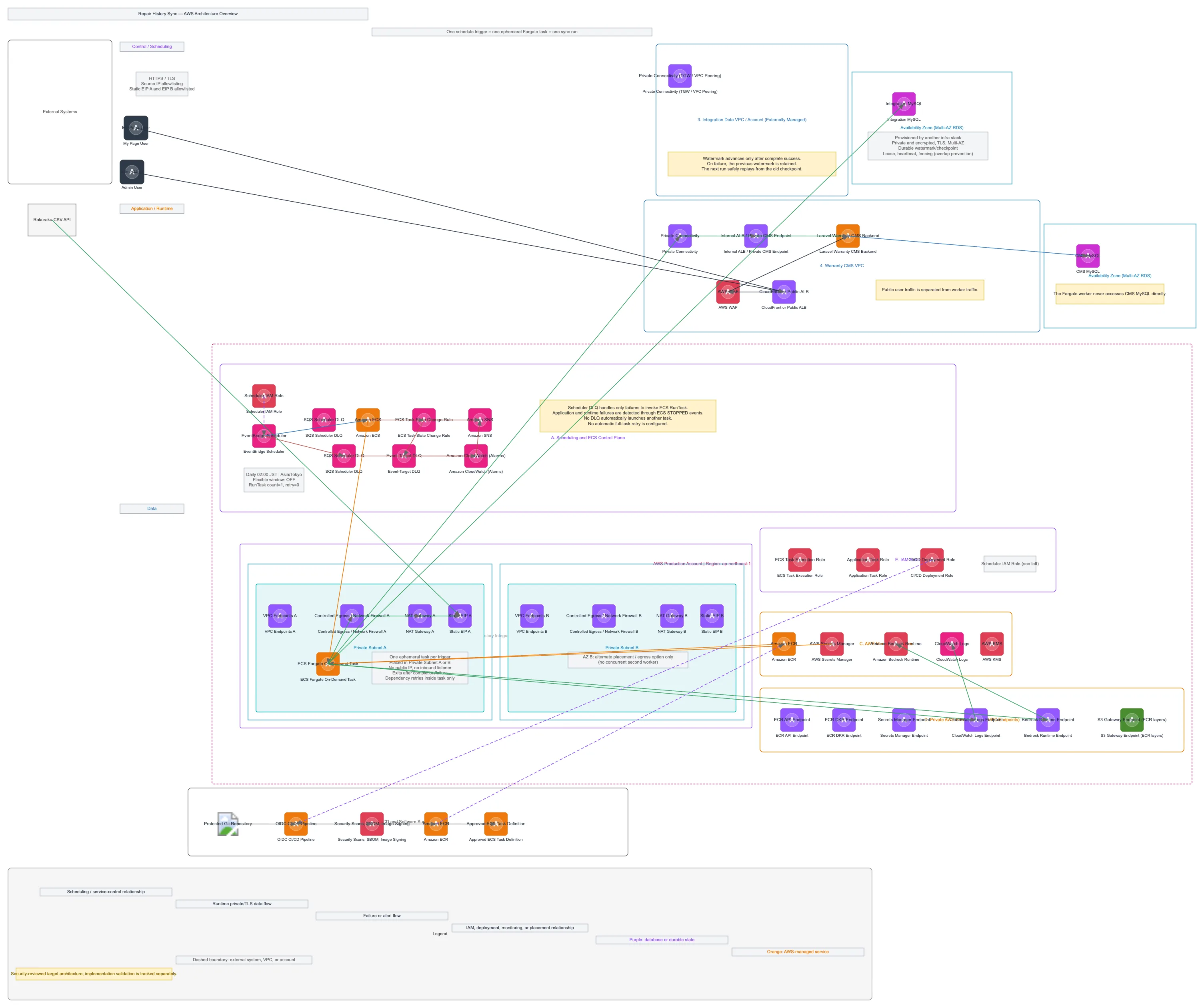
Repair History Sync - AWS Architecture Overview — AWS architecture diagram

About This Architecture

Event-driven repair history synchronization architecture using EventBridge Scheduler to trigger ephemeral ECS Fargate tasks daily at 02:00 JST, pulling data from external Rakuraku CSV API via allowlisted static EIPs over TLS. Data flows through a dedicated VPC with dual availability zones, Network Firewall-controlled egress, VPC endpoints for AWS service access, and private connectivity to integration MySQL and warranty CMS backends. The design enforces least-privilege IAM roles, secrets rotation via AWS Secrets Manager, container image signing via ECR, and failure handling through SQS DLQs and SNS alerts to CloudWatch. Fork this diagram on Diagrams.so to customize scheduling rules, add additional external systems, or adapt the multi-AZ failover strategy for your repair data pipeline.

People also ask

How do I design a secure, scheduled data sync pipeline in AWS that pulls from external APIs with strict IP allowlisting and private VPC connectivity?

This diagram shows an EventBridge Scheduler triggering daily ECS Fargate tasks in a hardened VPC with dual NAT Gateways (static EIPs), Network Firewall egress rules, and VPC endpoints for AWS services. Data flows over TLS to external Rakuraku CSV API, with failure handling via SQS DLQs and SNS alerts, ensuring secure, auditable, and resilient repair history synchronization.

Repair History Sync - AWS Architecture Overview

AWSadvancedEventBridgeECS FargateVPC EndpointsNetwork SecurityData Integration
Domain: Cloud AwsAudience: AWS solutions architects designing event-driven data sync pipelines with strict network isolation
1 views0 favoritesPublic

Created by

July 21, 2026

Updated

August 6, 2026 at 9:39 PM

Type

architecture

Need a custom architecture diagram?

Describe your architecture in plain English and get a production-ready Draw.io diagram in seconds. Works for AWS, Azure, GCP, Kubernetes, and more.

Generate with AI

AI-generated. Verify before production use. Learn more

Report this diagram