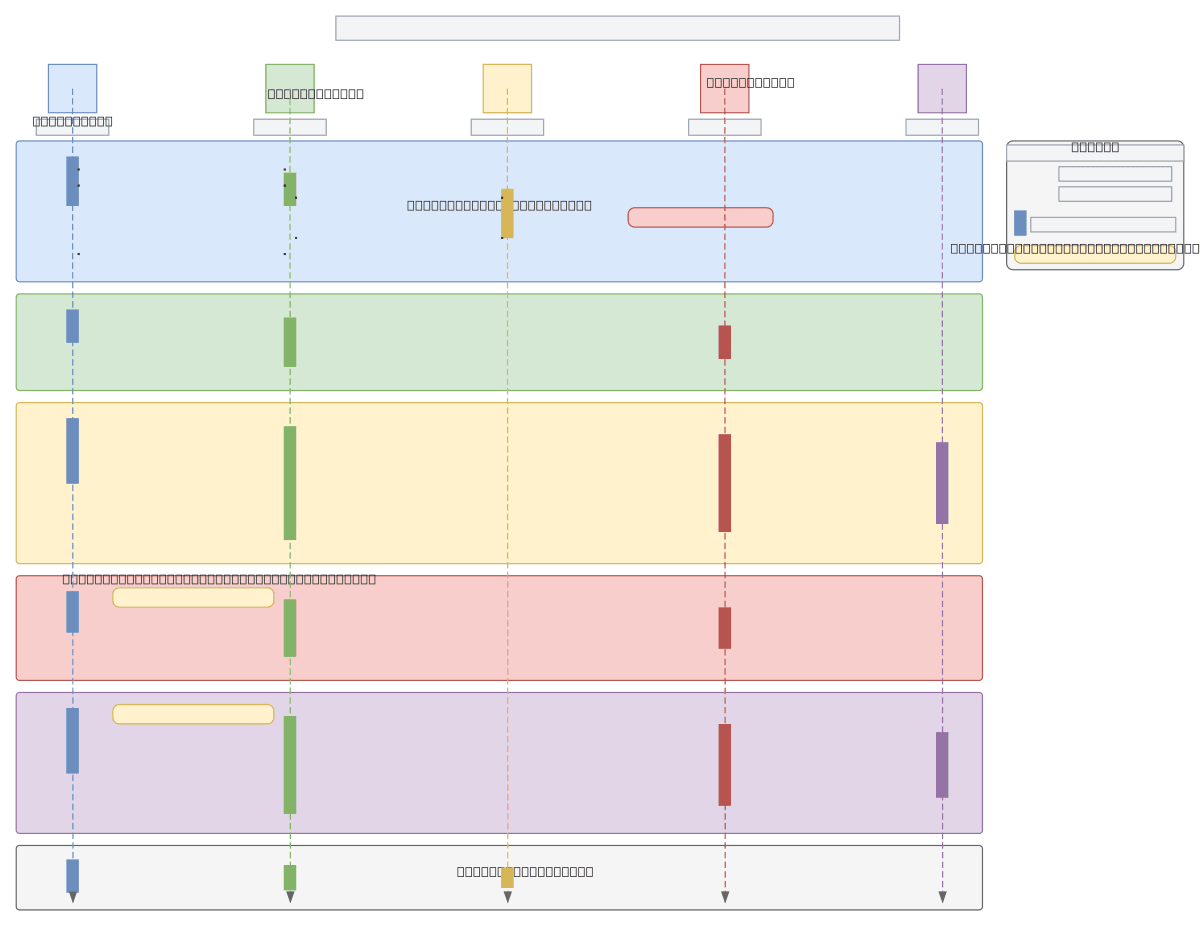
Prometrica — Admin User Flow
About This Architecture
Prometrica's admin user flow is a six-phase sequence diagram orchestrating authentication, dashboard access, candidate directory browsing, PDF export, and survey oversight. The flow begins with an Admin User authenticating via a Browser UI against an Auth Service, which validates credentials and denies non-admin access before proceeding. Authenticated admins access the Backend API to retrieve candidate data from the Data Store, with optional branches for PDF export and secondary survey management paths. This architecture demonstrates role-based access control (RBAC) enforcement at the authentication layer and conditional feature access patterns. Fork and customize this diagram on Diagrams.so to adapt the flow for your own multi-role admin systems or add additional guard conditions.
People also ask
How should I design an admin user authentication and authorization flow with role-based access control and optional feature branches?
Prometrica's admin flow demonstrates a six-phase sequence: authenticate via Auth Service with non-admin denial guards, grant dashboard access to authenticated admins, enable candidate directory and detail retrieval from the Data Store, support optional PDF export, provide secondary survey oversight paths, and secure sign-out. This pattern enforces RBAC at the Auth Service layer and uses conditiona
- Domain:
- Software Architecture
- Audience:
- Full-stack developers and system architects designing admin authentication and authorization flows
Generated by Diagrams.so — AI architecture diagram generator with native Draw.io output. Fork this diagram, remix it, or download as .drawio, PNG, or SVG.