Power Platform VNet Injection - AU Paired Regions

MULTINetworkadvanced
Power Platform VNet Injection - AU Paired Regions — MULTI network diagram

About This Architecture

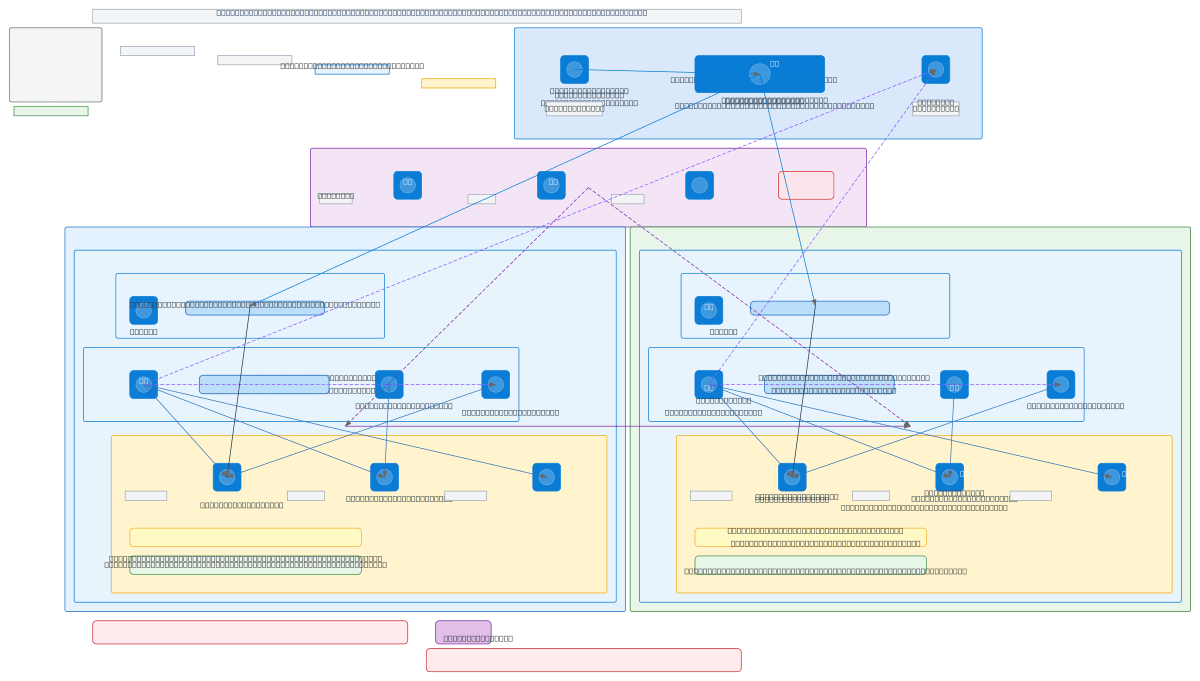
Power Platform VNet injection across Azure paired regions (Australia East and Australia Southeast) with delegated subnets, private endpoints, and Entra ID integration. Traffic flows through dedicated Power Platform injection subnets, Function App VNet-integrated subnets, and private endpoint subnets for Storage, Key Vault, and Function Apps, with all DNS resolution routed through Private DNS Zones linked to both VNets. Network Security Groups enforce allow-list policies for cross-subnet and cross-region traffic, while Managed Identity provides zero-secret authentication between Function Apps and backend services. This architecture eliminates public IP exposure, enforces least-privilege network access, and ensures compliance-ready isolation for enterprise Power Platform workloads. Fork this diagram on Diagrams.so to customize subnet ranges, add hub-spoke peering, or extend to additional Azure regions.

People also ask

How do you securely deploy Power Platform across multiple Azure regions using VNet injection and private endpoints?

This diagram shows a multi-region Power Platform architecture using delegated subnets for Power Platform injection, separate subnets for Function App VNet integration, and dedicated private endpoint subnets for Storage, Key Vault, and Function Apps. Private DNS Zones linked to both VNets ensure all traffic stays private, while NSGs enforce allow-list policies and Managed Identity eliminates creden

AzurePower PlatformVNet InjectionPrivate EndpointsNetwork ArchitecturePaired Regions
Domain:
Cloud Azure
Audience:
Azure network architects designing secure Power Platform deployments with VNet injection across paired regions

Generated by Diagrams.so — AI architecture diagram generator with native Draw.io output. Fork this diagram, remix it, or download as .drawio, PNG, or SVG.

Generate your own network diagram →

About This Architecture

Power Platform VNet injection across Azure paired regions (Australia East and Australia Southeast) with delegated subnets, private endpoints, and Entra ID integration. Traffic flows through dedicated Power Platform injection subnets, Function App VNet-integrated subnets, and private endpoint subnets for Storage, Key Vault, and Function Apps, with all DNS resolution routed through Private DNS Zones linked to both VNets. Network Security Groups enforce allow-list policies for cross-subnet and cross-region traffic, while Managed Identity provides zero-secret authentication between Function Apps and backend services. This architecture eliminates public IP exposure, enforces least-privilege network access, and ensures compliance-ready isolation for enterprise Power Platform workloads. Fork this diagram on Diagrams.so to customize subnet ranges, add hub-spoke peering, or extend to additional Azure regions.

People also ask

How do you securely deploy Power Platform across multiple Azure regions using VNet injection and private endpoints?

This diagram shows a multi-region Power Platform architecture using delegated subnets for Power Platform injection, separate subnets for Function App VNet integration, and dedicated private endpoint subnets for Storage, Key Vault, and Function Apps. Private DNS Zones linked to both VNets ensure all traffic stays private, while NSGs enforce allow-list policies and Managed Identity eliminates creden

Power Platform VNet Injection - AU Paired Regions

MultiadvancedAzurePower PlatformVNet InjectionPrivate EndpointsNetwork ArchitecturePaired Regions
Domain: Cloud AzureAudience: Azure network architects designing secure Power Platform deployments with VNet injection across paired regions
0 views0 favoritesPublic

Created by

April 30, 2026

Updated

April 30, 2026 at 7:15 AM

Type

network

Need a custom architecture diagram?

Describe your architecture in plain English and get a production-ready Draw.io diagram in seconds. Works for AWS, Azure, GCP, Kubernetes, and more.

Generate with AI