Power Apps to Business Central via Azure Functions

AZUREArchitectureintermediate
Power Apps to Business Central via Azure Functions — AZURE architecture diagram

About This Architecture

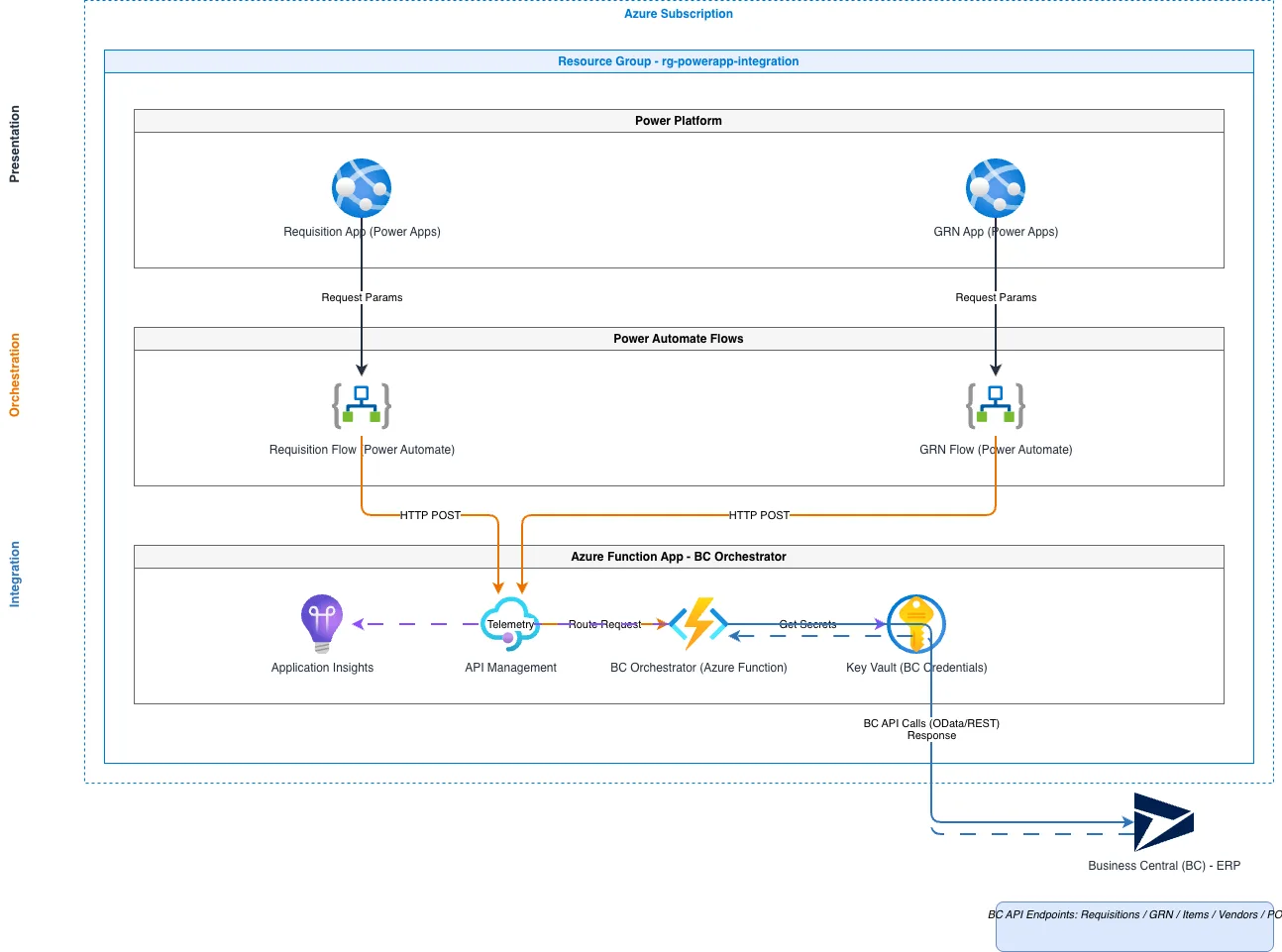
Power Apps Requisition and GRN applications connect to Business Central via Azure Functions, orchestrating multi-step ERP workflows through a secure, scalable integration layer. Power Automate flows route requests from both apps through API Management to a BC Orchestrator Azure Function, which retrieves credentials from Key Vault and executes API calls against Business Central endpoints for requisitions, goods receipt notes, items, vendors, and purchase orders. This architecture decouples the low-code Power Platform tier from backend ERP systems, enabling rapid app development while maintaining security and auditability through Application Insights monitoring. Fork this diagram to customize API endpoints, add additional Power Apps, or extend the orchestration logic for your Business Central implementation. The pattern demonstrates best-practice separation of concerns: presentation (Power Apps), orchestration (Power Automate + Azure Functions), and integration (API Management + Key Vault) across a single Azure subscription.

People also ask

How do I integrate Power Apps with Business Central using Azure Functions and API Management?

This diagram shows a three-tier Azure architecture where Power Apps Requisition and GRN applications trigger Power Automate flows that route requests through API Management to an Azure Function BC Orchestrator. The orchestrator retrieves Business Central credentials from Key Vault, executes API calls to BC endpoints, and logs all activity to Application Insights for monitoring and compliance.

AzurePower AppsBusiness CentralAzure FunctionsAPI ManagementPower Automate
Domain:
Cloud Azure
Audience:
Azure solutions architects integrating Power Apps with Business Central ERP

Generated by Diagrams.so — AI architecture diagram generator with native Draw.io output. Fork this diagram, remix it, or download as .drawio, PNG, or SVG.

Generate your own architecture diagram →

About This Architecture

Power Apps Requisition and GRN applications connect to Business Central via Azure Functions, orchestrating multi-step ERP workflows through a secure, scalable integration layer. Power Automate flows route requests from both apps through API Management to a BC Orchestrator Azure Function, which retrieves credentials from Key Vault and executes API calls against Business Central endpoints for requisitions, goods receipt notes, items, vendors, and purchase orders. This architecture decouples the low-code Power Platform tier from backend ERP systems, enabling rapid app development while maintaining security and auditability through Application Insights monitoring. Fork this diagram to customize API endpoints, add additional Power Apps, or extend the orchestration logic for your Business Central implementation. The pattern demonstrates best-practice separation of concerns: presentation (Power Apps), orchestration (Power Automate + Azure Functions), and integration (API Management + Key Vault) across a single Azure subscription.

People also ask

How do I integrate Power Apps with Business Central using Azure Functions and API Management?

This diagram shows a three-tier Azure architecture where Power Apps Requisition and GRN applications trigger Power Automate flows that route requests through API Management to an Azure Function BC Orchestrator. The orchestrator retrieves Business Central credentials from Key Vault, executes API calls to BC endpoints, and logs all activity to Application Insights for monitoring and compliance.

Power Apps to Business Central via Azure Functions

AzureintermediatePower AppsBusiness CentralAzure FunctionsAPI ManagementPower Automate
Domain: Cloud AzureAudience: Azure solutions architects integrating Power Apps with Business Central ERP
0 views0 favoritesPublic

Created by

May 6, 2026

Updated

May 6, 2026 at 10:16 AM

Type

architecture

Need a custom architecture diagram?

Describe your architecture in plain English and get a production-ready Draw.io diagram in seconds. Works for AWS, Azure, GCP, Kubernetes, and more.

Generate with AI