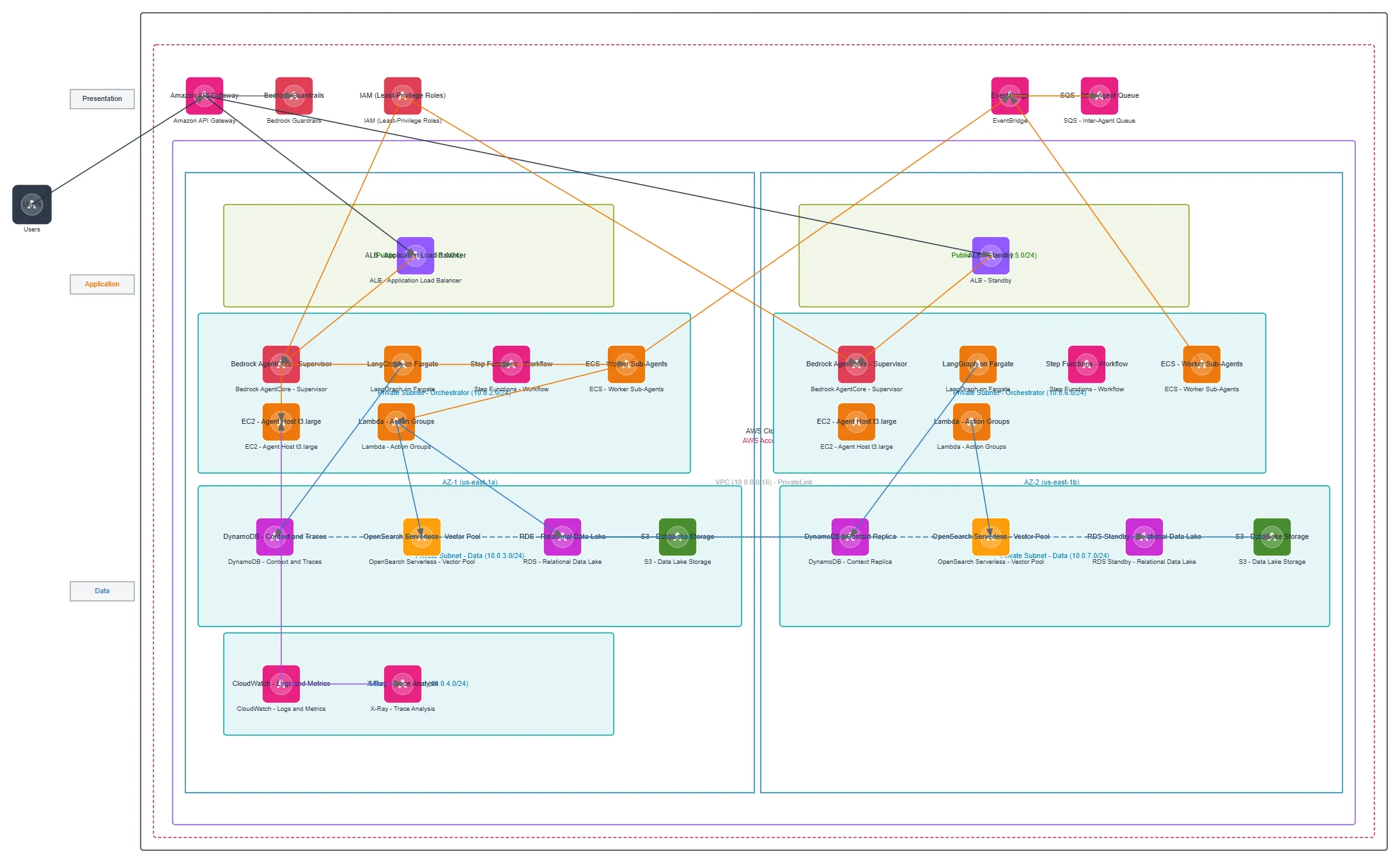
Multi-Agent Orchestrator on AWS Bedrock — AWS architecture diagram

About This Architecture

Multi-agent orchestrator on AWS Bedrock coordinates supervisor and worker agents across two availability zones using Bedrock AgentCore, LangGraph on Fargate, Step Functions, and ECS. User requests flow through API Gateway and Bedrock Guardrails into the orchestrator layer, which routes tasks via EventBridge and SQS to Lambda action groups and EC2 worker agents. Context, traces, and vector embeddings persist in DynamoDB, OpenSearch Serverless, and RDS across private subnets, with CloudWatch and X-Ray monitoring the entire workflow. This architecture demonstrates high-availability multi-agent coordination with least-privilege IAM roles, VPC isolation, and cross-AZ redundancy. Fork and customize this diagram on Diagrams.so to adapt agent topologies, add new action groups, or integrate additional data sources.

People also ask

How do I design a production-grade multi-agent AI system on AWS Bedrock with high availability and least-privilege security?

This diagram shows a supervisor-worker multi-agent architecture using Bedrock AgentCore as the orchestrator, LangGraph on Fargate for agent logic, and Step Functions for workflow coordination. Worker agents run on ECS and EC2, with Lambda action groups handling integrations, while DynamoDB, OpenSearch Serverless, and RDS provide persistent context and data across two availability zones with cross-

Multi-Agent Orchestrator on AWS Bedrock

AWSadvancedAWS Bedrockmulti-agent AILangGraphStep Functionshigh availabilityleast-privilege security
Domain: Cloud AwsAudience: AWS solutions architects designing multi-agent AI systems on Bedrock
2 views0 favoritesPublic

Created by

July 15, 2026

Updated

August 14, 2026 at 11:28 PM

Type

architecture

Need a custom architecture diagram?

Describe your architecture in plain English and get a production-ready Draw.io diagram in seconds. Works for AWS, Azure, GCP, Kubernetes, and more.

Generate with AI

AI-generated. Verify before production use. Learn more

Report this diagram