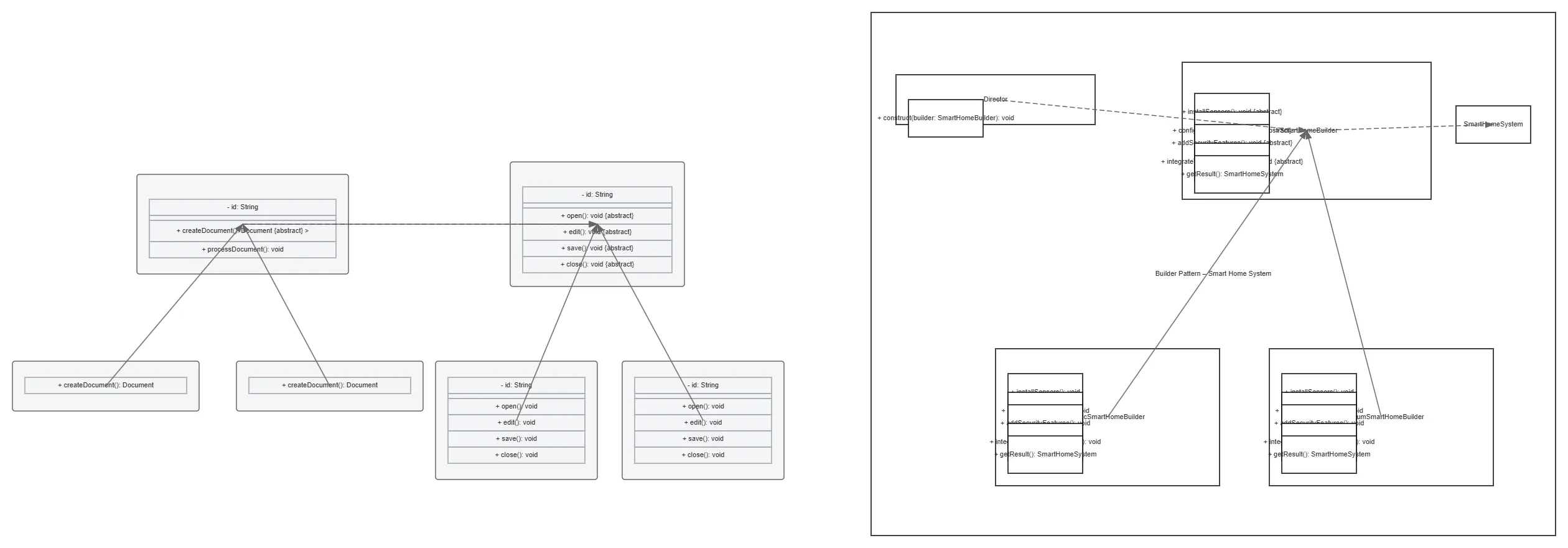
Factory Method Document Processing architecture diagram

About This Architecture

Factory Method pattern for document processing defines an abstract DocumentCreator base class with concrete PDFDocumentCreator and WordDocumentCreator subclasses that instantiate their respective PDFDocument and WordDocument implementations. Each document type implements the abstract Document interface with open, edit, save, and close methods, allowing polymorphic document handling. This pattern decouples document creation logic from client code, enabling easy addition of new document formats without modifying existing creator classes. Fork this diagram on Diagrams.so to customize for your specific document types, add new formats like ExcelDocument, or adapt the pattern to other factory scenarios. The Factory Method is ideal when a system must work with objects whose types are determined at runtime rather than compile time.

People also ask

How do you implement the Factory Method design pattern for creating different document types like PDF and Word files?

The Factory Method pattern uses an abstract DocumentCreator class with concrete PDFDocumentCreator and WordDocumentCreator subclasses that implement createDocument() to instantiate their respective PDFDocument and WordDocument objects. Each document type implements the abstract Document interface with open, edit, save, and close methods, enabling clients to work with documents polymorphically with

Factory Method Document Processing

Autointermediatedesign-patternsfactory-methodobject-oriented-programmingdocument-processingsoftware-architecture
Domain: Software ArchitectureAudience: Software engineers and architects implementing design patterns in object-oriented systems
2 views0 favoritesPublic

Created by

October 8, 2026

Updated

October 21, 2026 at 12:07 AM

Type

uml

Make your own

Need a custom architecture diagram?

Describe your architecture in plain English and get a production-ready Draw.io diagram in seconds. Works for AWS, Azure, GCP, Kubernetes, and more.

Generate with AI

AI-generated. Verify before production use. Learn more

Report this diagram