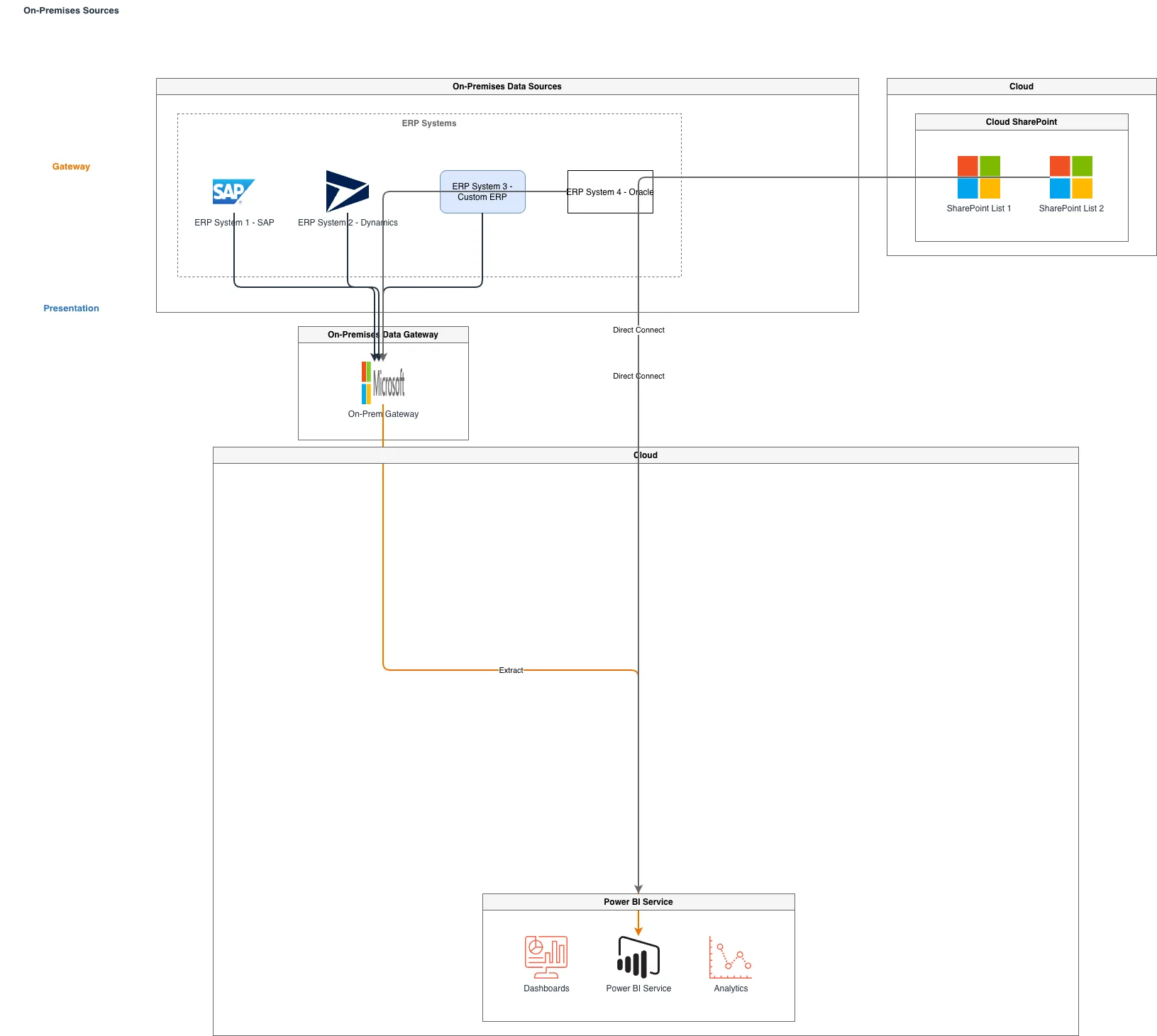
ERP and SQL to Power BI via On-Prem Gateway

GENERALArchitectureintermediate
ERP and SQL to Power BI via On-Prem Gateway — GENERAL architecture diagram

About This Architecture

Hybrid BI architecture connecting on-premises ERP systems (SAP, Dynamics, custom) and SQL databases to cloud-based Power BI via the On-Premises Data Gateway. The gateway acts as a secure bridge, enabling real-time data refresh and connectivity without exposing internal systems to the internet. This pattern solves the challenge of centralizing analytics across legacy enterprise systems while maintaining data residency and security compliance. Fork this diagram on Diagrams.so to customize gateway configurations, add additional data sources, or document your own hybrid BI topology. The gateway supports scheduled refresh, DirectQuery, and import modes depending on latency and data volume requirements.

People also ask

How do I connect on-premises ERP systems and SQL databases to Power BI while maintaining security and compliance?

Use the On-Premises Data Gateway to create a secure bridge between your on-premises ERP systems (SAP, Dynamics, custom) and SQL databases to Power BI Service. The gateway enables real-time data refresh and supports DirectQuery or import modes without exposing internal systems to the internet, maintaining data residency and compliance requirements.

Power BIOn-Premises Data GatewayHybrid ArchitectureERP IntegrationAzureBusiness Intelligence
Domain:
Cloud Azure
Audience:
Business intelligence architects and data engineers implementing hybrid Power BI solutions with on-premises data sources

Generated by Diagrams.so — AI architecture diagram generator with native Draw.io output. Fork this diagram, remix it, or download as .drawio, PNG, or SVG.

Generate your own architecture diagram →

About This Architecture

Hybrid BI architecture connecting on-premises ERP systems (SAP, Dynamics, custom) and SQL databases to cloud-based Power BI via the On-Premises Data Gateway. The gateway acts as a secure bridge, enabling real-time data refresh and connectivity without exposing internal systems to the internet. This pattern solves the challenge of centralizing analytics across legacy enterprise systems while maintaining data residency and security compliance. Fork this diagram on Diagrams.so to customize gateway configurations, add additional data sources, or document your own hybrid BI topology. The gateway supports scheduled refresh, DirectQuery, and import modes depending on latency and data volume requirements.

People also ask

How do I connect on-premises ERP systems and SQL databases to Power BI while maintaining security and compliance?

Use the On-Premises Data Gateway to create a secure bridge between your on-premises ERP systems (SAP, Dynamics, custom) and SQL databases to Power BI Service. The gateway enables real-time data refresh and supports DirectQuery or import modes without exposing internal systems to the internet, maintaining data residency and compliance requirements.

ERP and SQL to Power BI via On-Prem Gateway

AutointermediatePower BIOn-Premises Data GatewayHybrid ArchitectureERP IntegrationAzureBusiness Intelligence
Domain: Cloud AzureAudience: Business intelligence architects and data engineers implementing hybrid Power BI solutions with on-premises data sources
0 views0 favoritesPublic

Created by

May 20, 2026

Updated

May 20, 2026 at 1:36 AM

Type

architecture

Need a custom architecture diagram?

Describe your architecture in plain English and get a production-ready Draw.io diagram in seconds. Works for AWS, Azure, GCP, Kubernetes, and more.

Generate with AI