Envelope Signing Workflow Lifecycle

aws · sequence diagram.

About This Architecture

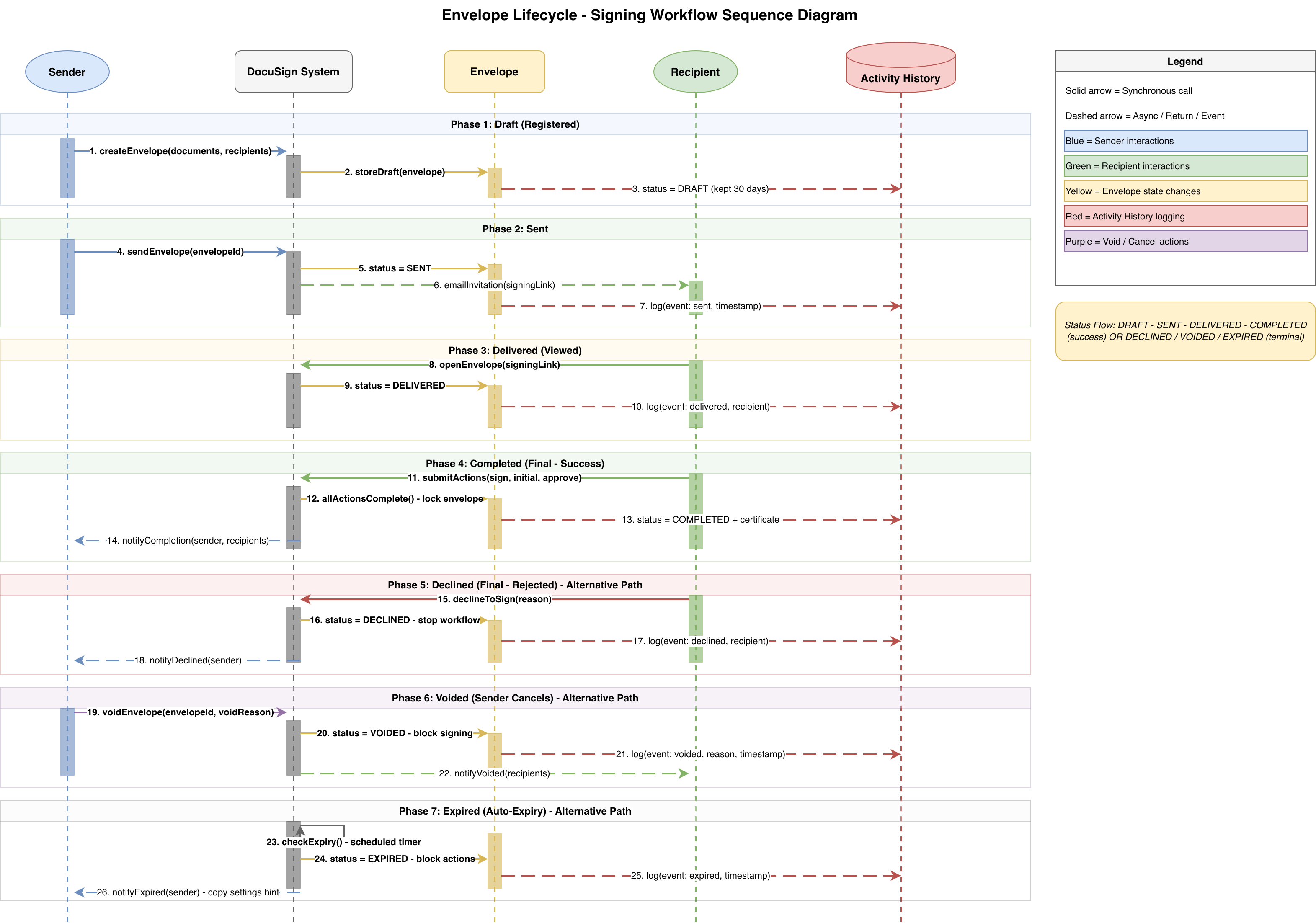
DocuSign envelope signing workflow lifecycle sequence diagram illustrating seven phases from draft through completion, decline, void, or expiry. The diagram maps sender, DocuSign system, envelope, and recipient interactions across synchronous and asynchronous operations, with activity history logging at each state transition. This architecture demonstrates best practices for managing document lifecycle, audit trails, and alternative completion paths in production e-signature workflows. Fork this diagram on Diagrams.so to customize envelope states, add webhook integrations, or extend for multi-signer scenarios. The color-coded legend (blue sender, green recipient, yellow state, red audit, purple cancellation) enables quick visual parsing of complex signing sequences.

People also ask

What are the phases and state transitions in a DocuSign envelope signing workflow?

The DocuSign envelope lifecycle progresses through seven phases: Draft (registered), Sent, Delivered (viewed), Completed (success), with alternative terminal states for Declined, Voided, or Expired envelopes. Each phase involves synchronous sender/recipient actions and asynchronous system events logged to activity history, enabling full audit compliance and workflow visibility.

Envelope Signing Workflow Lifecycle

AWSintermediateDocuSignWorkflowSequence DiagramDocument ManagementE-Signature
Domain: ServerlessAudience: AWS solutions architects designing document workflow systems with DocuSign integration
1 views0 favoritesPublic

Created by

March 16, 2026

Updated

March 16, 2026 at 5:42 PM

Type

sequence

Need a custom architecture diagram?

Describe your architecture in plain English and get a production-ready Draw.io diagram in seconds. Works for AWS, Azure, GCP, Kubernetes, and more.

Generate with AI