Enterprise Campus Network - Three-Tier Design

OCIArchitectureadvanced
Enterprise Campus Network - Three-Tier Design — OCI architecture diagram

About This Architecture

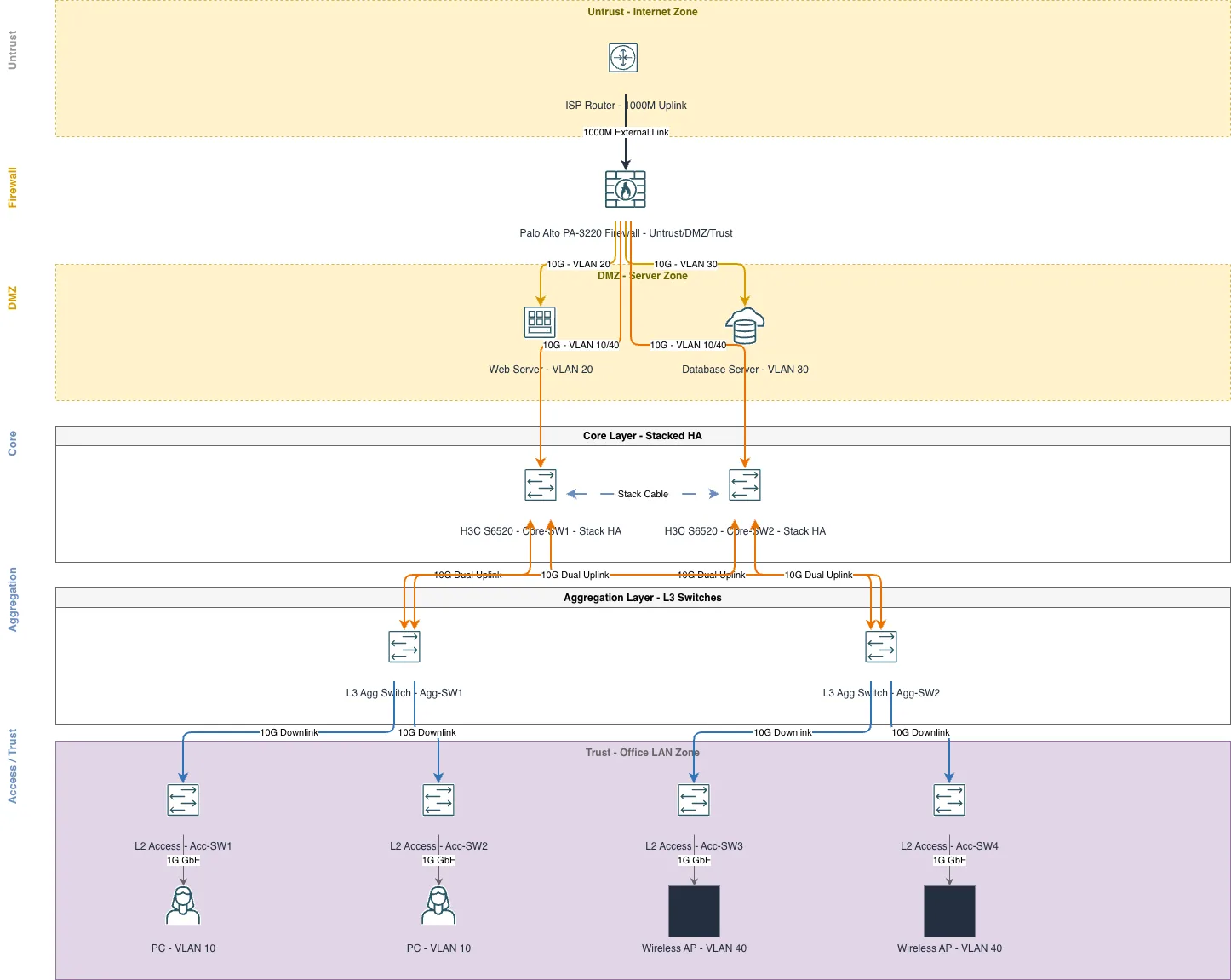
Enterprise campus network using a three-tier design with Palo Alto PA-3220 firewall protecting DMZ servers and core infrastructure. Traffic flows from ISP Router through the firewall into stacked H3C S6520 core switches, then through L3 aggregation switches to L2 access switches serving PCs and wireless APs across VLANs 10, 20, 30, and 40. The architecture implements redundancy at core and aggregation layers with dual switch stacks and cross-connected uplinks, eliminating single points of failure. This design demonstrates enterprise best practices for network segmentation, high availability, and scalable access layer connectivity. Fork and customize this diagram on Diagrams.so to match your campus topology, VLAN scheme, or switch models.

People also ask

How do I design a three-tier enterprise campus network with firewall protection and high availability?

This diagram shows a production enterprise campus network using a Palo Alto PA-3220 firewall to protect DMZ servers and core infrastructure, with stacked H3C S6520 core switches providing redundancy and dual L3 aggregation switches distributing traffic to L2 access switches. The design segments traffic across VLANs (10 for PCs, 20 for web servers, 30 for databases, 40 for wireless) and eliminates

enterprise networkingthree-tier architecturePalo Alto firewallH3C switchesVLAN segmentationnetwork redundancy
Domain:
Networking
Audience:
Network architects designing enterprise campus LANs with high availability and security segmentation

Generated by Diagrams.so — AI architecture diagram generator with native Draw.io output. Fork this diagram, remix it, or download as .drawio, PNG, or SVG.

Generate your own architecturediagram →

About This Architecture

Enterprise campus network using a three-tier design with Palo Alto PA-3220 firewall protecting DMZ servers and core infrastructure. Traffic flows from ISP Router through the firewall into stacked H3C S6520 core switches, then through L3 aggregation switches to L2 access switches serving PCs and wireless APs across VLANs 10, 20, 30, and 40. The architecture implements redundancy at core and aggregation layers with dual switch stacks and cross-connected uplinks, eliminating single points of failure. This design demonstrates enterprise best practices for network segmentation, high availability, and scalable access layer connectivity. Fork and customize this diagram on Diagrams.so to match your campus topology, VLAN scheme, or switch models.

People also ask

How do I design a three-tier enterprise campus network with firewall protection and high availability?

This diagram shows a production enterprise campus network using a Palo Alto PA-3220 firewall to protect DMZ servers and core infrastructure, with stacked H3C S6520 core switches providing redundancy and dual L3 aggregation switches distributing traffic to L2 access switches. The design segments traffic across VLANs (10 for PCs, 20 for web servers, 30 for databases, 40 for wireless) and eliminates

Enterprise Campus Network - Three-Tier Design

OCIadvancedenterprise networkingthree-tier architecturePalo Alto firewallH3C switchesVLAN segmentationnetwork redundancy
Domain: NetworkingAudience: Network architects designing enterprise campus LANs with high availability and security segmentation
0 views0 favoritesPublic

Created by

June 10, 2026

Updated

June 10, 2026 at 2:38 AM

Type

architecture

Need a custom architecture diagram?

Describe your architecture in plain English and get a production-ready Draw.io diagram in seconds. Works for AWS, Azure, GCP, Kubernetes, and more.

Generate with AI