Dynamics 365 Hotfix CI/CD Pipeline

GENERALCicdintermediate
Dynamics 365 Hotfix CI/CD Pipeline — GENERAL cicd diagram

About This Architecture

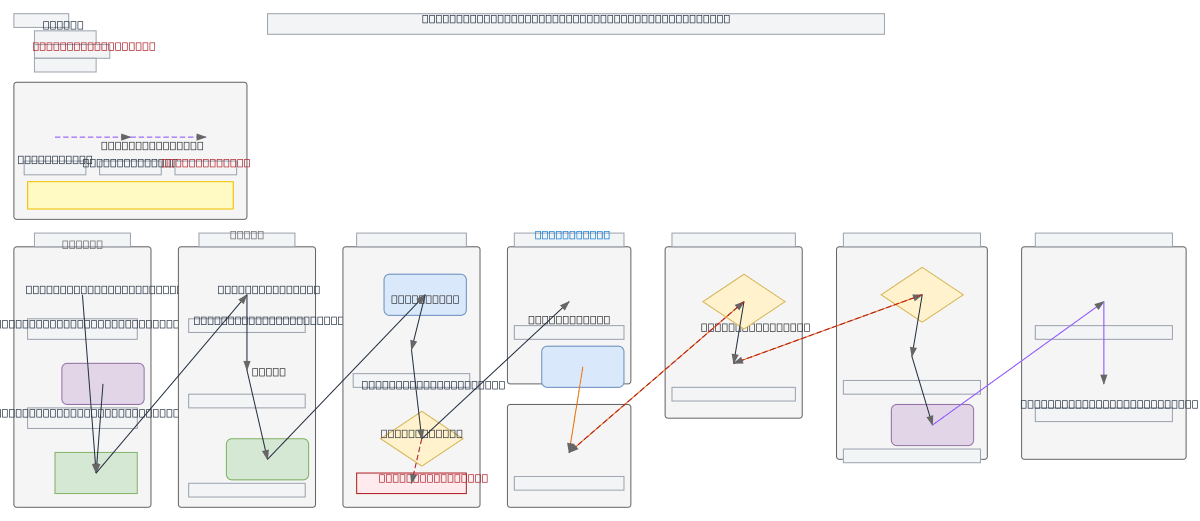
Dynamics 365 hotfix CI/CD pipeline orchestrates rapid P1 fixes from production back through dev and test environments using a dedicated hotfix branch strategy. Developers push fixes to the hotfix branch, triggering automated builds, unit tests, and Solution Checker validation before deployment across Dev, Test, Staging, and Production D365 environments. Production changes auto-sync back to the hotfix branch post-deploy, ensuring consistency and enabling fast rollback if needed. Fork this diagram to customize approval gates, add additional quality checks, or adapt the merge-back strategy for your release cadence. The pattern demonstrates GitFlow-inspired branching with production-first hotfix handling, critical for teams managing mission-critical Dynamics 365 instances.

People also ask

How do I set up a CI/CD pipeline for Dynamics 365 hotfixes that syncs production changes back to development?

This diagram shows a Dynamics 365 hotfix pipeline where developers push P1 fixes to a dedicated hotfix branch, triggering automated builds, unit tests, and Solution Checker validation. After production deployment, changes auto-merge back to the hotfix branch and then to main and develop, ensuring consistency across environments and enabling rapid rollback.

Dynamics 365CI/CDDevOpsGitFlowhotfix strategypipeline automation
Domain:
Devops Cicd
Audience:
Dynamics 365 developers and DevOps engineers implementing hotfix CI/CD pipelines

Generated by Diagrams.so — AI architecture diagram generator with native Draw.io output. Fork this diagram, remix it, or download as .drawio, PNG, or SVG.

Generate your own cicd diagram →

About This Architecture

Dynamics 365 hotfix CI/CD pipeline orchestrates rapid P1 fixes from production back through dev and test environments using a dedicated hotfix branch strategy. Developers push fixes to the hotfix branch, triggering automated builds, unit tests, and Solution Checker validation before deployment across Dev, Test, Staging, and Production D365 environments. Production changes auto-sync back to the hotfix branch post-deploy, ensuring consistency and enabling fast rollback if needed. Fork this diagram to customize approval gates, add additional quality checks, or adapt the merge-back strategy for your release cadence. The pattern demonstrates GitFlow-inspired branching with production-first hotfix handling, critical for teams managing mission-critical Dynamics 365 instances.

People also ask

How do I set up a CI/CD pipeline for Dynamics 365 hotfixes that syncs production changes back to development?

This diagram shows a Dynamics 365 hotfix pipeline where developers push P1 fixes to a dedicated hotfix branch, triggering automated builds, unit tests, and Solution Checker validation. After production deployment, changes auto-merge back to the hotfix branch and then to main and develop, ensuring consistency across environments and enabling rapid rollback.

Dynamics 365 Hotfix CI/CD Pipeline

AutointermediateDynamics 365CI/CDDevOpsGitFlowhotfix strategypipeline automation
Domain: Devops CicdAudience: Dynamics 365 developers and DevOps engineers implementing hotfix CI/CD pipelines
0 views0 favoritesPublic

Created by

April 16, 2026

Updated

April 16, 2026 at 8:30 AM

Type

cicd

Need a custom architecture diagram?

Describe your architecture in plain English and get a production-ready Draw.io diagram in seconds. Works for AWS, Azure, GCP, Kubernetes, and more.

Generate with AI