Dashboard Information Architecture

GENERALArchitectureintermediate
Dashboard Information Architecture — GENERAL architecture diagram

About This Architecture

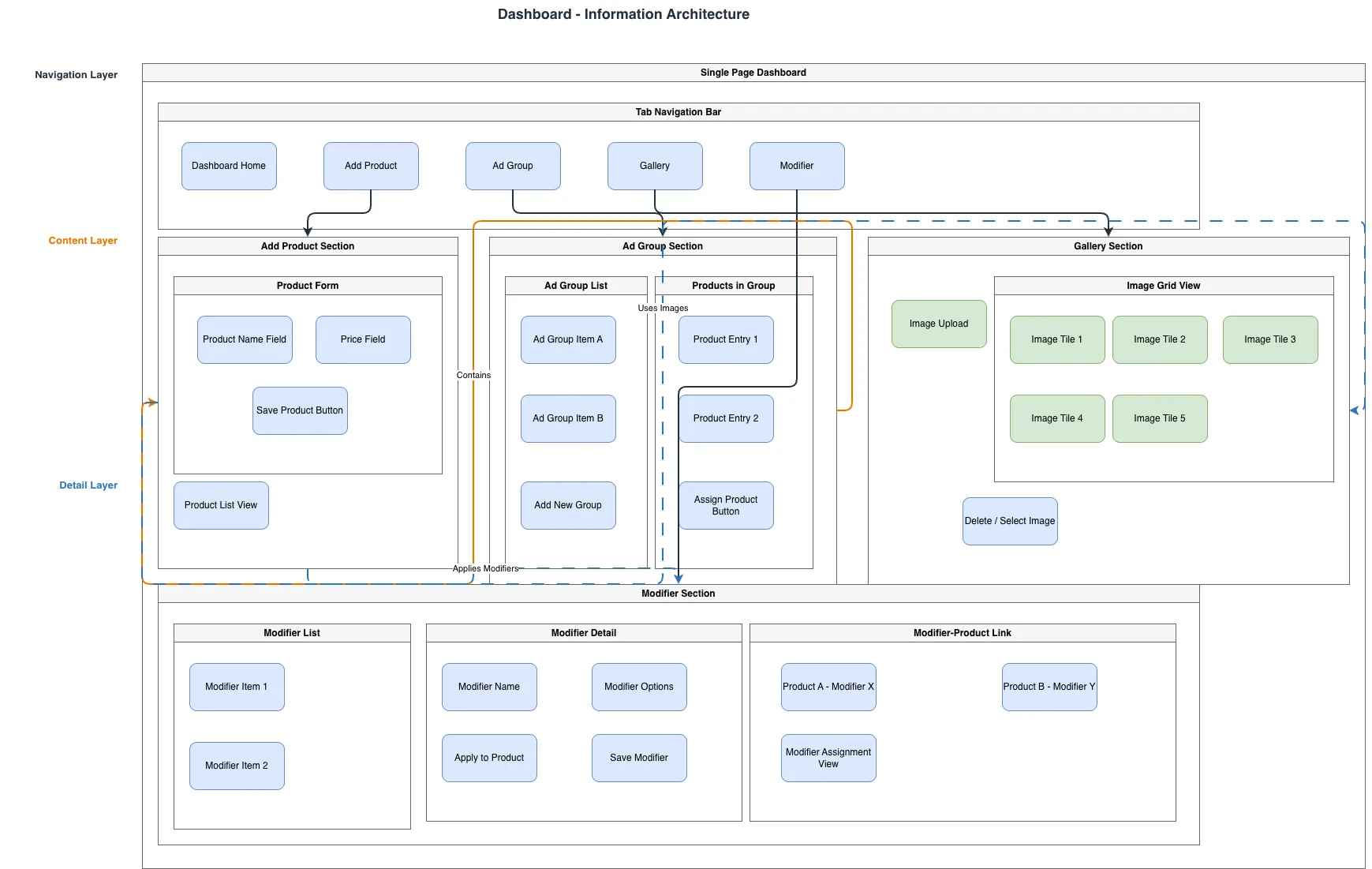
Dashboard information architecture organizing product management, ad groups, image galleries, and modifiers into a hierarchical navigation and content structure. The Navigation Layer routes users through Tab Navigation Bar to core sections: Dashboard Home, Add Product, Ad Group, Gallery, and Modifier, each with dedicated content and detail layers. Add Product Section connects to Gallery and Modifier sections, enabling product creation with associated images and customization options. This layered architecture demonstrates separation of concerns and progressive disclosure, allowing users to manage complex product catalogs without cognitive overload. Fork this diagram on Diagrams.so to customize section names, add workflow states, or adapt for your specific product domain.

People also ask

How should I structure a dashboard information architecture for a product management system with galleries and modifiers?

This diagram shows a three-layer IA pattern: Navigation Layer (Tab Navigation Bar routing to sections), Content Layer (Add Product, Ad Group, Gallery, Modifier sections), and Detail Layer (forms, lists, grids). The Add Product Section connects to Gallery and Modifier sections, enabling users to create products and assign images and customizations in a logical workflow.

information architecturedashboard designproduct managementUI structurenavigation patternscontent organization
Domain:
Software Architecture
Audience:
UX/UI designers and product managers designing dashboard interfaces

Generated by Diagrams.so — AI architecture diagram generator with native Draw.io output. Fork this diagram, remix it, or download as .drawio, PNG, or SVG.

Generate your own architecture diagram →

About This Architecture

Dashboard information architecture organizing product management, ad groups, image galleries, and modifiers into a hierarchical navigation and content structure. The Navigation Layer routes users through Tab Navigation Bar to core sections: Dashboard Home, Add Product, Ad Group, Gallery, and Modifier, each with dedicated content and detail layers. Add Product Section connects to Gallery and Modifier sections, enabling product creation with associated images and customization options. This layered architecture demonstrates separation of concerns and progressive disclosure, allowing users to manage complex product catalogs without cognitive overload. Fork this diagram on Diagrams.so to customize section names, add workflow states, or adapt for your specific product domain.

People also ask

How should I structure a dashboard information architecture for a product management system with galleries and modifiers?

This diagram shows a three-layer IA pattern: Navigation Layer (Tab Navigation Bar routing to sections), Content Layer (Add Product, Ad Group, Gallery, Modifier sections), and Detail Layer (forms, lists, grids). The Add Product Section connects to Gallery and Modifier sections, enabling users to create products and assign images and customizations in a logical workflow.

Dashboard Information Architecture

Autointermediateinformation architecturedashboard designproduct managementUI structurenavigation patternscontent organization
Domain: Software ArchitectureAudience: UX/UI designers and product managers designing dashboard interfaces
0 views0 favoritesPublic

Created by

May 4, 2026

Updated

May 4, 2026 at 8:23 PM

Type

architecture

Need a custom architecture diagram?

Describe your architecture in plain English and get a production-ready Draw.io diagram in seconds. Works for AWS, Azure, GCP, Kubernetes, and more.

Generate with AI