Create A Network Infrastructure Diagram With The

AWSFlowchartadvanced
Create A Network Infrastructure Diagram With The — AWS flowchart diagram

About This Architecture

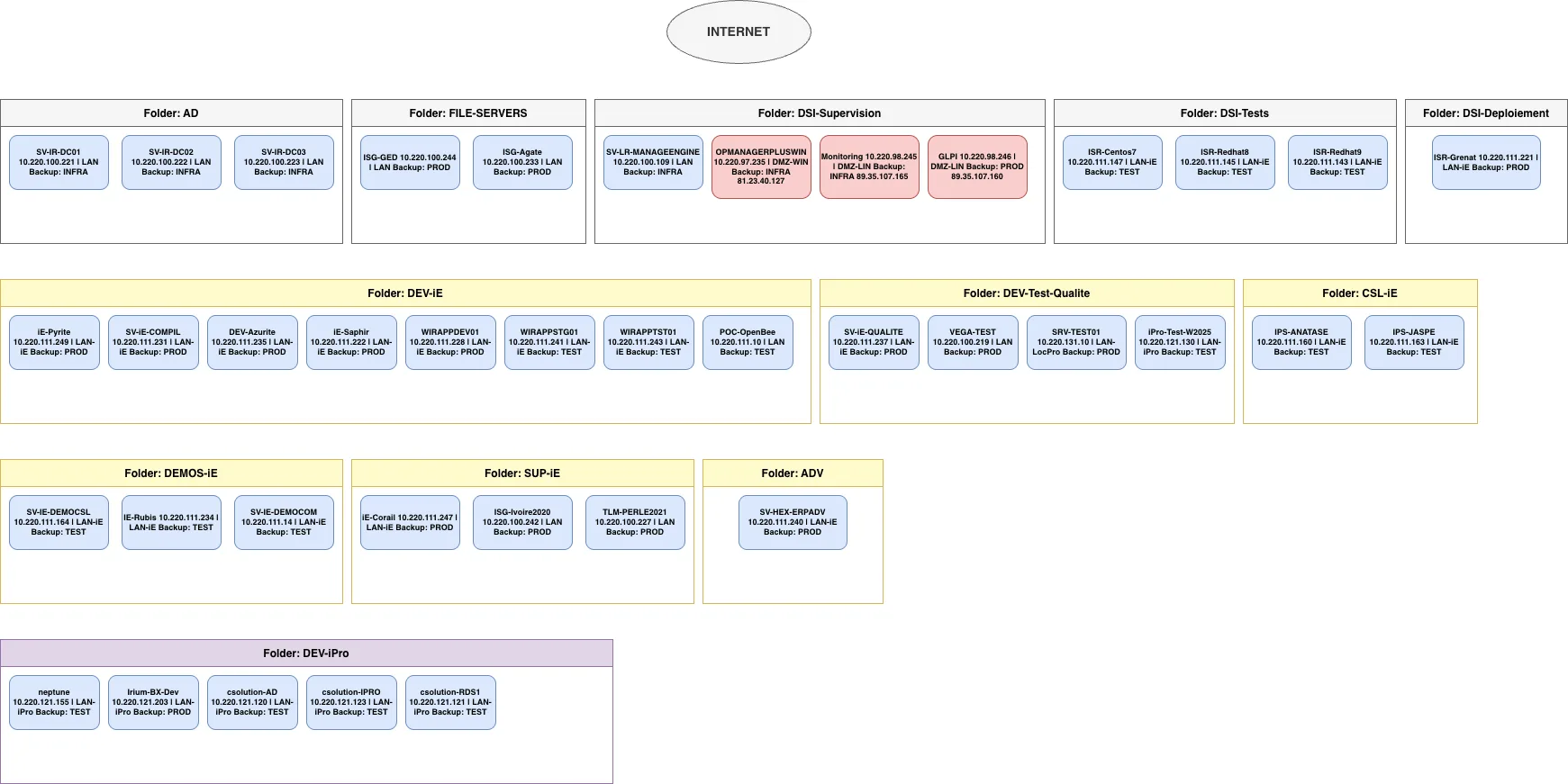
Hybrid network infrastructure diagram spanning Active Directory, file servers, monitoring, development, and application deployment across multiple LAN segments and DMZ zones. Traffic flows from the Internet through segmented VLANs (LAN, DMZ-WIN, DMZ-LIN, LAN-iE, LAN-iPro, LAN-LocPro) to domain controllers, backup systems, and application servers with assigned IP ranges and backup policies. This architecture demonstrates network isolation best practices, separating infrastructure, production, and test workloads while maintaining centralized AD authentication and monitoring. Fork this diagram on Diagrams.so to customize IP ranges, add AWS Direct Connect or VPN overlays, or export as .drawio for integration into your network documentation. The multi-tier VLAN design with dedicated backup classifications (INFRA, PROD, TEST) reflects enterprise-grade network segmentation aligned with disaster recovery and compliance requirements.

People also ask

How should I design a hybrid network architecture with Active Directory, multiple VLAN segments, and production/test/infrastructure isolation?

This diagram shows a production-grade hybrid network with domain controllers (SV-IR-DC01/02/03), segmented VLANs for infrastructure, production, and test workloads, DMZ monitoring systems, and backup policies tied to each segment. It demonstrates network isolation best practices using VLAN separation, centralized AD authentication, and tiered backup classifications (INFRA, PROD, TEST) across file

network-architecturehybrid-infrastructureactive-directoryvlan-segmentationdmz-designenterprise-networking
Domain:
Networking
Audience:
Network architects and infrastructure engineers managing hybrid on-premises and cloud network segmentation

Generated by Diagrams.so — AI architecture diagram generator with native Draw.io output. Fork this diagram, remix it, or download as .drawio, PNG, or SVG.

Generate your own flowchart diagram →

About This Architecture

Hybrid network infrastructure diagram spanning Active Directory, file servers, monitoring, development, and application deployment across multiple LAN segments and DMZ zones. Traffic flows from the Internet through segmented VLANs (LAN, DMZ-WIN, DMZ-LIN, LAN-iE, LAN-iPro, LAN-LocPro) to domain controllers, backup systems, and application servers with assigned IP ranges and backup policies. This architecture demonstrates network isolation best practices, separating infrastructure, production, and test workloads while maintaining centralized AD authentication and monitoring. Fork this diagram on Diagrams.so to customize IP ranges, add AWS Direct Connect or VPN overlays, or export as .drawio for integration into your network documentation. The multi-tier VLAN design with dedicated backup classifications (INFRA, PROD, TEST) reflects enterprise-grade network segmentation aligned with disaster recovery and compliance requirements.

People also ask

How should I design a hybrid network architecture with Active Directory, multiple VLAN segments, and production/test/infrastructure isolation?

This diagram shows a production-grade hybrid network with domain controllers (SV-IR-DC01/02/03), segmented VLANs for infrastructure, production, and test workloads, DMZ monitoring systems, and backup policies tied to each segment. It demonstrates network isolation best practices using VLAN separation, centralized AD authentication, and tiered backup classifications (INFRA, PROD, TEST) across file

Create A Network Infrastructure Diagram With The

AWSadvancednetwork-architecturehybrid-infrastructureactive-directoryvlan-segmentationdmz-designenterprise-networking
Domain: NetworkingAudience: Network architects and infrastructure engineers managing hybrid on-premises and cloud network segmentation
0 views0 favoritesPublic

Created by

April 26, 2026

Updated

April 26, 2026 at 4:30 PM

Type

flowchart

Need a custom architecture diagram?

Describe your architecture in plain English and get a production-ready Draw.io diagram in seconds. Works for AWS, Azure, GCP, Kubernetes, and more.

Generate with AI