Burger Quick - Diagrama de Casos de Uso

GENERALSequenceintermediate
Burger Quick - Diagrama de Casos de Uso — GENERAL sequence diagram

About This Architecture

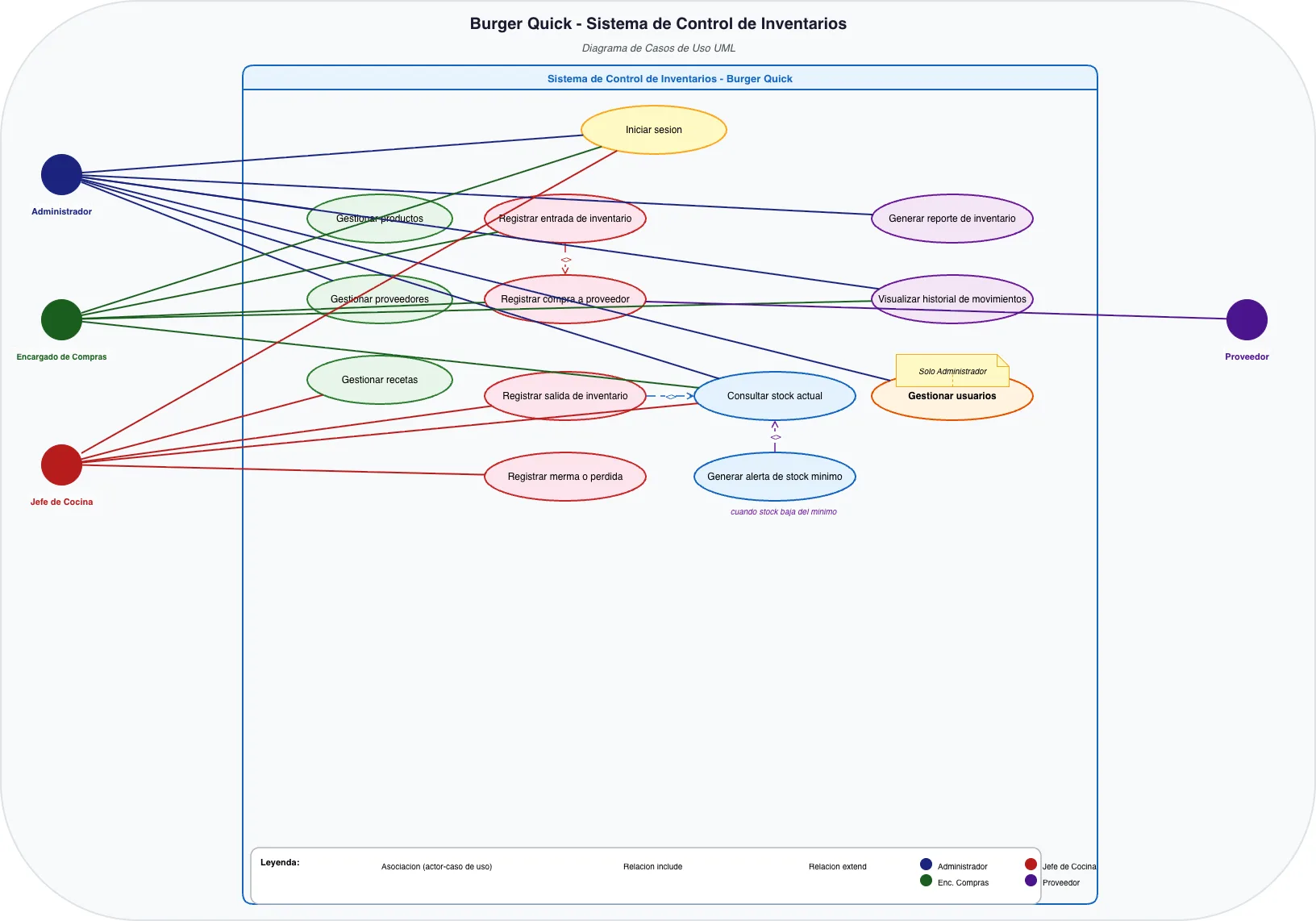
Burger Quick's inventory control system uses a UML use case diagram to map four distinct user roles—Administrator, Purchasing Manager, Kitchen Chief, and Supplier—against 13 core system functions. The diagram shows how each actor interacts with use cases like product management, purchase registration, stock tracking, and inventory alerts, with include and extend relationships clarifying dependencies between operations. This architecture demonstrates role-based access control and separation of concerns, ensuring that purchasing, kitchen, and administrative teams work within their assigned responsibilities. Fork this diagram on Diagrams.so to customize actor roles, add new use cases, or adapt it for your restaurant or retail inventory workflow.

People also ask

How do you design a UML use case diagram for a restaurant inventory management system with multiple user roles?

This diagram models four actors—Administrator, Encargado de Compras, Jefe de Cocina, and Proveedor—each with distinct use cases. The Administrator manages products, providers, users, and reports; the Purchasing Manager handles purchase registration and stock entry; the Kitchen Chief registers stock exits and losses; and the Supplier participates in purchase registration. Include and extend relatio

UMLuse case diagraminventory managementrole-based access controlrestaurant systemsbusiness process modeling
Domain:
Software Architecture
Audience:
Business analysts and UML modelers designing inventory management systems

Generated by Diagrams.so — AI architecture diagram generator with native Draw.io output. Fork this diagram, remix it, or download as .drawio, PNG, or SVG.

Generate your own sequence diagram →

About This Architecture

Burger Quick's inventory control system uses a UML use case diagram to map four distinct user roles—Administrator, Purchasing Manager, Kitchen Chief, and Supplier—against 13 core system functions. The diagram shows how each actor interacts with use cases like product management, purchase registration, stock tracking, and inventory alerts, with include and extend relationships clarifying dependencies between operations. This architecture demonstrates role-based access control and separation of concerns, ensuring that purchasing, kitchen, and administrative teams work within their assigned responsibilities. Fork this diagram on Diagrams.so to customize actor roles, add new use cases, or adapt it for your restaurant or retail inventory workflow.

People also ask

How do you design a UML use case diagram for a restaurant inventory management system with multiple user roles?

This diagram models four actors—Administrator, Encargado de Compras, Jefe de Cocina, and Proveedor—each with distinct use cases. The Administrator manages products, providers, users, and reports; the Purchasing Manager handles purchase registration and stock entry; the Kitchen Chief registers stock exits and losses; and the Supplier participates in purchase registration. Include and extend relatio

Burger Quick - Diagrama de Casos de Uso

AutointermediateUMLuse case diagraminventory managementrole-based access controlrestaurant systemsbusiness process modeling
Domain: Software ArchitectureAudience: Business analysts and UML modelers designing inventory management systems
0 views0 favoritesPublic

Created by

May 7, 2026

Updated

May 7, 2026 at 1:36 AM

Type

sequence

Need a custom architecture diagram?

Describe your architecture in plain English and get a production-ready Draw.io diagram in seconds. Works for AWS, Azure, GCP, Kubernetes, and more.

Generate with AI