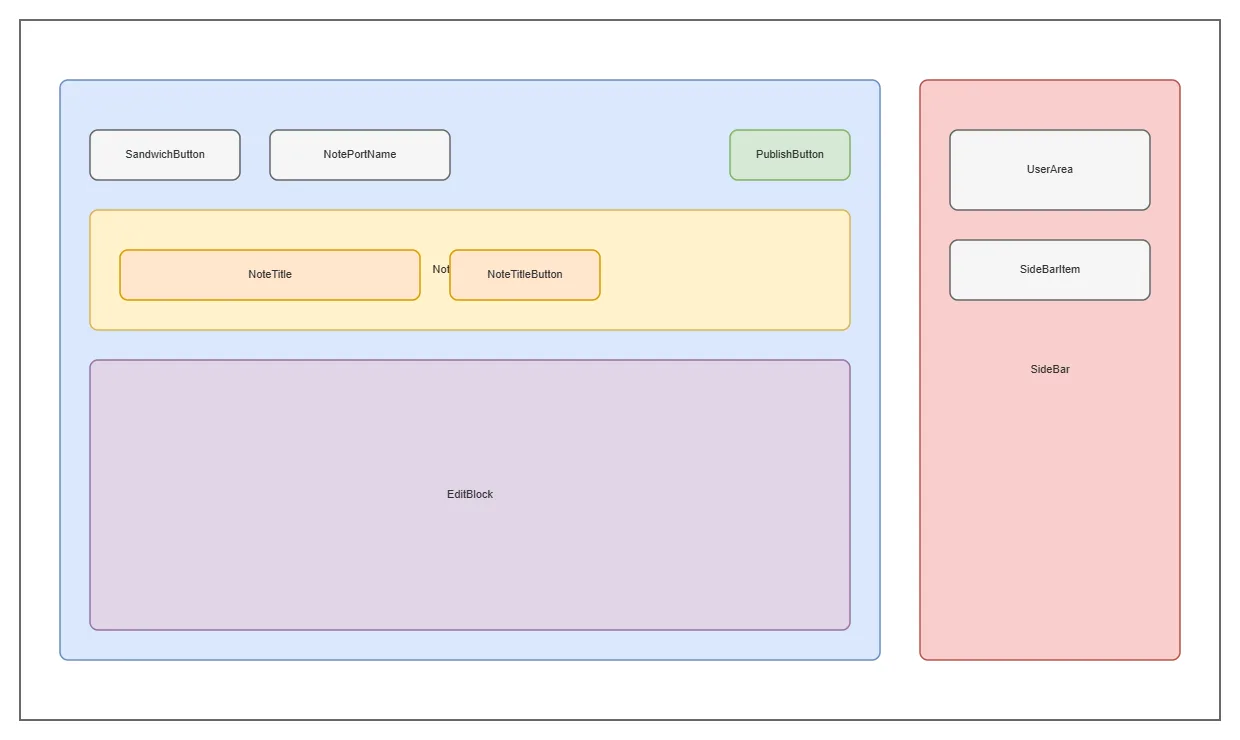
App UI Layout Structure architecture diagram

About This Architecture

App UI layout structure organizing a note-taking interface with sidebar navigation, user area, and editing workspace. The architecture connects SideBar with UserArea and EditBlock, while NotePort manages the note display with NoteTitle, NoteTitleSpace, and action buttons like PublishButton and NoteTitleButton. This modular component hierarchy demonstrates best practices for separating navigation, user context, and content editing concerns. Fork and customize this diagram on Diagrams.so to prototype your own note app layout or document component relationships. The SandwichButton and SideBarItem components enable responsive menu patterns common in modern web applications.

People also ask

How should I structure the UI components for a note-taking application?

This diagram shows a modular layout separating SideBar navigation, UserArea context, and EditBlock workspace. Components like NotePort, NoteTitle, and action buttons (PublishButton, NoteTitleButton) organize the note display and editing interface, demonstrating clear separation of concerns for scalable frontend architecture.

App UI Layout Structure

AutosimpleUI layoutfrontend architecturecomponent structurenote-taking appweb designresponsive design
Domain: Software ArchitectureAudience: UI/UX designers and frontend developers building note-taking applications
1 views0 favoritesPublic

Created by

August 14, 2026

Updated

August 15, 2026 at 1:40 PM

Type

others

Need a custom architecture diagram?

Describe your architecture in plain English and get a production-ready Draw.io diagram in seconds. Works for AWS, Azure, GCP, Kubernetes, and more.

Generate with AI

AI-generated. Verify before production use. Learn more

Report this diagram