App Cultura Bogota - User Authentication Flow
About This Architecture
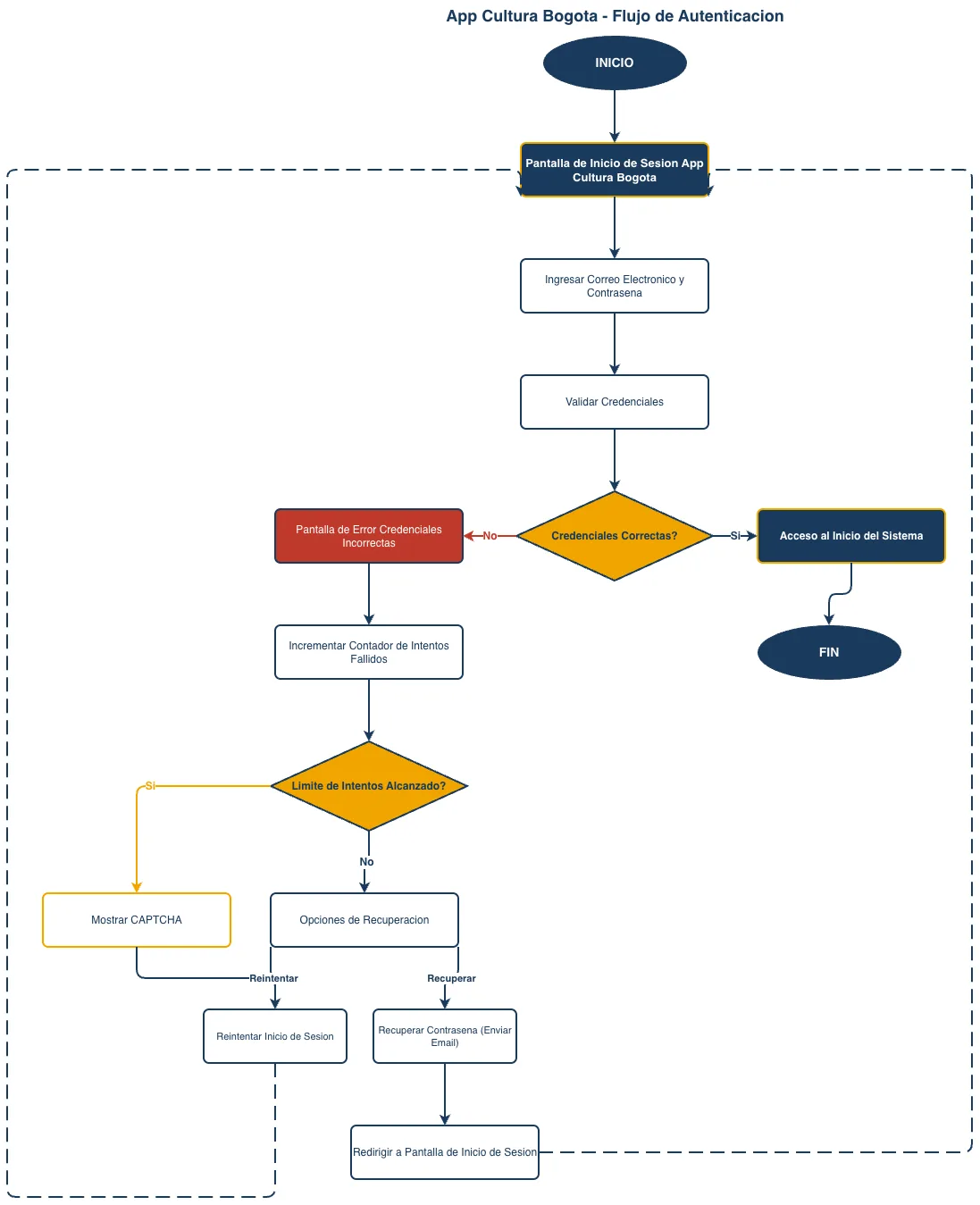
App Cultura Bogota implements a multi-stage user authentication flow with credential validation, failed attempt tracking, and account recovery mechanisms. Users enter email and password on the login screen, which validates credentials against stored records and branches to either system access or error handling. Failed login attempts increment a counter that triggers CAPTCHA display and recovery options including password reset via email, ensuring both security and user accessibility. This architecture demonstrates best practices for protecting user accounts while maintaining a smooth recovery path for legitimate users who forget credentials. Fork and customize this flowchart on Diagrams.so to adapt the authentication logic for your own civic or cultural platform.
People also ask
How should I design a secure user authentication flow with failed attempt protection and password recovery for a mobile app?
App Cultura Bogota's authentication flow validates user credentials, increments a failed attempt counter, displays CAPTCHA after reaching the attempt limit, and offers password recovery via email. This multi-layered approach balances security against brute-force attacks with user-friendly recovery options.
- Domain:
- Software Architecture
- Audience:
- Mobile app developers and UX designers building secure authentication flows for cultural and civic applications
Generated by Diagrams.so — AI architecture diagram generator with native Draw.io output. Fork this diagram, remix it, or download as .drawio, PNG, or SVG.