App Cultura Bogota - Error Flow

GENERALFlowchartintermediate
App Cultura Bogota - Error Flow — GENERAL flowchart diagram

About This Architecture

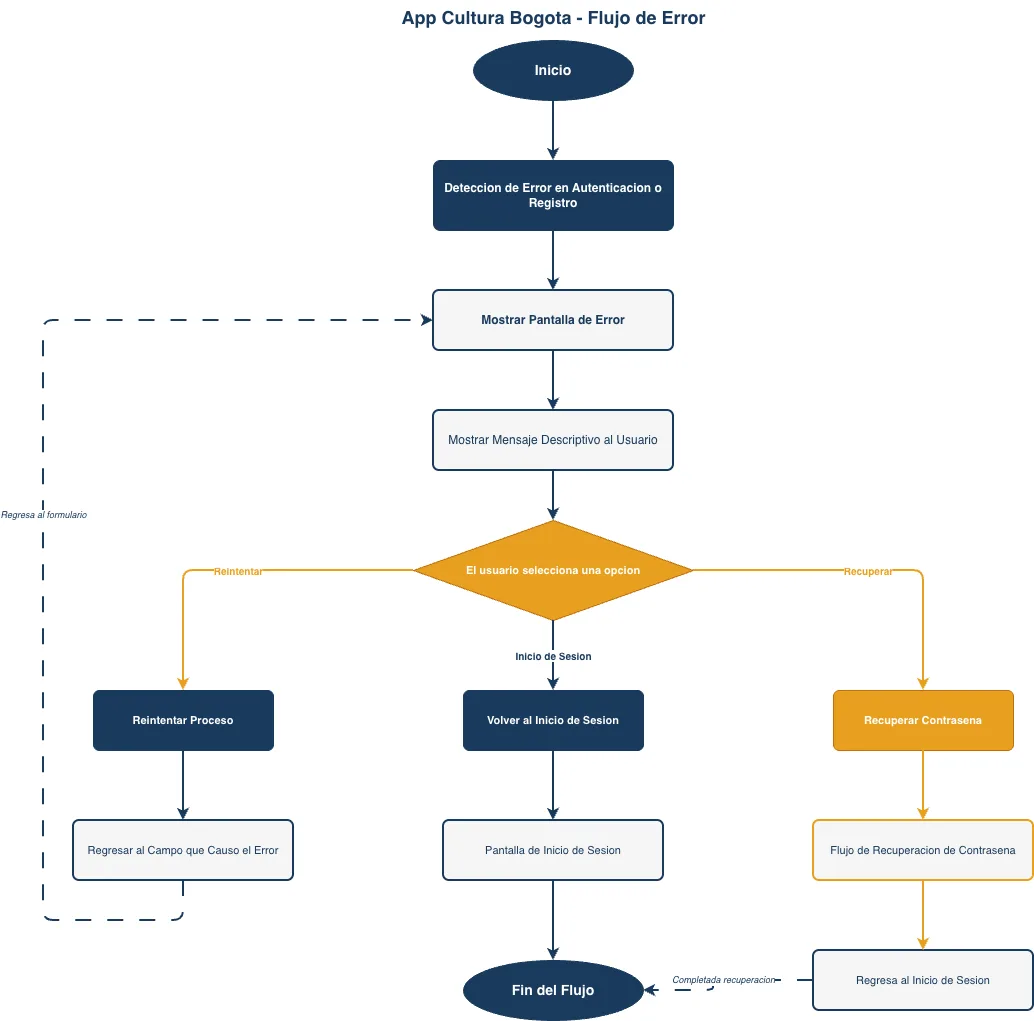
App Cultura Bogota's error flow diagram maps authentication and registration failure handling with user-centric recovery paths. From initial error detection through descriptive messaging, users branch into three recovery options: retry the failed field, return to login, or initiate password recovery. Each path loops back to the login screen or error state, ensuring users never reach a dead end and can always recover from authentication failures. Fork this diagram to customize error messages, add additional recovery paths, or integrate with your own authentication system. The flow demonstrates best practices for graceful error handling in mobile applications where user experience during failures directly impacts retention.

People also ask

How should a mobile app handle authentication errors and guide users through password recovery?

App Cultura Bogota's error flow demonstrates a user-centric approach: detect authentication failures, display clear error messages, and offer three recovery paths—retry the field, restart login, or recover password. This ensures users always have a way forward and reduces support burden.

authenticationerror-handlingmobile-appflowchartUX-designpassword-recovery
Domain:
Software Architecture
Audience:
mobile app developers and UX designers building authentication flows

Generated by Diagrams.so — AI architecture diagram generator with native Draw.io output. Fork this diagram, remix it, or download as .drawio, PNG, or SVG.

Generate your own flowchart diagram →

About This Architecture

App Cultura Bogota's error flow diagram maps authentication and registration failure handling with user-centric recovery paths. From initial error detection through descriptive messaging, users branch into three recovery options: retry the failed field, return to login, or initiate password recovery. Each path loops back to the login screen or error state, ensuring users never reach a dead end and can always recover from authentication failures. Fork this diagram to customize error messages, add additional recovery paths, or integrate with your own authentication system. The flow demonstrates best practices for graceful error handling in mobile applications where user experience during failures directly impacts retention.

People also ask

How should a mobile app handle authentication errors and guide users through password recovery?

App Cultura Bogota's error flow demonstrates a user-centric approach: detect authentication failures, display clear error messages, and offer three recovery paths—retry the field, restart login, or recover password. This ensures users always have a way forward and reduces support burden.

App Cultura Bogota - Error Flow

Autointermediateauthenticationerror-handlingmobile-appUX-designpassword-recovery
Domain: Software ArchitectureAudience: mobile app developers and UX designers building authentication flows
0 views0 favoritesPublic

Created by

May 9, 2026

Updated

May 9, 2026 at 2:57 AM

Type

flowchart

Need a custom architecture diagram?

Describe your architecture in plain English and get a production-ready Draw.io diagram in seconds. Works for AWS, Azure, GCP, Kubernetes, and more.

Generate with AI