M2M SharePoint App-Only Certificate Architecture
AZUREFlowchartadvanced
M2M SharePoint App-Only Certificate Architecture — AZURE flowchart diagram

About This Architecture

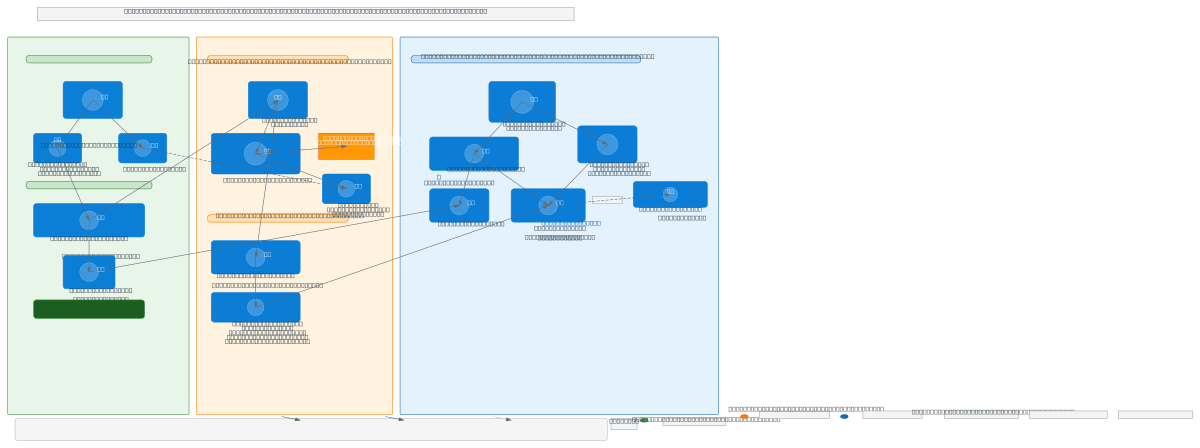
Machine-to-machine SharePoint app-only certificate architecture on Azure uses Entra ID app registration, certificate-based TLS authentication, and granular Sites.Selected permissions to enable secure, delegated access without user credentials. The workflow spans five phases: certificate generation (.cer/.pfx), app registration in Entra ID with public key upload, optional admin consent configuration, dedicated SharePoint site creation with scoped permissions, and PowerShell PnP script execution for document operations. This pattern eliminates credential exposure, enforces least-privilege access limited to a single site, and meets compliance requirements for unattended automation. Fork this diagram on Diagrams.so to customize certificate paths, tenant URLs, or permission scopes for your M2M integration. The architecture demonstrates Azure best practices for service-to-service authentication in hybrid and cloud-native environments.

People also ask

How do I set up machine-to-machine SharePoint access on Azure using certificate-based authentication instead of credentials?

This diagram shows the five-phase process: generate .cer/.pfx certificates, register the app in Entra ID with the public key, optionally grant admin consent, create a dedicated SharePoint site with scoped permissions, and authenticate via PowerShell PnP using the certificate path. Sites.Selected permissions ensure the app accesses only the designated site, enforcing least-privilege security.

AzureSharePoint OnlineEntra IDcertificate authenticationM2MPowerShell PnP
Domain:
Cloud Azure
Audience:
Azure cloud architects implementing machine-to-machine SharePoint access with certificate-based authentication

Generated by Diagrams.so — AI architecture diagram generator with native Draw.io output. Fork this diagram, remix it, or download as .drawio, PNG, or SVG.

Generate your own flowchart diagram →

About This Architecture

Machine-to-machine SharePoint app-only certificate architecture on Azure uses Entra ID app registration, certificate-based TLS authentication, and granular Sites.Selected permissions to enable secure, delegated access without user credentials. The workflow spans five phases: certificate generation (.cer/.pfx), app registration in Entra ID with public key upload, optional admin consent configuration, dedicated SharePoint site creation with scoped permissions, and PowerShell PnP script execution for document operations. This pattern eliminates credential exposure, enforces least-privilege access limited to a single site, and meets compliance requirements for unattended automation. Fork this diagram on Diagrams.so to customize certificate paths, tenant URLs, or permission scopes for your M2M integration. The architecture demonstrates Azure best practices for service-to-service authentication in hybrid and cloud-native environments.

People also ask

How do I set up machine-to-machine SharePoint access on Azure using certificate-based authentication instead of credentials?

This diagram shows the five-phase process: generate .cer/.pfx certificates, register the app in Entra ID with the public key, optionally grant admin consent, create a dedicated SharePoint site with scoped permissions, and authenticate via PowerShell PnP using the certificate path. Sites.Selected permissions ensure the app accesses only the designated site, enforcing least-privilege security.

M2M SharePoint App-Only Certificate Architecture

AzureadvancedSharePoint OnlineEntra IDcertificate authenticationM2MPowerShell PnP
Domain: Cloud AzureAudience: Azure cloud architects implementing machine-to-machine SharePoint access with certificate-based authentication
0 views0 favoritesPublic

Created by

May 1, 2026

Updated

May 1, 2026 at 1:11 PM

Type

flowchart

Need a custom architecture diagram?

Describe your architecture in plain English and get a production-ready Draw.io diagram in seconds. Works for AWS, Azure, GCP, Kubernetes, and more.

Generate with AI