Enterprise Network Topology - Layered Security
OCIFlowchartadvanced
Enterprise Network Topology - Layered Security — OCI flowchart diagram

About This Architecture

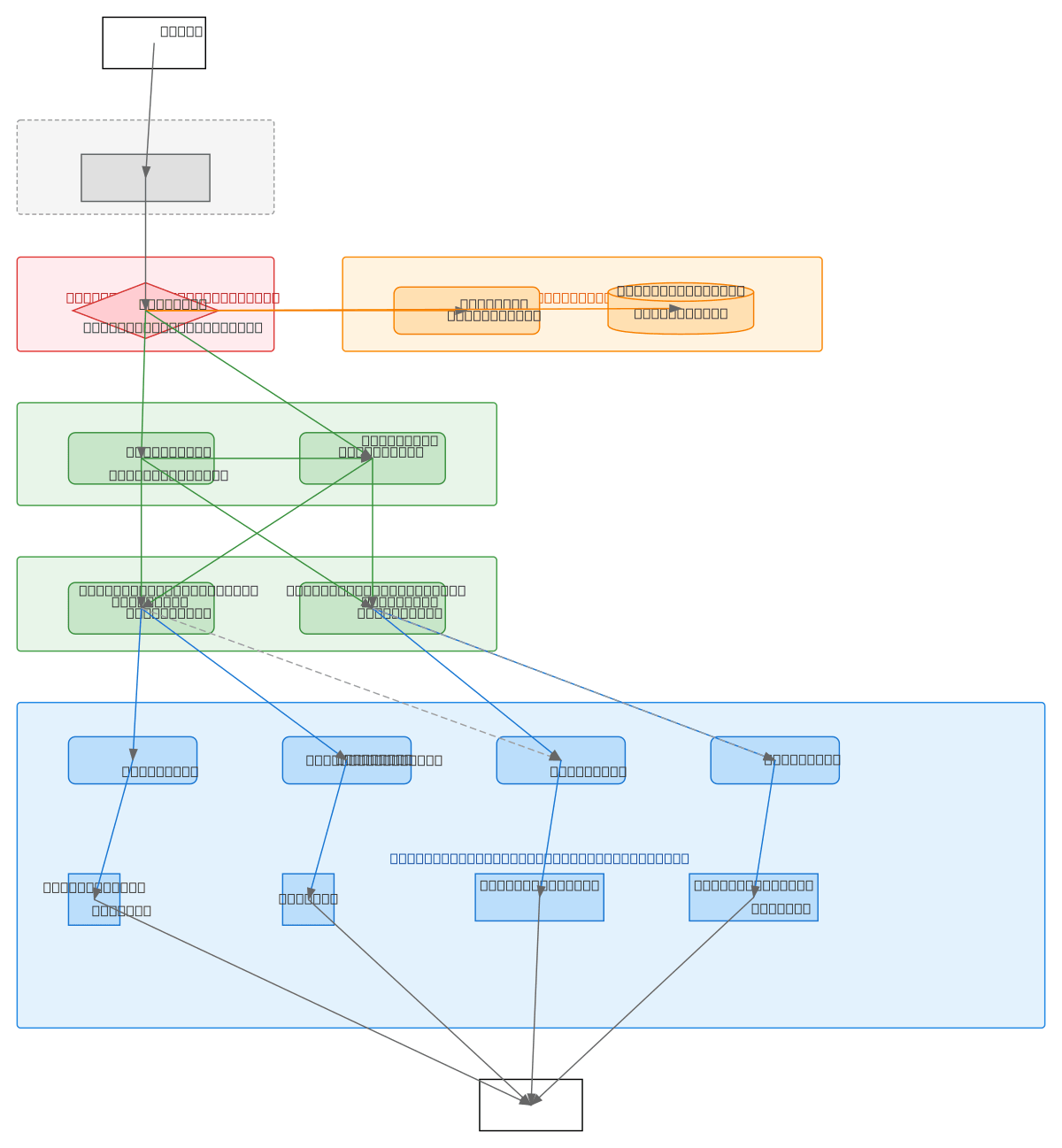
Enterprise network topology with layered security using Palo Alto Firewall PA-FW-01 to segment Untrust, DMZ, and Trust zones across dual H3C S6520 core switches. Traffic flows from ISP Internet through the firewall to DMZ servers (Web Server VLAN 100, Database Server VLAN 100) and internal office networks via L3 aggregation and L2 access layers. The architecture implements defense-in-depth with VLAN 10 for office PCs and VLAN 20 for wireless APs, each connected through redundant aggregation switches (Agg-SW-01, Agg-SW-02) to four access switches. This design demonstrates enterprise best practices for network segmentation, high availability through dual core switches and aggregation paths, and controlled access to critical resources. Fork this diagram on Diagrams.so to customize VLANs, add additional security zones, or adapt firewall rules for your organization's requirements.

People also ask

How do you design an enterprise network topology with DMZ segmentation and layered security using Palo Alto firewalls and VLAN isolation?

This diagram shows a three-tier enterprise network where a Palo Alto Firewall PA-FW-01 enforces security between Untrust (ISP), DMZ (Web/Database servers on VLAN 100), and Trust zones (office networks). Dual H3C S6520 core switches provide redundancy and route traffic through L3 aggregation switches to L2 access switches, which connect office PCs (VLAN 10) and wireless APs (VLAN 20) with isolated

enterprise-networkingfirewall-architecturedmz-segmentationvlan-designnetwork-securityoci
Domain:
Networking
Audience:
Enterprise network architects designing secure, layered network topologies with DMZ segmentation and VLAN isolation

Generated by Diagrams.so — AI architecture diagram generator with native Draw.io output. Fork this diagram, remix it, or download as .drawio, PNG, or SVG.

Generate your own flowchartdiagram →

About This Architecture

Enterprise network topology with layered security using Palo Alto Firewall PA-FW-01 to segment Untrust, DMZ, and Trust zones across dual H3C S6520 core switches. Traffic flows from ISP Internet through the firewall to DMZ servers (Web Server VLAN 100, Database Server VLAN 100) and internal office networks via L3 aggregation and L2 access layers. The architecture implements defense-in-depth with VLAN 10 for office PCs and VLAN 20 for wireless APs, each connected through redundant aggregation switches (Agg-SW-01, Agg-SW-02) to four access switches. This design demonstrates enterprise best practices for network segmentation, high availability through dual core switches and aggregation paths, and controlled access to critical resources. Fork this diagram on Diagrams.so to customize VLANs, add additional security zones, or adapt firewall rules for your organization's requirements.

People also ask

How do you design an enterprise network topology with DMZ segmentation and layered security using Palo Alto firewalls and VLAN isolation?

This diagram shows a three-tier enterprise network where a Palo Alto Firewall PA-FW-01 enforces security between Untrust (ISP), DMZ (Web/Database servers on VLAN 100), and Trust zones (office networks). Dual H3C S6520 core switches provide redundancy and route traffic through L3 aggregation switches to L2 access switches, which connect office PCs (VLAN 10) and wireless APs (VLAN 20) with isolated

Enterprise Network Topology - Layered Security

OCIadvancedenterprise-networkingfirewall-architecturedmz-segmentationvlan-designnetwork-security
Domain: NetworkingAudience: Enterprise network architects designing secure, layered network topologies with DMZ segmentation and VLAN isolation
0 views0 favoritesPublic

Created by

June 10, 2026

Updated

June 10, 2026 at 2:53 AM

Type

flowchart

Need a custom architecture diagram?

Describe your architecture in plain English and get a production-ready Draw.io diagram in seconds. Works for AWS, Azure, GCP, Kubernetes, and more.

Generate with AI