SOC Network Architecture - pfSense, Wazuh, DMZ

GENERALNetworkintermediate
SOC Network Architecture - pfSense, Wazuh, DMZ — GENERAL network diagram

About This Architecture

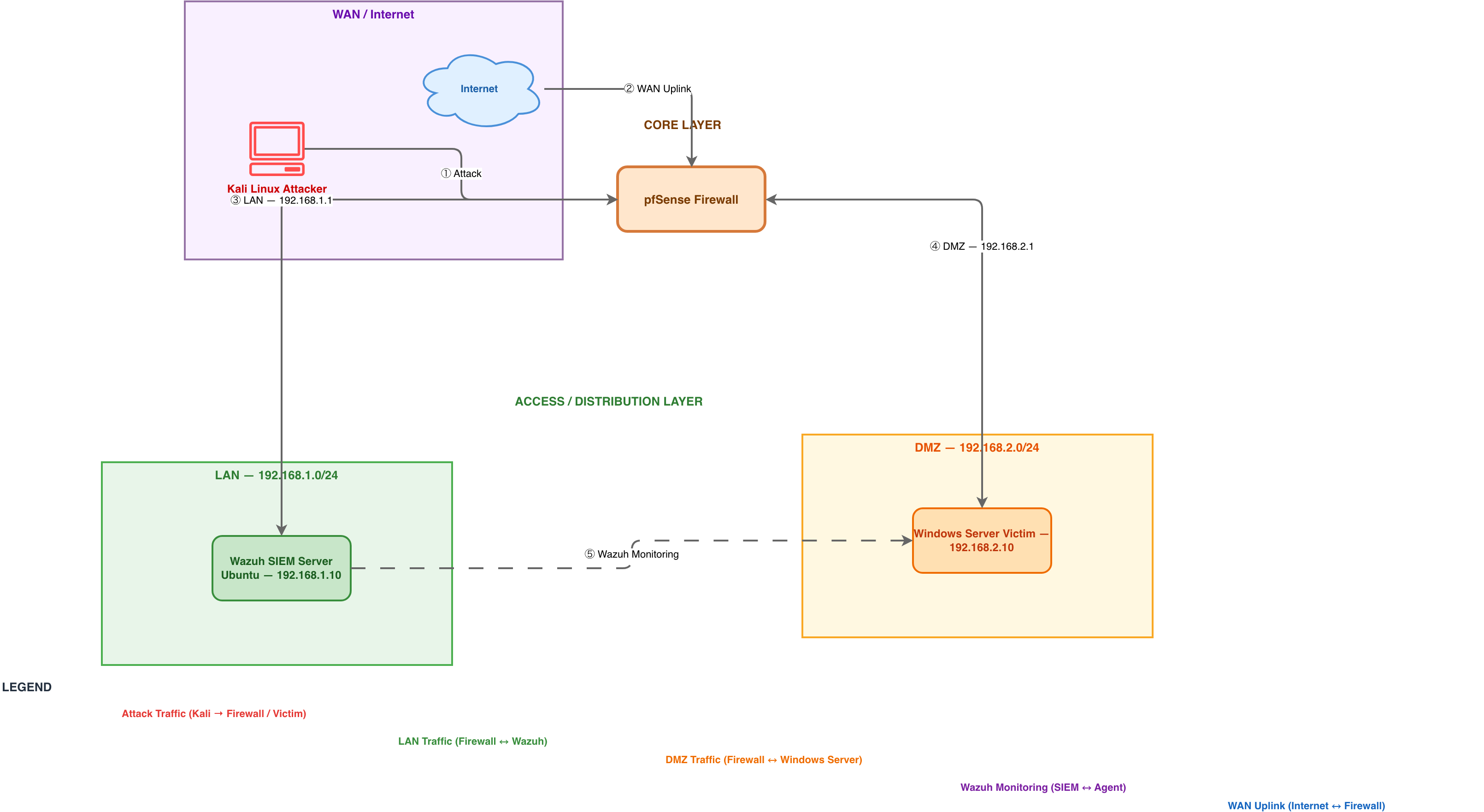
pfSense firewall with DMZ segmentation and Wazuh SIEM monitoring demonstrates a production-grade security operations center network architecture. Traffic flows from the WAN through pfSense (192.168.1.1 gateway, 192.168.2.1 DMZ gateway) into isolated LAN (192.168.1.0/24) and DMZ (192.168.2.0/24) segments, with Wazuh SIEM Server (192.168.1.10) monitoring Windows Server Victim (192.168.2.10) for intrusion detection. This architecture enforces least-privilege access, separates critical assets into a DMZ, and provides real-time security visibility—essential for detecting lateral movement and attack patterns. Fork this diagram to customize firewall rules, add additional monitoring agents, or adapt it for your lab environment. Color-coded traffic flows (red attack, orange LAN, blue DMZ, purple monitoring) make threat scenarios and detection workflows immediately clear.

People also ask

How do I design a SOC network with pfSense firewall, Wazuh SIEM, and DMZ segmentation?

This diagram shows a production-grade SOC architecture where pfSense firewall controls traffic between WAN, LAN (192.168.1.0/24), and DMZ (192.168.2.0/24) segments. Wazuh SIEM Server (192.168.1.10) monitors the Windows Server Victim (192.168.2.10) in the DMZ, detecting attacks and lateral movement. Color-coded traffic flows illustrate attack paths, firewall rules, and monitoring visibility.

pfSenseWazuhnetwork-securityDMZSIEMSOC
Domain:
Security
Audience:
Security architects and SOC engineers designing network segmentation and threat detection labs

Generated by Diagrams.so — AI architecture diagram generator with native Draw.io output. Fork this diagram, remix it, or download as .drawio, PNG, or SVG.

Generate your own network diagram →

About This Architecture

pfSense firewall with DMZ segmentation and Wazuh SIEM monitoring demonstrates a production-grade security operations center network architecture. Traffic flows from the WAN through pfSense (192.168.1.1 gateway, 192.168.2.1 DMZ gateway) into isolated LAN (192.168.1.0/24) and DMZ (192.168.2.0/24) segments, with Wazuh SIEM Server (192.168.1.10) monitoring Windows Server Victim (192.168.2.10) for intrusion detection. This architecture enforces least-privilege access, separates critical assets into a DMZ, and provides real-time security visibility—essential for detecting lateral movement and attack patterns. Fork this diagram to customize firewall rules, add additional monitoring agents, or adapt it for your lab environment. Color-coded traffic flows (red attack, orange LAN, blue DMZ, purple monitoring) make threat scenarios and detection workflows immediately clear.

People also ask

How do I design a SOC network with pfSense firewall, Wazuh SIEM, and DMZ segmentation?

This diagram shows a production-grade SOC architecture where pfSense firewall controls traffic between WAN, LAN (192.168.1.0/24), and DMZ (192.168.2.0/24) segments. Wazuh SIEM Server (192.168.1.10) monitors the Windows Server Victim (192.168.2.10) in the DMZ, detecting attacks and lateral movement. Color-coded traffic flows illustrate attack paths, firewall rules, and monitoring visibility.

SOC Network Architecture - pfSense, Wazuh, DMZ

AutointermediatepfSenseWazuhnetwork-securityDMZSIEMSOC
Domain: SecurityAudience: Security architects and SOC engineers designing network segmentation and threat detection labs
11 views0 favoritesPublic

Created by

April 1, 2026

Updated

May 18, 2026 at 7:38 AM

Type

network

Need a custom architecture diagram?

Describe your architecture in plain English and get a production-ready Draw.io diagram in seconds. Works for AWS, Azure, GCP, Kubernetes, and more.

Generate with AI