Sitemap - Sistema de Controle de Estoque de
GENERALArchitectureintermediate
Sitemap - Sistema de Controle de Estoque de — GENERAL architecture diagram

About This Architecture

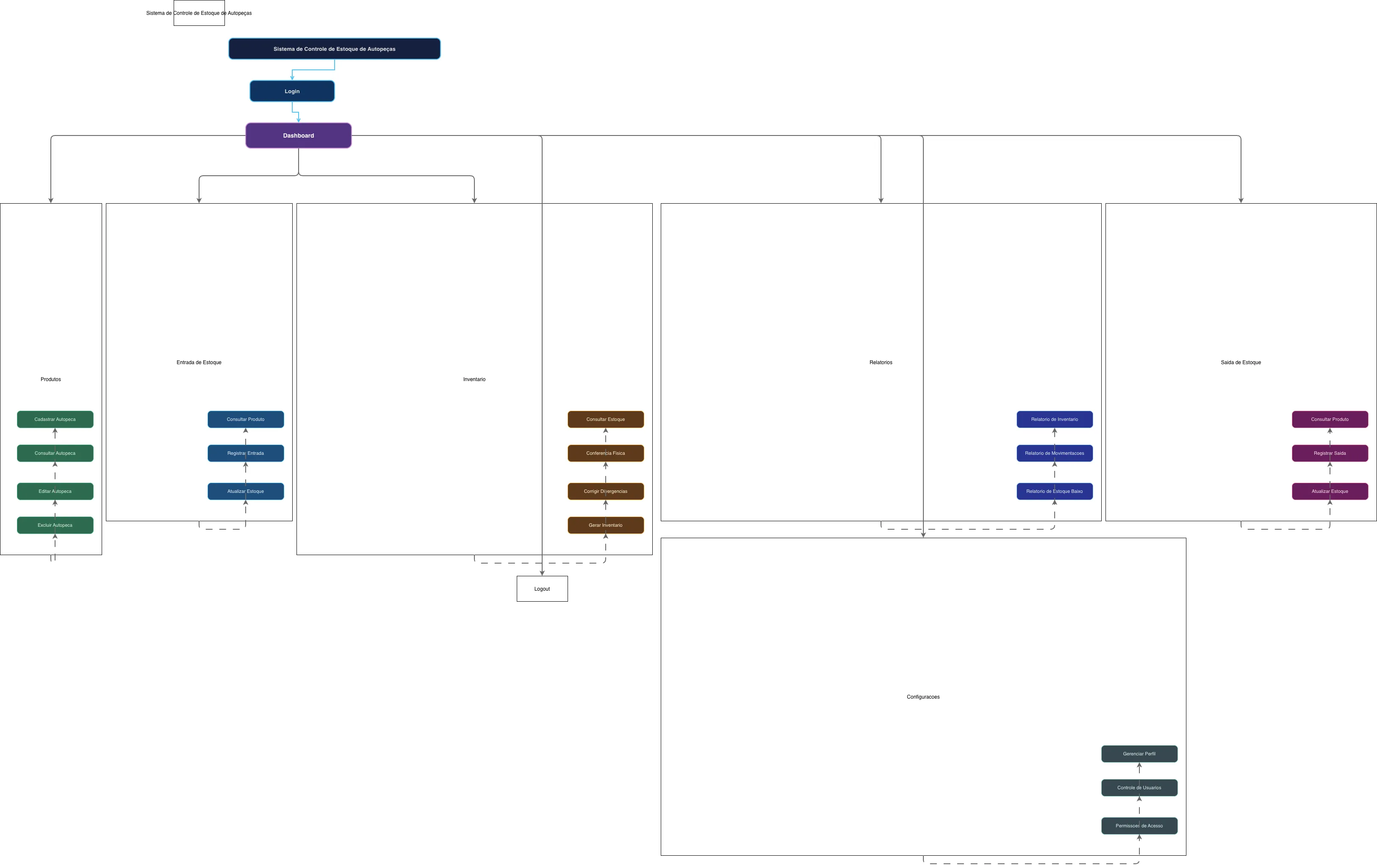
Auto parts inventory control system sitemap organizing seven core modules—Products, Stock Entry, Stock Exit, Inventory, Reports, Settings, and Dashboard—with hierarchical navigation from Login through a central Dashboard hub. Data flows from product registration and stock transactions through inventory reconciliation to comprehensive reporting on stock levels and movements. This architecture demonstrates best practices for modular inventory system design, separating transactional operations from analytics and administrative functions. Fork this diagram on Diagrams.so to customize module names, add new workflows, or adapt it for different inventory domains. The sitemap structure supports role-based access control through the Permissions module, enabling secure multi-user operations.

People also ask

What is the typical information architecture for an auto parts inventory management system?

This sitemap shows a hub-and-spoke architecture centered on a Dashboard that connects to seven functional modules: Products (registration, consultation, editing), Stock Entry and Exit (transaction recording and updates), Inventory (physical counts and reconciliation), Reports (stock levels and movements), and Settings (user and permission management). This modular design separates transactional wo

inventory managementsitemapauto partssoftware architecturedashboard designworkflow diagram
Domain:
Software Architecture
Audience:
software architects and UX designers designing inventory management systems

Generated by Diagrams.so — AI architecture diagram generator with native Draw.io output. Fork this diagram, remix it, or download as .drawio, PNG, or SVG.

Generate your own architecture diagram →

About This Architecture

Auto parts inventory control system sitemap organizing seven core modules—Products, Stock Entry, Stock Exit, Inventory, Reports, Settings, and Dashboard—with hierarchical navigation from Login through a central Dashboard hub. Data flows from product registration and stock transactions through inventory reconciliation to comprehensive reporting on stock levels and movements. This architecture demonstrates best practices for modular inventory system design, separating transactional operations from analytics and administrative functions. Fork this diagram on Diagrams.so to customize module names, add new workflows, or adapt it for different inventory domains. The sitemap structure supports role-based access control through the Permissions module, enabling secure multi-user operations.

People also ask

What is the typical information architecture for an auto parts inventory management system?

This sitemap shows a hub-and-spoke architecture centered on a Dashboard that connects to seven functional modules: Products (registration, consultation, editing), Stock Entry and Exit (transaction recording and updates), Inventory (physical counts and reconciliation), Reports (stock levels and movements), and Settings (user and permission management). This modular design separates transactional wo

Sitemap - Sistema de Controle de Estoque de

Autointermediateinventory managementsitemapauto partssoftware architecturedashboard designworkflow diagram
Domain: Software ArchitectureAudience: software architects and UX designers designing inventory management systems
0 views0 favoritesPublic

Created by

May 21, 2026

Updated

May 21, 2026 at 3:53 PM

Type

architecture

Need a custom architecture diagram?

Describe your architecture in plain English and get a production-ready Draw.io diagram in seconds. Works for AWS, Azure, GCP, Kubernetes, and more.

Generate with AI