Rack-1 Network Device Layout
OCINetworkintermediate
Rack-1 Network Device Layout — OCI network diagram

About This Architecture

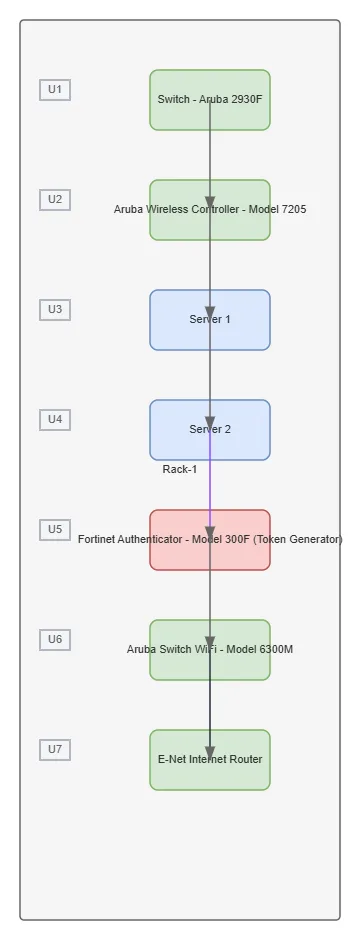
Rack-1 Network Device Layout demonstrates a vertically integrated enterprise network stack spanning seven rack units with Aruba switching, wireless control, and Fortinet security. The Aruba 2930F switch at U1 connects to the Aruba Wireless Controller 7205, which manages traffic through Server 1 and Server 2 before reaching the Fortinet Authenticator 300F token generator for authentication. The Aruba Switch WiFi 6300M at U6 bridges authenticated traffic to the E-Net Internet Router, creating a secure, hierarchical network perimeter. This architecture demonstrates best practices for enterprise network segmentation, wireless controller placement, and multi-factor authentication integration within a compact physical footprint. Fork this diagram on Diagrams.so to customize rack assignments, add additional security zones, or adapt the topology for your OCI network deployment.

People also ask

How should I physically arrange enterprise network devices in a rack with Aruba switches, wireless controller, and Fortinet authentication?

Rack-1 Network Device Layout shows a seven-unit configuration where the Aruba 2930F switch (U1) connects to the Aruba Wireless Controller 7205 (U2), which manages traffic through servers and the Fortinet Authenticator 300F (U5) before the Aruba WiFi 6300M (U6) routes to the internet. This vertical stack demonstrates proper device ordering for network hierarchy, security, and wireless management.

OCInetwork architectureArubaFortinetenterprise networkingrack design
Domain:
Networking
Audience:
Network architects designing enterprise rack infrastructure on OCI

Generated by Diagrams.so — AI architecture diagram generator with native Draw.io output. Fork this diagram, remix it, or download as .drawio, PNG, or SVG.

Generate your own networkdiagram →

Rack-1 Network Device Layout — OCI architecture diagram

About This Architecture

Rack-1 Network Device Layout demonstrates a vertically integrated enterprise network stack spanning seven rack units with Aruba switching, wireless control, and Fortinet security. The Aruba 2930F switch at U1 connects to the Aruba Wireless Controller 7205, which manages traffic through Server 1 and Server 2 before reaching the Fortinet Authenticator 300F token generator for authentication. The Aruba Switch WiFi 6300M at U6 bridges authenticated traffic to the E-Net Internet Router, creating a secure, hierarchical network perimeter. This architecture demonstrates best practices for enterprise network segmentation, wireless controller placement, and multi-factor authentication integration within a compact physical footprint. Fork this diagram on Diagrams.so to customize rack assignments, add additional security zones, or adapt the topology for your OCI network deployment.

People also ask

How should I physically arrange enterprise network devices in a rack with Aruba switches, wireless controller, and Fortinet authentication?

Rack-1 Network Device Layout shows a seven-unit configuration where the Aruba 2930F switch (U1) connects to the Aruba Wireless Controller 7205 (U2), which manages traffic through servers and the Fortinet Authenticator 300F (U5) before the Aruba WiFi 6300M (U6) routes to the internet. This vertical stack demonstrates proper device ordering for network hierarchy, security, and wireless management.

Rack-1 Network Device Layout

OCIintermediatenetwork architectureArubaFortinetenterprise networkingrack design
Domain: NetworkingAudience: Network architects designing enterprise rack infrastructure on OCI
0 views0 favoritesPublic

Created by

July 7, 2026

Updated

July 7, 2026 at 12:20 PM

Type

network

Need a custom architecture diagram?

Describe your architecture in plain English and get a production-ready Draw.io diagram in seconds. Works for AWS, Azure, GCP, Kubernetes, and more.

Generate with AI