Multi-Site SSL VPN Infrastructure
GENERALNetworkadvanced
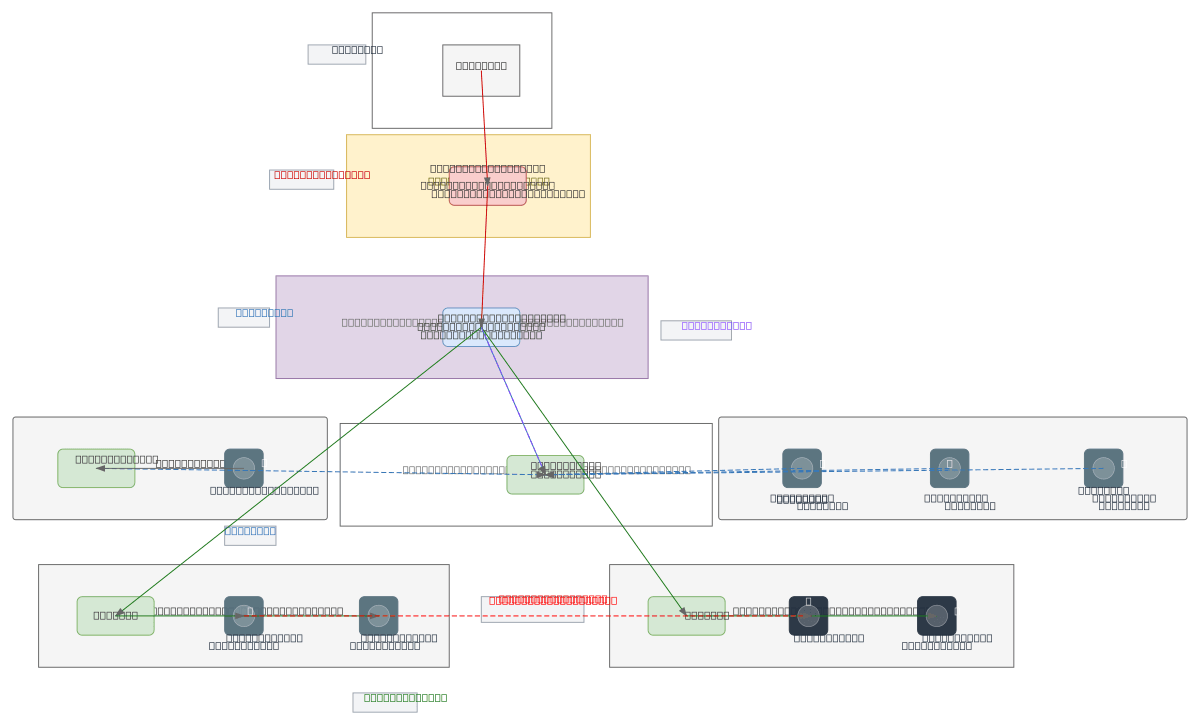
Multi-Site SSL VPN Infrastructure — GENERAL network diagram

About This Architecture

Multi-site SSL VPN infrastructure using FortiGate firewall, OpenVPN gateway, and FreeRADIUS authentication to securely connect HQ, branch offices, and remote clients across isolated VLANs. Internet traffic flows through the FortiGate WAN interface with NAT and VPN policies, then to the HQ OpenVPN server which bridges the 10.8.0.0/24 VPN zone and enforces RADIUS-based access control. Branch routers and remote laptops establish SSL VPN tunnels to the central gateway, receiving dynamic IPs within the VPN subnet while maintaining segmentation between Admin (VLAN 10) and User (VLAN 20) networks. This architecture demonstrates zero-trust segmentation with inter-VLAN isolation and centralized authentication, critical for organizations requiring secure remote access without compromising internal network boundaries. Fork this diagram on Diagrams.so to customize subnets, add additional branch sites, or integrate alternative VPN protocols and firewall vendors.

People also ask

How do you design a multi-site VPN infrastructure that securely connects branch offices and remote clients while maintaining VLAN isolation and centralized authentication?

This diagram shows a FortiGate firewall protecting the WAN edge, routing VPN traffic to a central OpenVPN gateway (10.8.0.1/24) with FreeRADIUS authentication. Branch routers and remote laptops tunnel to the gateway, while Admin (VLAN 10) and User (VLAN 20) networks remain isolated with blocked inter-VLAN traffic, enforcing zero-trust segmentation.

VPNFortiGateOpenVPNVLAN SegmentationNetwork SecurityMulti-Site Architecture
Domain:
Networking
Audience:
Network architects designing multi-site VPN infrastructure with FortiGate and OpenVPN

Generated by Diagrams.so — AI architecture diagram generator with native Draw.io output. Fork this diagram, remix it, or download as .drawio, PNG, or SVG.

Generate your own network diagram →

About This Architecture

Multi-site SSL VPN infrastructure using FortiGate firewall, OpenVPN gateway, and FreeRADIUS authentication to securely connect HQ, branch offices, and remote clients across isolated VLANs. Internet traffic flows through the FortiGate WAN interface with NAT and VPN policies, then to the HQ OpenVPN server which bridges the 10.8.0.0/24 VPN zone and enforces RADIUS-based access control. Branch routers and remote laptops establish SSL VPN tunnels to the central gateway, receiving dynamic IPs within the VPN subnet while maintaining segmentation between Admin (VLAN 10) and User (VLAN 20) networks. This architecture demonstrates zero-trust segmentation with inter-VLAN isolation and centralized authentication, critical for organizations requiring secure remote access without compromising internal network boundaries. Fork this diagram on Diagrams.so to customize subnets, add additional branch sites, or integrate alternative VPN protocols and firewall vendors.

People also ask

How do you design a multi-site VPN infrastructure that securely connects branch offices and remote clients while maintaining VLAN isolation and centralized authentication?

This diagram shows a FortiGate firewall protecting the WAN edge, routing VPN traffic to a central OpenVPN gateway (10.8.0.1/24) with FreeRADIUS authentication. Branch routers and remote laptops tunnel to the gateway, while Admin (VLAN 10) and User (VLAN 20) networks remain isolated with blocked inter-VLAN traffic, enforcing zero-trust segmentation.

Multi-Site SSL VPN Infrastructure

AutoadvancedVPNFortiGateOpenVPNVLAN SegmentationNetwork SecurityMulti-Site Architecture
Domain: NetworkingAudience: Network architects designing multi-site VPN infrastructure with FortiGate and OpenVPN
0 views0 favoritesPublic

Created by

May 1, 2026

Updated

May 1, 2026 at 8:09 PM

Type

network

Need a custom architecture diagram?

Describe your architecture in plain English and get a production-ready Draw.io diagram in seconds. Works for AWS, Azure, GCP, Kubernetes, and more.

Generate with AI