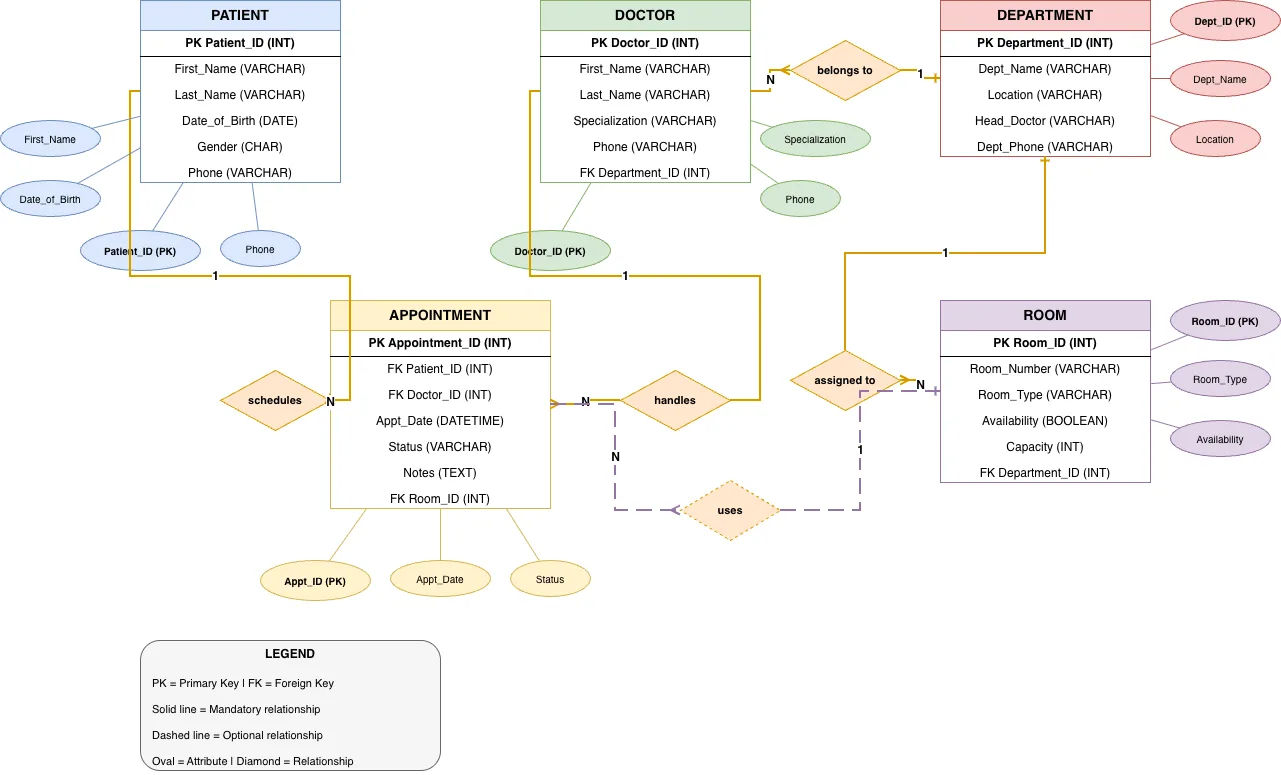
Hospital Management System ER Diagram architecture diagram

About This Architecture

Hospital Management System ER diagram models five core entities—Patient, Doctor, Appointment, Department, and Room—with their attributes and relationships. Patients schedule appointments with doctors, who belong to departments and handle patient care, while appointments are assigned to available rooms within departments. This normalized schema eliminates data redundancy, enforces referential integrity through primary and foreign keys, and supports mandatory and optional relationships critical for operational healthcare workflows. Fork this diagram on Diagrams.so to customize entity attributes, add new tables like billing or medical records, or export as .drawio for integration into your database design documentation. The legend clearly distinguishes primary keys, foreign keys, and relationship cardinality, making it ideal for onboarding new database administrators or presenting to stakeholders.

People also ask

How do I design a normalized database schema for a hospital management system?

This ER diagram demonstrates a normalized schema with five core entities: Patient, Doctor, Appointment, Department, and Room. Relationships like 'schedules', 'handles', 'belongs to', 'assigned to', and 'uses' connect these entities through primary and foreign keys, enforcing data integrity and eliminating redundancy. The diagram uses solid lines for mandatory relationships and dashed lines for opt

Hospital Management System ER Diagram

AutointermediateER diagramdatabase designhealthcarehospital managementdata modelingnormalization
Domain: Data EngineeringAudience: Database designers and healthcare IT architects building hospital management systems
7 views0 favoritesPublic

Created by

May 13, 2026

Updated

August 6, 2026 at 5:34 PM

Type

er

Need a custom architecture diagram?

Describe your architecture in plain English and get a production-ready Draw.io diagram in seconds. Works for AWS, Azure, GCP, Kubernetes, and more.

Generate with AI

AI-generated. Verify before production use. Learn more

Report this diagram