Databricks Workspace Provisioning - esa-dev-test
About This Architecture
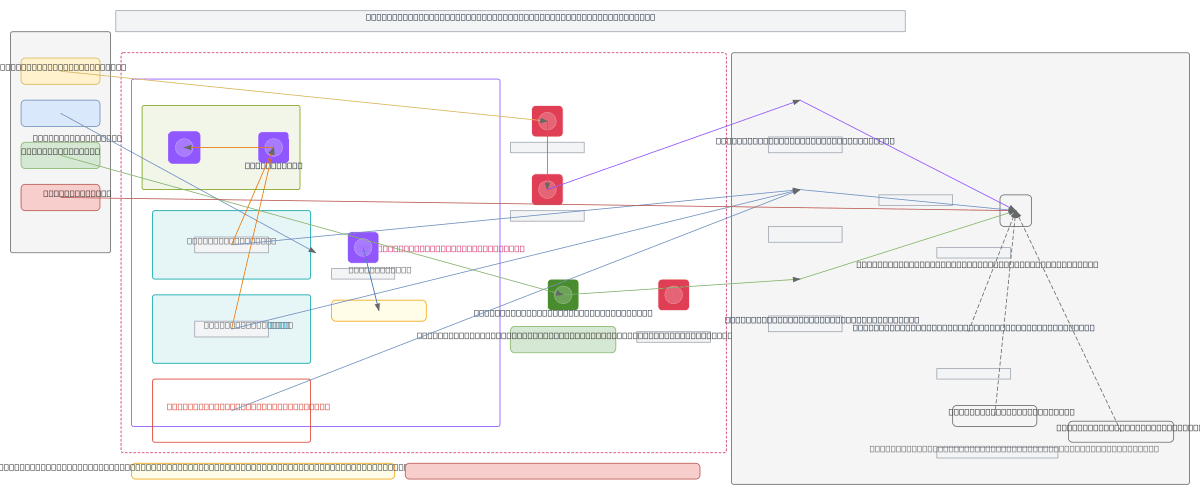
Databricks workspace provisioning on AWS using Terraform modules orchestrates cross-account IAM credentials, VPC networking, and S3 root bucket configuration in a customer AWS account. The architecture spans a VPC (10.20.0.0/20) with public and private subnets, NAT/Internet gateways, security groups, and an S3 Gateway VPC endpoint, all managed through Terraform modules for credentials, network, and storage. MWS (Managed Workspace Service) credentials, network config, and storage config are derived from IAM roles, VPC topology, and encrypted S3 buckets to register the workspace with Databricks control plane. This pattern demonstrates infrastructure-as-code best practices for secure, repeatable workspace deployment while maintaining least-privilege cross-account access and data isolation. Fork this diagram on Diagrams.so to customize subnets, security groups, or IAM policies for your own Databricks environment.
People also ask
How do you provision a Databricks workspace on AWS using Terraform with cross-account IAM and VPC networking?
This diagram shows a complete Terraform-driven Databricks workspace provisioning workflow on AWS, including VPC setup (10.20.0.0/20 with public/private subnets), cross-account IAM role and policy creation, S3 root bucket with encryption and Databricks bucket policy, and MWS credentials/network/storage registration. The architecture uses Terraform modules to manage credentials, network, and storage
- Domain:
- Cloud Aws
- Audience:
- AWS solutions architects provisioning Databricks workspaces with Terraform
Generated by Diagrams.so — AI architecture diagram generator with native Draw.io output. Fork this diagram, remix it, or download as .drawio, PNG, or SVG.
