AWS Hub-and-Spoke with Centralized Inspection

MULTIArchitectureadvanced
AWS Hub-and-Spoke with Centralized Inspection — MULTI architecture diagram

About This Architecture

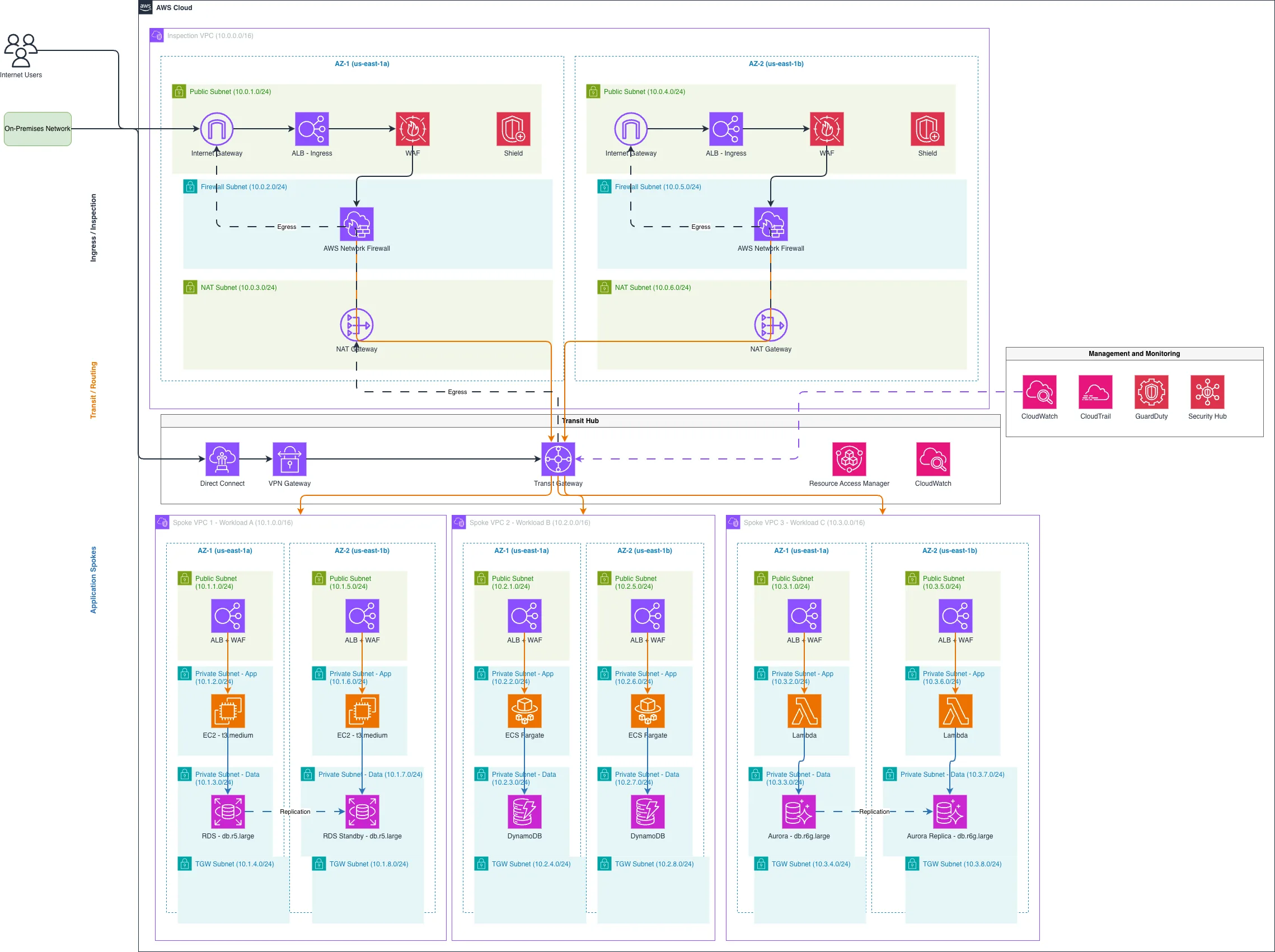
AWS Hub-and-Spoke network topology with centralized inspection uses a dedicated Inspection VPC (10.0.0.0/16) in the hub to route all ingress, egress, and inter-spoke traffic through AWS Network Firewall, WAF, and Shield for unified threat detection. Transit Gateway connects three application spokes—Workload A (EC2+RDS), Workload B (ECS Fargate+DynamoDB), and Workload C (Lambda+Aurora)—each across two availability zones with redundant ALBs and private subnets for compute and data layers. Internet Users and On-Premises Networks reach the hub via Internet Gateway, VPN Gateway, and Direct Connect, with all traffic inspected before routing to spokes via Transit Gateway and Resource Access Manager. This architecture enforces least-privilege access, centralized logging via CloudWatch and CloudTrail, and threat detection with GuardDuty, eliminating the need for distributed firewalls in each spoke. Fork and customize this diagram on Diagrams.so to match your CIDR ranges, add additional spokes, or swap compute services.

People also ask

How do I design a multi-VPC AWS network with centralized security inspection and Transit Gateway routing?

Use a dedicated Inspection VPC in the hub with AWS Network Firewall, WAF, and Shield to inspect all ingress, egress, and inter-VPC traffic. Connect application spokes via Transit Gateway, ensuring all traffic flows through the hub for unified threat detection and logging before reaching compute resources like EC2, ECS Fargate, or Lambda.

AWSnetworkinghub-and-spokeTransit Gatewaysecuritymulti-VPC
Domain:
Cloud Aws
Audience:
AWS solutions architects designing multi-VPC enterprise networks with centralized security

Generated by Diagrams.so — AI architecture diagram generator with native Draw.io output. Fork this diagram, remix it, or download as .drawio, PNG, or SVG.

Generate your own architecture diagram →

About This Architecture

AWS Hub-and-Spoke network topology with centralized inspection uses a dedicated Inspection VPC (10.0.0.0/16) in the hub to route all ingress, egress, and inter-spoke traffic through AWS Network Firewall, WAF, and Shield for unified threat detection. Transit Gateway connects three application spokes—Workload A (EC2+RDS), Workload B (ECS Fargate+DynamoDB), and Workload C (Lambda+Aurora)—each across two availability zones with redundant ALBs and private subnets for compute and data layers. Internet Users and On-Premises Networks reach the hub via Internet Gateway, VPN Gateway, and Direct Connect, with all traffic inspected before routing to spokes via Transit Gateway and Resource Access Manager. This architecture enforces least-privilege access, centralized logging via CloudWatch and CloudTrail, and threat detection with GuardDuty, eliminating the need for distributed firewalls in each spoke. Fork and customize this diagram on Diagrams.so to match your CIDR ranges, add additional spokes, or swap compute services.

People also ask

How do I design a multi-VPC AWS network with centralized security inspection and Transit Gateway routing?

Use a dedicated Inspection VPC in the hub with AWS Network Firewall, WAF, and Shield to inspect all ingress, egress, and inter-VPC traffic. Connect application spokes via Transit Gateway, ensuring all traffic flows through the hub for unified threat detection and logging before reaching compute resources like EC2, ECS Fargate, or Lambda.

AWS Hub-and-Spoke with Centralized Inspection

MultiadvancedAWSnetworkinghub-and-spokeTransit Gatewaysecuritymulti-VPC
Domain: Cloud AwsAudience: AWS solutions architects designing multi-VPC enterprise networks with centralized security
0 views0 favoritesPublic

Created by

May 9, 2026

Updated

May 9, 2026 at 5:34 PM

Type

architecture

Need a custom architecture diagram?

Describe your architecture in plain English and get a production-ready Draw.io diagram in seconds. Works for AWS, Azure, GCP, Kubernetes, and more.

Generate with AI