App Cultura Bogota - Flujo de Navegacion
About This Architecture
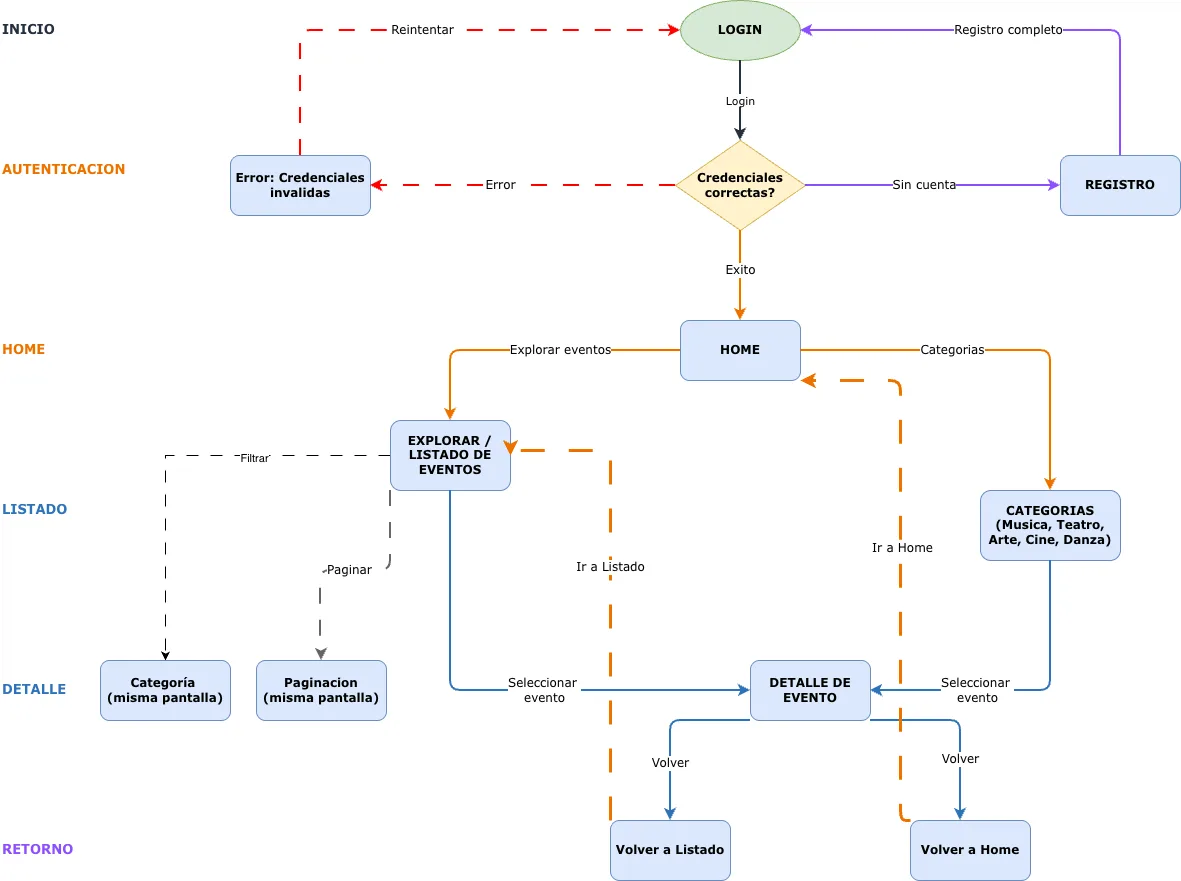
App Cultura Bogota implements a multi-screen event discovery flow with authentication, category browsing, and detailed event views. Users authenticate via LOGIN with credential validation, then navigate from HOME to EXPLORAR / LISTADO DE EVENTOS, filter by CATEGORIAS (Musica, Teatro, Arte, Cine, Danza), and view DETALLE DE EVENTO with pagination and category filters on the same screen. The architecture demonstrates a clean separation between authentication (LOGIN, REGISTRO, credential validation), home navigation, and event exploration with intuitive back-navigation to HOME or LISTADO. This user flow pattern solves the core challenge of designing discoverable, category-driven event apps with minimal friction and clear navigation paths. Fork this diagram on Diagrams.so to customize screens, add API endpoints, or adapt the flow for your cultural events platform. The design prioritizes user retention by keeping filters and pagination in-context rather than requiring full page reloads.
People also ask
How should I structure the user navigation flow for an event discovery app with authentication and category filtering?
The App Cultura Bogota diagram shows a proven flow: authenticate users via LOGIN with credential validation, route to HOME, then enable navigation to EXPLORAR / LISTADO DE EVENTOS with inline CATEGORIAS filters (Musica, Teatro, Arte, Cine, Danza) and pagination. Users drill into DETALLE DE EVENTO and return via clear back-navigation paths to HOME or LISTADO, minimizing friction and keeping context
- Domain:
- Software Architecture
- Audience:
- mobile app developers building event discovery platforms
Generated by Diagrams.so — AI architecture diagram generator with native Draw.io output. Fork this diagram, remix it, or download as .drawio, PNG, or SVG.
